1. Where to place a pipeline #
Three locations.
The three places #
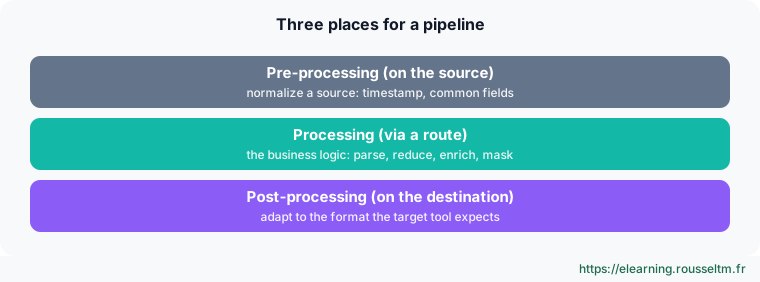
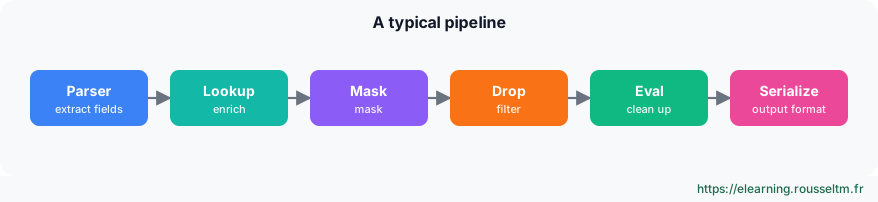
A pipeline is an ordered list of functions. Each function has a filter (it only applies to matching events) and can be marked Final to stop processing those events. Functions can be grouped for readability and disabled without being deleted.
2. The function catalogue #
The most used.
By use #
| Use | Functions |
|---|---|
| Extract | Parser (JSON, CSV, key=value, delimited, Grok), Regex Extract, Auto Timestamp, XML / JSON Unroll |
| Modify | Eval, Rename, Flatten, Numerify, Serialize, Code |
| Enrich | Lookup, GeoIP, DNS Lookup, Redis |
| Protect | Mask (regular expressions, hashing), dropping sensitive fields |
| Reduce | Drop, Regex Filter, Sampling, Dynamic Sampling, Suppress, Aggregations, Rollup Metrics |
| Metrics | Publish Metrics, Prometheus Publisher, Aggregations |
| Organize | Chain (call another pipeline), Comment, groups |
Good to know : The Tee function has been deprecated since 4.18: use non-final routes or the Output Router to duplicate a flow.
3. Cribl expressions #
JavaScript everywhere.
Examples #
Filters, computed values and file names are written in JavaScript, extended with a C object of helper functions:
| Expression | Result |
|---|---|
status >= 500 | true for server errors |
uri.split('?')[0] | the URL without parameters |
C.Mask.md5(user) | MD5 hash of an identifier (pseudonymization) |
C.Time.strftime(_time, '%Y-%m-%d') | formatted date |
C.Lookup('assets.csv', 'ip').match(src_ip, 'owner') | owner of the address in a table |
C.Net.cidrMatch('192.168.0.0/16', dst_ip) | network membership |
`${host}:${port}` | composed string (template literal) |
Watch out : Field values in Eval are expressions: a string is written in quotes ('prod'), otherwise Cribl looks for a field namedprod.
4. A complete pipeline #
Apache access logs.
Configuration #
# local/cribl/pipelines/apache_access/conf.yml (excerpt)
functions:
  - id: regex_extract
    filter: "true"
    conf:
      source: _raw
      regex: '/^(?<client>\S+) \S+ \S+ \[[^\]]+\] "(?<method>\S+) (?<uri>\S+) [^"]*" (?<status>\d{3}) (?<bytes>\d+|-)/'
  - id: lookup
    conf:
      file: http_status.csv
      inFields: [{ eventField: status, lookupField: status }]
      outFields: [{ lookupField: category, eventField: status_category }]
  - id: mask
    conf:
      fields: [_raw]
      rules: [{ matchRegex: '/(email=)[^&\s]+/g', replaceExpr: "`${g1}${C.Mask.md5(g0)}`" }]
  - id: eval
    conf:
      add: [{ name: env, value: "'prod'" }]
remove: [bytes]- Regex Extract creates the
client,method,uri,status,bytesfields. - Lookup adds
status_categoryfrom a CSV table (Processing › Knowledge › Lookups). - Mask replaces e-mail addresses in parameters with a hash.
- Eval adds
envand removes a useless field.
You build a pipeline in the UI, not in YAML: the excerpt only shows what is saved in local/.
The preview #
- Load a sample file in the right panel: IN shows the incoming event, OUT the result, with added fields in green and removed ones in red.
- The statistics icon shows event and byte counts before and after: reduction is measured at design time.
- Full preview also runs the route and post-processing pipeline to see the event as it will leave.
Best practice : For performance: filter early (Drop first), prefer Parser to long regular expressions, anchor your regexes, and keep the Code function for cases with no equivalent.
Commands to know #
Commands to know
C.Mask.md5(user): pseudonymize a fieldC.Lookup('assets.csv','ip').match(src_ip,'owner'): enrich from a tableC.Time.strftime(_time, '%Y-%m-%d'): format a date/(?<status>\d{3})/: Regex Extract named group
Sources #
Checked in November 2026 (Cribl 4.20): Cribl ships a minor release about every two months, check the release notes before relying on a detail.