1. Building and publishing #
An image traced back to its commit.
The workflow #
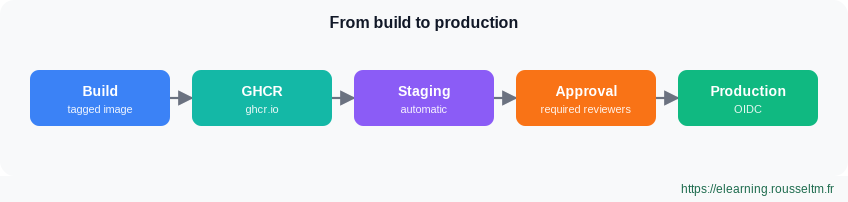
jobs:
  image:
    runs-on: ubuntu-latest
    permissions:
      contents: read
      packages: write
      attestations: write
      id-token: write
    steps:
      - uses: actions/checkout@v7
      - uses: docker/login-action@v4
        with:
          registry: ghcr.io
          username: ${{ github.actor }}
          password: ${{ secrets.GITHUB_TOKEN }}
      - id: meta
        uses: docker/metadata-action@v6
        with:
          images: ghcr.io/${{ github.repository }}
          tags: type=sha
      - id: push
        uses: docker/build-push-action@v7
        with:
          push: true
          tags: ${{ steps.meta.outputs.tags }}
      - uses: actions/attest-build-provenance@v4
        with:
          subject-name: ghcr.io/${{ github.repository }}
          subject-digest: ${{ steps.push.outputs.digest }}
          push-to-registry: true
  production:
    needs: image
    runs-on: ubuntu-latest
    environment:
      name: production
      url: https://boutique.exemple.fr
    permissions:
      id-token: write
      contents: read
    steps:
      - uses: aws-actions/configure-aws-credentials@v5
        with:
          role-to-assume: arn:aws:iam::123456789012:role/shop-deployment
          aws-region: eu-west-3
- run: ./deploy.sh ${{ needs.image.outputs.tag }}GITHUB_TOKENis a temporary token created for each run; its rights are set withpermissions(here, writing packages).- A signed provenance attestation proves which workflow, on which commit, produced the image; it is verified with
gh attestation verify.
2. Environments and OIDC #
Controlling who deploys and with which rights.
Environments #
| Protection rule | Effect |
|---|---|
| Required reviewers | the job waits for approval from a designated person or team |
| Wait timer | pause before deployment (1 to 43,200 minutes) |
| Deployment branches | only some branches or tags can target the environment |
| Environment secrets | only available to jobs of that environment, after approval |
With id-token: write, the job gets a GitHub-signed OIDC token that the cloud exchanges for temporary rights. The trust relationship specifies the repository and environment (repo:org/repo:environment:production): no key to store.
Best practice : Put production secrets in the production environment, never at repository level: they are then only exposed after approval.Commands to know #
Commands to know
gh attestation verify oci://ghcr.io/org/boutique:sha-abc1234 --owner org: verify an image's provenancegh run list --workflow deploy.yml: deployment historygh release create v1.2.0 --generate-notes: create a release
Sources #
Checked in November 2026: CI/CD platforms change every month, check versions and plans in the vendor's documentation.