1. Real users and active checks #
Two complementary views.
Overview #
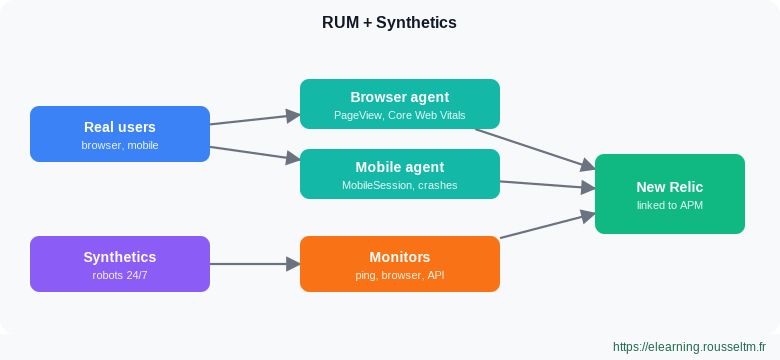
| Approach | Measures | Limit |
|---|---|---|
| RUM (browser, mobile) | the real experience, by country, device, browser | nothing without traffic (at night, before a launch) |
| Synthetics | availability and critical journeys 24/7, from several regions | a robot does not represent every user |
2. Browser #
The JavaScript agent.
Installing #
- Through the APM agent, which automatically injects the script into served pages (Java, .NET, PHP, Python, Ruby, Node.js); or by pasting the script into the
<head>; or via the npm package for single-page apps. - Data:
PageView,PageViewTiming(Core Web Vitals),BrowserInteraction(SPA navigations),AjaxRequest,JavaScriptError. - Session replay replays sessions (with input masking by default) to understand an error or abandonment.
Core Web Vitals #
| Metric | Measures | Good if |
|---|---|---|
| LCP | largest element rendered | ≤ 2.5 s |
| INP | interaction responsiveness | ≤ 200 ms |
| CLS | visual stability | ≤ 0.1 |
SELECT percentile(largestContentfulPaint, 75) FROM PageViewTiming WHERE timingName = 'largestContentfulPaint' FACET pageUrl SINCE 1 day agoWatch out : Think GDPR: inform visitors, mask sensitive fields and tune custom attribute collection.
3. Mobile and Synthetics #
Apps and robots.
Mobile #
iOS, Android, Flutter, React Native, .NET MAUI and Unity agents report launches, crashes (with symbolication), HTTP requests and interactions (MobileSession, MobileCrash, MobileRequest). Fixes are prioritised by app version and device.
Synthetic monitors #
| Type | Use |
|---|---|
| Ping | simple URL availability |
| Simple browser | full page load in Chrome |
| Scripted browser | user journey (Selenium WebDriver) |
| Step monitor | no-code journey |
| API test | scripted HTTP requests and assertions |
| Certificate, broken links | TLS expiry, dead links |
// Monitor "scripted browser" : checkout journey
const assert = require('assert');
await $webDriver.get('https://boutique.exemple.fr/');
await $webDriver.findElement($selenium.By.linkText('Promotions')).click();
await $webDriver.findElement($selenium.By.css('.produit .ajouter')).click();
const total = await $webDriver.findElement($selenium.By.id('total-panier')).getText();
assert.ok(total.length > 0, 'empty cart');- Public locations in several regions, or private locations (job manager deployed on your side) to test internal applications.
- Script secrets go in secure credentials (
$secure.PASSWORD), never in clear.
Best practice : Alert on at least two locations failing at once: a local outage of one location must not wake on-call.
Commands to know #
Commands to know
SELECT percentage(count(*), WHERE result = 'SUCCESS') FROM SyntheticCheck FACET monitorName: availability per monitorSELECT count(*) FROM JavaScriptError FACET errorMessage SINCE 1 day ago: frequent JavaScript errorsSELECT count(*) FROM MobileCrash FACET appVersion: crashes per version$secure.MOT_DE_PASSE: secure credential in a script
Sources #
Checked in November 2026: New Relic evolves its platform continuously (UI, plans, limits); check the documentation before relying on a detail.