1. An integrated platform #
Code, CI/CD, security and deployment in one place.
Overview #
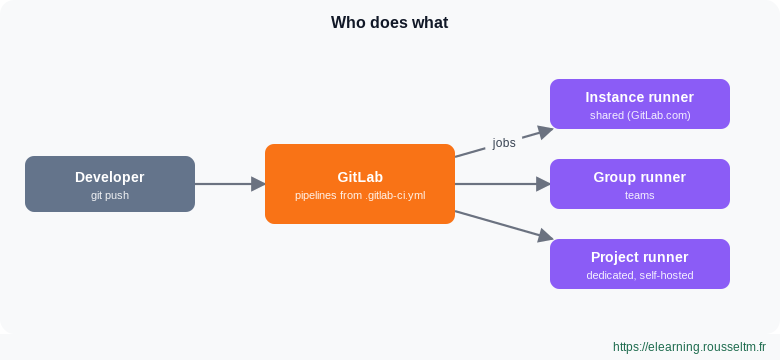
GitLab brings together in a single application the Git repository, merge requests, CI/CD, registries (containers, packages), security scans, environments and issue tracking. CI/CD is described in a .gitlab-ci.yml file at the root of the repository: every push or merge request triggers a pipeline.
| Concept | Definition |
|---|---|
| Pipeline | all jobs triggered by an event (push, merge request, schedule, API) |
| Stage | a step; stages run in sequence, jobs of the same stage run in parallel |
| Job | a sequence of commands (script) run by a runner, in an image |
| Runner | the agent that runs jobs: shared (GitLab.com) or self-hosted |
| Artefact | files produced by a job and kept (reports, binaries) |
2. Variables and context #
What each job knows about its run.
Predefined variables #
| Variable | Content |
|---|---|
| CI_COMMIT_SHA, CI_COMMIT_SHORT_SHA | commit identifier |
| CI_COMMIT_BRANCH, CI_DEFAULT_BRANCH | current branch, default branch |
| CI_PIPELINE_SOURCE | origin: push, merge_request_event, schedule, web… |
| CI_REGISTRY, CI_REGISTRY_IMAGE | project container registry |
| CI_JOB_TOKEN | temporary job token (registry, API, dependencies) |
| CI_ENVIRONMENT_NAME | deployment environment |
Your own variables are defined in the file, or in Settings › CI/CD › Variables for sensitive values: masked (hidden in logs) and protected (only available on protected branches and tags).
3. Editions and alternatives #
What is free, what is not.
Editions #
- GitLab.com (SaaS) or self-managed (free GitLab CE, EE); Free, Premium and Ultimate plans.
- On GitLab.com, shared runners consume compute minutes (400 per month on Free for private projects, to be checked); a self-hosted runner consumes none.
- Premium notably adds protected environments, deployment approvals and merge trains; Ultimate adds security dashboards and compliance.
Compared with other tools #
| Tool | Difference with GitLab CI |
|---|---|
| GitHub Actions | action ecosystem, triggered by GitHub events; paid advanced security |
| Azure DevOps | Microsoft suite (Boards, Repos, Pipelines), Azure integration |
| Jenkins | self-hosted, plugin-extensible, more operations work |
Commands to know #
Commands to know
glab ci lint: validate .gitlab-ci.ymlglab ci status: branch pipeline statusglab ci view: follow the pipeline liveglab ci trace <job>: job log
Sources #
Checked in November 2026: CI/CD platforms change every month, check versions and plans in the vendor's documentation.