1. The two types of data #
Chunks and index.
What does Loki store? #
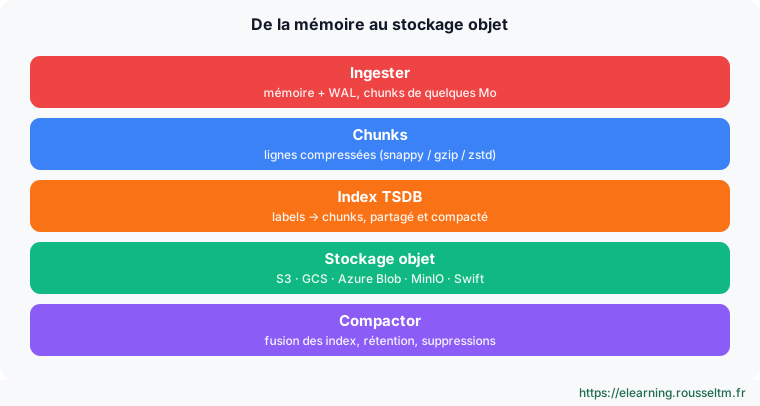
- Chunks: compressed blocks of lines from the same stream. They make up most of the volume.
- Index: the relationship between labels and chunks. Since Loki 2.8, the recommended format is TSDB (schema v13): more compact and faster than BoltDB-shipper.
2. Configuring object storage #
MinIO / S3 example.
loki.yaml with S3 #
common:
  path_prefix: /loki
  replication_factor: 3
  ring: { kvstore: { store: memberlist } }
  storage:
    s3:
      endpoint: minio:9000
      bucketnames: loki-chunks
      access_key_id: ${MINIO_USER}
      secret_access_key: ${MINIO_PASSWORD}
      s3forcepathstyle: true
      insecure: true

schema_config:
  configs:
    - from: 2024-04-01
      store: tsdb
      object_store: s3
      schema: v13
      index: { prefix: index_, period: 24h }

storage_config:
  tsdb_shipper:
    active_index_directory: /loki/index
    cache_location: /loki/index_cache
# MinIO pour les tests
docker run -d --name minio -p 9000:9000 -p 9001:9001 \
-e MINIO_ROOT_USER=minio -e MINIO_ROOT_PASSWORD=minio123 \
quay.io/minio/minio server /data --console-address ":9001"
docker run --rm --network host --entrypoint sh quay.io/minio/mc -c \
"mc alias set local http://localhost:9000 minio minio123 && mc mb local/loki-chunks"
# Lancer Loki en passant les variables (-config.expand-env=true)
loki -config.file=loki.yaml -config.expand-env=true3. Retention and deletion #
Keeping only what is useful.
Global and per-stream retention #
limits_config:
  retention_period: 744h                 # 31 jours par défaut
  retention_stream:
    - selector: '{env="dev"}'
      priority: 1
      period: 72h                       # 3 jours pour le dev
    - selector: '{app="audit"}'
      priority: 2
      period: 8760h                     # 1 an pour l'audit

compactor:
  working_directory: /loki/compactor
  retention_enabled: true
  retention_delete_delay: 2h
  delete_request_store: s3
# Suppression à la demande (RGPD) via l'API du compactor
curl -X POST 'http://loki:3100/loki/api/v1/delete?query={app="api"}%20|=%20"john@example.com"&start=1700000000&end=1700086400'
curl http://loki:3100/loki/api/v1/delete # lister les demandesCommon mistake: Withoutretention_enabled: trueon the compactor,retention_periodhas no effect: storage grows indefinitely.
4. Performance and caches #
Sizing reasonably.
Caches and useful parameters #
chunk_store_config:
  chunk_cache_config:
    memcached_client: { addresses: dnssrv+_memcached._tcp.loki-chunk-cache }
query_range:
  results_cache:
    cache:
      embedded_cache: { enabled: true, max_size_mb: 200 }
ingester:
  chunk_idle_period: 30m
  chunk_target_size: 1572864            # ~1,5 Mo compressés
  max_chunk_age: 2h
  wal: { enabled: true, dir: /loki/wal }
Good practice: Aim for compressed chunks of 1 to 2 MB: too small, they multiply objects and requests; too large, they delay availability in storage.
