1. The basics #
Cmdlets, help and discovery.
Two PowerShells #
Windows ships Windows PowerShell 5.1, frozen but still present. PowerShell 7 is the modern cross-platform version (Windows, Linux, macOS), installed side by side (pwsh.exe). Most administration modules work with both; use PowerShell 7 for new scripts and 5.1 when an older module requires it.
winget install --id Microsoft.PowerShell --source winget   # installer PowerShell 7
$PSVersionTable.PSVersion
Commands (cmdlets) follow the Verb-Noun form: Get-Process, Stop-Service, New-LocalUser. Verbs are standardized (Get-Verb), so command names are easy to guess.
Find and understand a command #
Get-Command -Noun *Service*            # toutes les commandes sur les services
Get-Command -Module NetTCPIP            # les commandes d'un module
Update-Help -UICulture en-US            # télécharger l'aide (en administrateur)
Get-Help Get-Service -Examples          # exemples d'utilisation
Get-Service | Get-Member                # propriétés et méthodes des objets renvoyés
Get-Alias ls, dir, gci                  # alias historiques
Good practice: Remember three commands:Get-Commandto find,Get-Help -Examplesto learn,Get-Memberto see what an object contains. In a script, write full cmdlet names, not aliases.
2. The object pipeline #
The big difference with Unix shells.
Filter, sort, select #
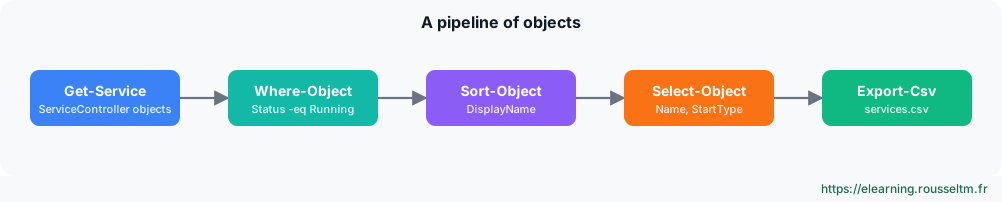
The pipeline passes objects with their properties, not lines of text: no need to cut columns. You filter on a property, sort, pick columns, then export.
Get-Service | Where-Object Status -eq 'Running' | Sort-Object DisplayName |
    Select-Object Name, DisplayName, StartType | Export-Csv C:\rapports\services.csv -NoTypeInformation -Encoding UTF8

Get-Process | Sort-Object CPU -Descending | Select-Object -First 5 Name, Id, CPU, WS
Get-ChildItem C:\Logs -Recurse -File | Where-Object LastWriteTime -lt (Get-Date).AddDays(-30) |
    Measure-Object -Property Length -Sum          # volume des fichiers de plus de 30 jours
Get-EventLog -List | Format-Table -AutoSize       # affichage en tableau (toujours en fin de pipeline)
Common mistake: PuttingFormat-TableorFormat-Listin the middle of a pipeline: these cmdlets produce display objects that cannot be used afterwards. Always put them last, or useSelect-Object.
Variables, arrays and strings #
$serveurs = 'SRV-DC01', 'SRV-FS01', 'SRV-WEB01'      # tableau
$cfg = @{ Partage = 'D:\Data'; Quota = 10GB }         # table de hachage
"Il y a $($serveurs.Count) serveurs, quota : $($cfg.Quota / 1GB) Go"
foreach ($s in $serveurs) { Test-Connection $s -Count 1 -Quiet }
$serveurs | ForEach-Object { "Serveur : $_" }        # $_ = objet courant
Get-Content .\serveurs.txt | Where-Object { $_ -match '^SRV-' }
3. Scripts, modules and errors #
From the console to automation.
A robust script #
# Nettoyer-Logs.ps1 : supprime les journaux plus anciens que N jours
[CmdletBinding(SupportsShouldProcess)]
param(
    [Parameter(Mandatory)][ValidateScript({ Test-Path $_ })][string]$Dossier,
    [ValidateRange(1, 365)][int]$Jours = 30
)
$ErrorActionPreference = 'Stop'
try {
    $limite = (Get-Date).AddDays(-$Jours)
    $fichiers = Get-ChildItem $Dossier -Filter *.log -File | Where-Object LastWriteTime -lt $limite
    foreach ($f in $fichiers) {
        if ($PSCmdlet.ShouldProcess($f.FullName, 'Supprimer')) { Remove-Item $f.FullName }
    }
    Write-Output "$($fichiers.Count) fichier(s) traité(s)"
} catch {
    Write-Error "Échec : $($_.Exception.Message)"
    exit 1
}
.\Nettoyer-Logs.ps1 -Dossier C:\Logs -Jours 15 -WhatIf # simulation
.\Nettoyer-Logs.ps1 -Dossier C:\Logs -Jours 15 -VerboseGood to know:SupportsShouldProcessgives the script-WhatIf(dry run) and-Confirmfor free.$ErrorActionPreference = 'Stop'turns errors into exceptions caught bytry/catch.
Execution policy and modules #
Get-ExecutionPolicy -List
Set-ExecutionPolicy RemoteSigned -Scope LocalMachine   # scripts locaux autorisés, scripts téléchargés signés
Unblock-File .\script.ps1                             # débloquer un script téléchargé et relu
Find-Module PSWindowsUpdate ; Install-Module PSWindowsUpdate -Scope AllUsers
Get-Module -ListAvailable | Select-Object Name, Version
Common mistake: Believing the execution policy is a security boundary. It mostly prevents running a script by mistake; a user can bypass it. To secure, sign your scripts, limit rights and use AppLocker or WDAC.
4. Remote administration #
One server or a hundred at once.
WinRM and PowerShell Remoting #
PowerShell Remoting uses WinRM (port 5985 for HTTP encrypted with Kerberos, 5986 for HTTPS). It is enabled by default on Windows Server; on a workstation, run Enable-PSRemoting. PowerShell 7 can also use SSH.
Enter-PSSession -ComputerName SRV-FS01            # session interactive (exit pour sortir)
Invoke-Command -ComputerName SRV-FS01, SRV-WEB01 -ScriptBlock {
    Get-PSDrive C | Select-Object @{n='Libre(Go)'; e={[math]::Round($_.Free/1GB,1)}}
}
$s = New-PSSession -ComputerName (Get-Content .\serveurs.txt)   # sessions réutilisables
Invoke-Command -Session $s -FilePath .\Inventaire.ps1
Copy-Item .\outil.zip -Destination C:\Temp -ToSession $s[0]
Good practice:Invoke-Commandruns the block in parallel on all servers and returns objects tagged withPSComputerName: it is the basis of inventories and bulk operations.
Commands to know #
| Action | Command |
|---|---|
| Find a command | Get-Command -Noun *Disk* |
| Help examples | Get-Help Get-ChildItem -Examples |
| Explore an object | Get-Process | Get-Member |
| Filter and sort | Get-Service | Where-Object Status -eq 'Stopped' | Sort-Object Name |
| Export to CSV | Get-LocalUser | Export-Csv users.csv -NoTypeInformation |
| Run remotely | Invoke-Command -ComputerName SRV01 -ScriptBlock { hostname } |
| Simulate an action | Remove-Item C:\Temp\* -Recurse -WhatIf |
| History | Get-History ; Invoke-History 12 |