1. Search structure #
A pipeline of commands.
The principle #
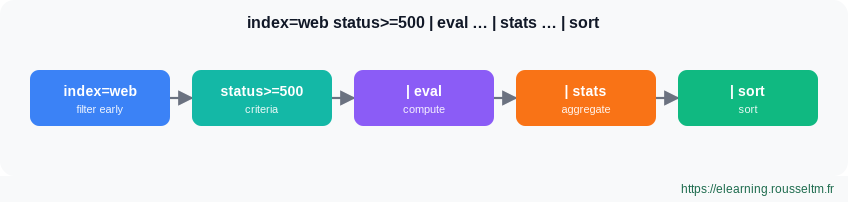
A search starts with criteria (words, field=value, booleans AND, OR, NOT) that select events from indexes, then chains commands separated by |: each receives the previous result.
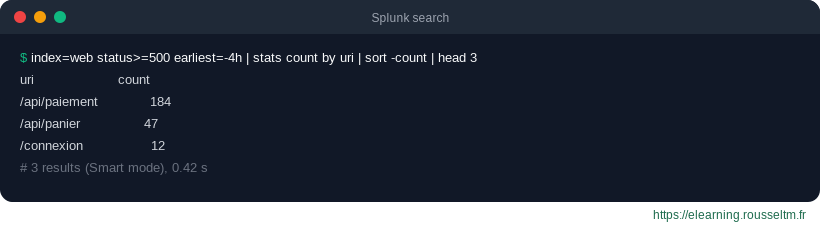
- Field names are case-sensitive, search criteria values are not; boolean operators are written in uppercase.
- Always start with
index=and, if possible,sourcetype=: it reduces indexer work the most.
Time #
| Syntax | Meaning |
|---|---|
| earliest=-24h latest=now | the last 24 hours |
| earliest=-1d@d latest=@d | yesterday, midnight to midnight |
| earliest=-7d@w1 | since Monday 7 days ago |
| earliest=-15m@m | last 15 minutes, snapped to the minute |
Fast, Smart (default) and Verbose modes set how many fields are extracted: Verbose shows everything but costs more.
2. Essential commands #
Filter, compute, aggregate.
Overview #
| Command | Role | Example |
|---|---|---|
| search / where | filter (where accepts expressions) | | where duration_ms > 2*avg_ms |
| eval | create or change a field | | eval kb = round(bytes/1024, 1) |
| stats | aggregate: count, dc, avg, sum, perc95, values | | stats count, avg(duration_ms) by uri |
| timechart | aggregate over time | | timechart span=15m count by status |
| chart | cross-tab | | chart count over uri by status |
| top / rare | most / least frequent values | | top limit=5 user |
| table, fields, rename | choose and name columns | | table _time user uri status |
| sort, dedup, head | sort, deduplicate, limit | | sort -count | head 10 |
Full searches #
index=web sourcetype=app:json earliest=-4h
| eval category = case(status>=500, "server error", status>=400, "client error", true(), "ok")
| stats count AS requests, perc95(duration_ms) AS p95 BY uri, category
| where requests > 20
| sort -p95
index=web status>=500 | timechart span=5m count AS errors
index=security action=failure | stats dc(user) AS accounts, count BY src_ip | where accounts > 5Best practice : Aggregate as early as possible with stats: following commands work on a few rows instead of millions of events.3. Extracting fields #
rex, IFX and subsearches.
rex #
index=web sourcetype=nginx
| rex field=_raw "\"(?<method>GET|POST|PUT|DELETE) (?<path>[^ ?]+)"
| rex field=useragent "(?<browser>Firefox|Chrome|Safari|Edg)/(?<version>\d+)"
| stats count BY method, browserrexextracts fields with named groups(?<name>…);rex mode=sedreplaces text in results.- For a permanent extraction, use the field extractor (IFX) or an
EXTRACT-inprops.conf: everyone benefits. - JSON data:
KV_MODE = jsonor thespathcommand.
Subsearches #
index=web [ search index=security action=blocked earliest=-1h | dedup src_ip | rename src_ip AS client_ip | fields client_ip ]
| stats count BY client_ip, uri
Watch out : A subsearch is limited (10,000 results and 60 seconds by default): beyond that, the result is truncated without a visible error. Prefer stats or a lookup.Commands to know #
Commands to know
index=web | stats count by status: count per value| timechart span=1h count by host: chart per host| eval duree_s = duration_ms/1000: compute a field| rex field=_raw "user=(?<user>\w+)": extract a field| top limit=10 uri: most frequent values| fieldsummary: summary of available fields
Sources #
Checked in November 2026 (Splunk Enterprise 10.6): check the release notes before relying on a detail, Splunk Cloud Platform evolves faster than the on-premises version.