Introduction #
Definition #
The Elastic Common Schema (ECS) is an open source specification that helps you structure your data. The standard is designed for Elasticsearch, but you can perfectly well use it in other contexts. For example, ECS has merged with OpenTelemetry's SemConv, which de facto makes Elasticsearch compatible with OpenTelemetry.
Why use ECS #
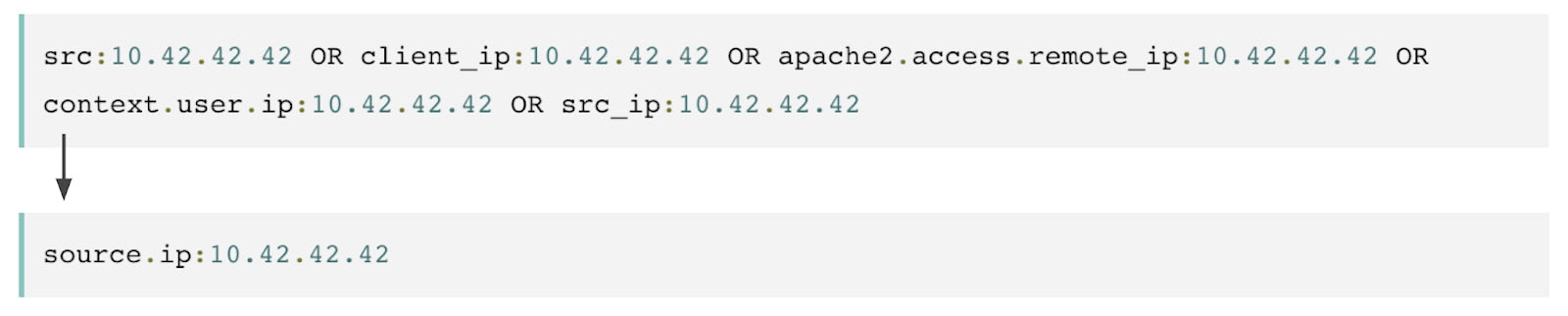
As you can see in this diagram, we are trying to retrieve the events related to a user whose IP is 10.42.42.42.In the first block, without ECS, the query is fairly complex because there is no agreed standard for the name of the field holding our user's IP.
In the second block, with ECS, the query is much simpler because ECS was used to normalise the field holding the IP, whatever its source. And the standard goes well beyond the field name alone:
- The data type
- The allowed values
- The hierarchy
When you collect data, the end goal is to set up alerts, build dashboards and so on. Without ECS, you generally have to modify them every time you add new data, whereas this is transparent when you work with ECS.
How it works #
What help is there to get started? #
Setting up, or at least introducing, ECS in a company can seem complicated. But the reality is quite different. Integrations in the Elastic Stack can natively send your data in ECS format.
What next? Logstash #
Many companies use Beats and/or Elastic Agent to send logs, metrics and so on directly to an Elasticsearch server/cluster in ECS mode. For data that does not come from these tools, you can use Logstash. During its enrichment phases, it can make your data compliant with the standard. In this scenario, you will probably need more configuration.
Testing #
You may need to test your configuration manually. This is the case, for example, when you use grok in Logstash. You can use these tools to check that your configurations are compliant:
Dev Tools #
For many versions now, the Dev Tools in Kibana have let you test Grok patterns.
Grok Constructor #
This tool is available at https://grokconstructor.appspot.com/. It lets you test grok patterns with ECS. Another, more popular tool is https://grokdebugger.com/.
