1. Lifecycle with ISM #
Automating rollover and deletion.
A policy #
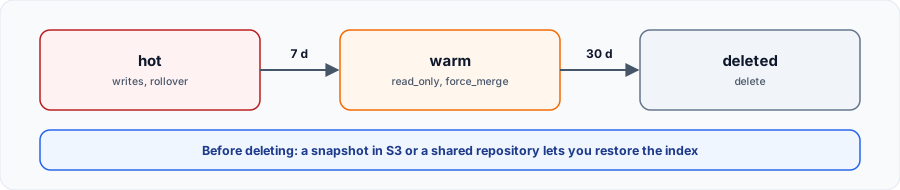
curl -sk -u 'admin:Str0ng!Passw0rd-2026' -H 'Content-Type: application/json' -X PUT https://localhost:9200/_plugins/_ism/policies/cycle_logs -d '{
  "policy": {
    "description": "Rollover, lecture seule puis suppression",
    "default_state": "chaud",
    "states": [
      {"name": "chaud",
       "actions": [{"rollover": {"min_doc_count": 2}}],
       "transitions": [{"state_name": "tiede", "conditions": {"min_index_age": "7d"}}]},
      {"name": "tiede",
       "actions": [{"read_only": {}}, {"force_merge": {"max_num_segments": 1}}],
       "transitions": [{"state_name": "supprime", "conditions": {"min_index_age": "30d"}}]},
      {"name": "supprime", "actions": [{"delete": {}}], "transitions": []}
    ],
    "ism_template": [{"index_patterns": ["cycle-*"], "priority": 100}]
  }
}'
Rollover needs a write alias and the rollover_alias setting. With ism_template, any new matching index gets the policy automatically.
# Template: the rollover alias the policy must use
curl -sk -u 'admin:Str0ng!Passw0rd-2026' -H 'Content-Type: application/json' -X PUT https://localhost:9200/_index_template/cycle -d '{
  "index_patterns": ["cycle-*"],
  "template": {"settings": {
    "number_of_shards": 1, "number_of_replicas": 0,
    "plugins.index_state_management.rollover_alias": "cycle"
  }}
}'

# First index, with the write alias
curl -sk -u 'admin:Str0ng!Passw0rd-2026' -H 'Content-Type: application/json' -X PUT https://localhost:9200/cycle-000001 -d '{"aliases":{"cycle":{"is_write_index":true}}}'

# For the lab only: check policies every minute (5 by default)
curl -sk -u 'admin:Str0ng!Passw0rd-2026' -H 'Content-Type: application/json' -X PUT https://localhost:9200/_cluster/settings \
  -d '{"persistent":{"plugins.index_state_management.job_interval":1}}'

# Write two documents through the alias
for i in 1 2; do
  curl -sk -u 'admin:Str0ng!Passw0rd-2026' -H 'Content-Type: application/json' -X POST 'https://localhost:9200/cycle/_doc?refresh=true' -d "{\"n\":$i}"
done
curl -sk -u 'admin:Str0ng!Passw0rd-2026' -H 'Content-Type: application/json' https://localhost:9200/_plugins/_ism/explain/cycle-000001
curl -sk -u 'admin:Str0ng!Passw0rd-2026' -H 'Content-Type: application/json' 'https://localhost:9200/_cat/indices/cycle-*?v'Rollover does not happen immediately: policies are checked every 5 minutes by default. In production, use realistic thresholds (min_size,min_index_age).
2. Backups #
Snapshots and restore.
Back up and restore #
Replicas protect against node failure, not human error: only a snapshot lets you go back. Tested: index deleted, restored, 3 documents found.
curl -sk -u 'admin:Str0ng!Passw0rd-2026' -H 'Content-Type: application/json' -X PUT https://localhost:9200/_snapshot/sauvegardes -d '{
  "type": "fs",
  "settings": {"location": "/usr/share/opensearch/data/snapshots"}
}'

curl -sk -u 'admin:Str0ng!Passw0rd-2026' -H 'Content-Type: application/json' -X PUT 'https://localhost:9200/_snapshot/sauvegardes/snap1?wait_for_completion=true' \
  -d '{"indices":"logs-app-*"}'

# Lose an index, then restore it
curl -sk -u 'admin:Str0ng!Passw0rd-2026' -H 'Content-Type: application/json' -X DELETE https://localhost:9200/logs-app-000001
curl -sk -u 'admin:Str0ng!Passw0rd-2026' -H 'Content-Type: application/json' -X POST 'https://localhost:9200/_snapshot/sauvegardes/snap1/_restore?wait_for_completion=true' \
  -d '{"indices":"logs-app-000001"}'
curl -sk -u 'admin:Str0ng!Passw0rd-2026' -H 'Content-Type: application/json' https://localhost:9200/logs-app-000001/_countThefsrepository must be declared inpath.repoand shared across all nodes. The lab keeps it in the data volume for simplicity: in production, use S3 or separate shared storage.
3. Security #
Users, roles and certificates.
A read-only role #
curl -sk -u 'admin:Str0ng!Passw0rd-2026' -H 'Content-Type: application/json' -X PUT https://localhost:9200/_plugins/_security/api/internalusers/lecteur \
  -d '{"password":"L3cteur!Passw0rd-26","backend_roles":[]}'

curl -sk -u 'admin:Str0ng!Passw0rd-2026' -H 'Content-Type: application/json' -X PUT https://localhost:9200/_plugins/_security/api/roles/lecture_logs -d '{
  "cluster_permissions": ["cluster_composite_ops_ro"],
  "index_permissions": [{"index_patterns": ["logs-app-*"], "allowed_actions": ["read"]}]
}'

curl -sk -u 'admin:Str0ng!Passw0rd-2026' -H 'Content-Type: application/json' -X PUT https://localhost:9200/_plugins/_security/api/rolesmapping/lecture_logs \
  -d '{"users":["lecteur"]}'

# Read: 200. Delete: 403.
curl -sk -u 'lecteur:L3cteur!Passw0rd-26' -o /dev/null -w '%{http_code}\n' https://localhost:9200/logs-app-000001/_search
curl -sk -u 'lecteur:L3cteur!Passw0rd-26' -o /dev/null -w '%{http_code}\n' -X DELETE https://localhost:9200/logs-app-000001
Observed result: 200 for reading, 403 for deletion. Map roles to your directory (LDAP, SAML, OpenID) rather than to local accounts.
Before production #
- Replace the demo certificates and run with
DISABLE_INSTALL_DEMO_CONFIG=true. - Do not use the
adminaccount for applications. - Do not disable the security plugin, except on an isolated lab.
4. Best practices #
Sizing and operating.
Sizing #
- Shard size: between 10 and 50 GB for logs. Too many small shards burden the cluster manager.
- Three dedicated cluster manager nodes on a large cluster, to avoid split brain.
- JVM heap: half the RAM, 32 GB at most.
- Replicas: at least one in production; zero is possible during a large initial load.
Operations #
- Declare types in versioned templates, and limit dynamic mapping.
- Watch cluster state, heap, disk and write rejections (
_cat/thread_pool). - Automate snapshots, and test restoring them.
- Upgrade node by node, after reading the release notes.
Commands to know #
curl -sk -u 'admin:Str0ng!Passw0rd-2026' -H 'Content-Type: application/json' https://localhost:9200/_cat/health?v
curl -sk -u 'admin:Str0ng!Passw0rd-2026' -H 'Content-Type: application/json' https://localhost:9200/_cat/nodes?v
curl -sk -u 'admin:Str0ng!Passw0rd-2026' -H 'Content-Type: application/json' https://localhost:9200/_cat/indices?v
curl -sk -u 'admin:Str0ng!Passw0rd-2026' -H 'Content-Type: application/json' 'https://localhost:9200/_cat/shards?v&h=index,shard,prirep,state,unassigned.reason'
curl -sk -u 'admin:Str0ng!Passw0rd-2026' -H 'Content-Type: application/json' https://localhost:9200/_cluster/allocation/explain
curl -sk -u 'admin:Str0ng!Passw0rd-2026' -H 'Content-Type: application/json' https://localhost:9200/_cat/thread_pool/write?v
curl -sk -u 'admin:Str0ng!Passw0rd-2026' -H 'Content-Type: application/json' https://localhost:9200/_plugins/_ism/explain/logs-app-000001