1. What is a conversion funnel? #
The concept and its vocabulary.
The principle #
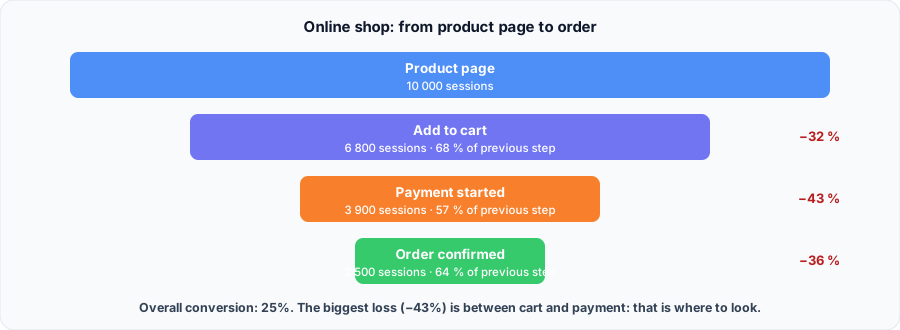
A conversion funnel follows the steps of an expected journey, for example product page, cart, payment, order, and counts how many sessions reach each one. It answers a simple question: where do users drop off?
RUM (Real User Monitoring) is an ideal source: it sees real sessions, in the real browser, with their errors and slowness. A RUM funnel does not only say how many drop off, it helps understand why.
The vocabulary #
| Term | Definition |
|---|---|
| Step | An observable event: a page view, a click, a business event |
| Step rate | Sessions at the step ÷ sessions at the previous step |
| Overall conversion | Sessions at the last step ÷ sessions at the first |
| Drop-off | 1 − step rate: the share lost between two steps |
| Unit | What you count: session (most common in RUM) or user |
| Window | The period in which steps must happen |
2. Building your funnel properly #
The choices that change the numbers.
Step order #
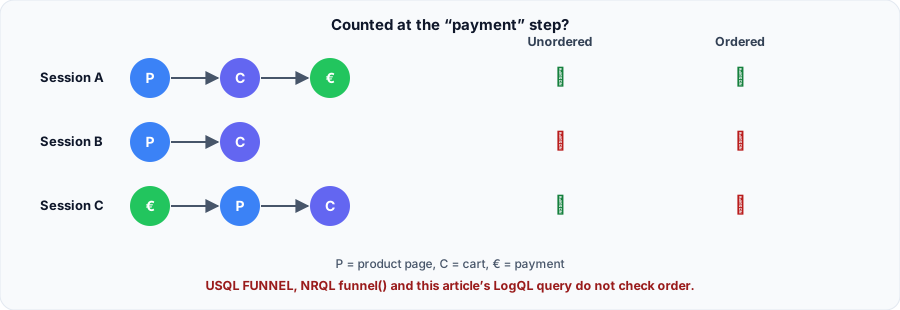
Many tools do not check order: a session that performed all steps, in any order, is counted. Dynatrace's documentation says so for USQL FUNNEL, New Relic's for funnel(). We checked it on Loki with the part 3 query: a session paying before seeing the product is counted to the end.
For a linear journey (cart then payment), the gap is small. For steps that can repeat or be reversed, prefer a tool that enforces order, such as Datadog funnels.
Best practices #
- 3 to 6 steps, each tied to a user decision. Beyond that, the funnel becomes unreadable.
- Stable event names:
add_to_carteverywhere, neveraddToCarton one page andcart_addelsewhere. - Count distinct sessions, not events: a user reloading the page must not inflate a step.
- Segment: browser, device, country, app version. A drop concentrated on mobile Safari points to a bug, not to pricing.
- Cross with technical data: JavaScript errors, load times and Core Web Vitals of the pages where users drop off.
- Protect data: never put an e-mail, name or exact per-customer amount in event attributes.
3. Grafana Faro #
Faro events and LogQL queries.
Instrumenting steps #
Faro has no funnel screen: you build it with events, sent with pushEvent and stored in Loki with the kind=event label.
// One step = one named event, always with the same names
faro.api.pushEvent('vue_produit', { produit: 'casque-x' });
faro.api.pushEvent('ajout_panier', { produit: 'casque-x', quantite: '1' });
faro.api.pushEvent('paiement', { moyen: 'carte' });
// Two identical events in a row are deduplicated by Faro:
faro.api.pushEvent('ajout_panier', { produit: 'casque-x' }, undefined, { skipDedupe: true });
Counting each step in LogQL #
Distinct sessions that viewed a product:
count(
  sum by (session_id) (count_over_time({app_name="boutique", kind="event"} | logfmt | event_name="vue_produit" [24h]))
)
Sessions that viewed a product and added to cart: the and operator only keeps sessions present in both results.
count(
    sum by (session_id) (count_over_time({app_name="boutique", kind="event"} | logfmt | event_name="vue_produit"  [24h]))
  and
    sum by (session_id) (count_over_time({app_name="boutique", kind="event"} | logfmt | event_name="ajout_panier" [24h]))
)
Third step:
count(
    sum by (session_id) (count_over_time({app_name="boutique", kind="event"} | logfmt | event_name="vue_produit"  [24h]))
  and
    sum by (session_id) (count_over_time({app_name="boutique", kind="event"} | logfmt | event_name="ajout_panier" [24h]))
  and
    sum by (session_id) (count_over_time({app_name="boutique", kind="event"} | logfmt | event_name="paiement"     [24h]))
)| Query | Test result |
|---|---|
| Product | 4 |
| Product and cart | 3 |
| Product, cart and payment | 2 (including one session that paid first) |
The simple count trap. sum by (event_name) (count_over_time(...)) gave 4 cart additions for 4 product views: one session added to cart without the product page. Count sessions that went through the previous steps, not events.In Grafana, put each query in a Bar gauge or Stat panel, one query per step, to get a readable funnel. These queries were tested on Loki 3.7.9.
4. Dynatrace #
Conversion goals, USQL and DQL.
RUM Classic: USQL FUNNEL #
With RUM Classic, first declare conversion goals on the application, then use the USQL FUNNEL function:
SELECT FUNNEL(
  useraction.name = "AppStart (easyTravel)" AS "Open",
  useraction.name = "searchJourney" AS "Search",
  useraction.name = "bookJourney" AS "Book",
  useraction.matchingConversionGoals = "Payment" AS "Paid")
FROM usersession
WHERE stringProperties.memberstatus = "GOLD"- 10 conditions at most.
- No
GROUP BY,ORDER BYorLIMIT. - Order is not guaranteed: the documentation states nothing ensures the first action precedes the second.
Combined with Session Replay, the funnel lets you replay sessions that drop off at a step.
New RUM experience: DQL #
On the Grail platform, RUM data lives in the user.events table, queried with DQL. The documentation shows how to count sessions per page:
fetch user.events
| filter characteristics.has_navigation
| summarize sessions = countDistinct(dt.rum.session.id), by: {view = view.url.path}
| sort sessions desc
On this model, a funnel is built in two aggregations: first one row per session with the number of visits per step, then the count of sessions that went through each step and the previous ones.
fetch user.events, from: now() - 7d
| filter characteristics.has_navigation
| summarize {
    produit  = countIf(view.url.path == "/produit"),
    panier   = countIf(view.url.path == "/panier"),
    paiement = countIf(view.url.path == "/paiement")
  }, by: {dt.rum.session.id}
| summarize {
    `1. Produit`  = countIf(produit > 0),
    `2. Panier`   = countIf(produit > 0 and panier > 0),
    `3. Paiement` = countIf(produit > 0 and panier > 0 and paiement > 0)
  }
Validate in your environment. Fields come from the new RUM experience documentation, still evolving; we could not run this query. Adapt page paths to your application.
5. Datadog and New Relic #
Two other approaches.
Datadog #
Datadog offers a dedicated screen, Digital Experience > Product Analytics > Funnels: you pick a starting view or action, then add steps with the + button. Actions happening between two steps do not affect the rates. Funnel queries can be reused in a RUM monitor to alert on a conversion rate drop.
New Relic #
FROM PageView
SELECT funnel(session,
  WHERE pageUrl LIKE '%browse%' AS 'Browse',
  WHERE pageUrl LIKE '%cart%' AS 'Cart',
  WHERE pageUrl LIKE '%checkout%' AS 'Checkout')
SINCE 1 week AGO- One grouping attribute per query (
sessionhere). - 10 steps at most; approximate results beyond 256 distinct values.
- Order is not enforced: the first step is always 100%.
Summary #
| Tool | How | Step order |
|---|---|---|
| Grafana Faro | pushEvent + LogQL in Grafana | Not checked |
| Dynatrace (Classic) | Conversion goals + USQL FUNNEL | Not guaranteed |
| Dynatrace (new RUM) | DQL on user.events | To build in the query |
| Datadog | Funnels screen, alerts | Successive steps |
| New Relic | NRQL funnel() | Not enforced |
