1. Instrumenting without changing code #
How Beyla works.
The principle #
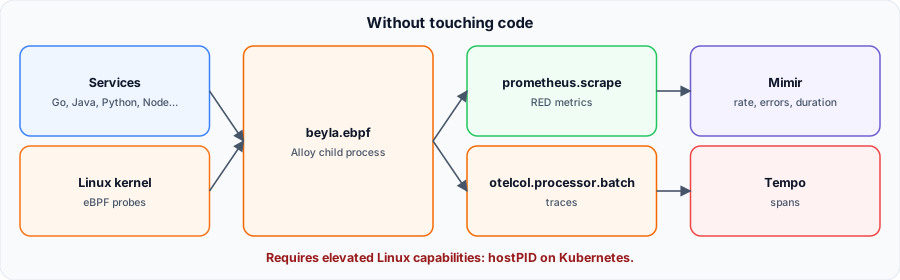
Beyla observes HTTP/S, gRPC and SQL calls of Linux services through eBPF probes in the kernel: no SDK, no redeployment. The beyla.ebpf component runs Beyla as an Alloy child process (Beyla v3.38.1 in the current documentation), producing RED metrics (rate, errors, duration) and traces.
2. The configuration #
Metrics and traces.
config.alloy #
beyla.ebpf "default" {
  discovery {
    instrument {
      open_ports = "8080,9000-9100"
    }
  }

  metrics {
    features = ["application", "application_service_graph"]
  }

  output {
    traces = [otelcol.processor.batch.default.input]
  }
}

prometheus.scrape "beyla" {
  targets      = beyla.ebpf.default.targets
  honor_labels = true
  forward_to   = [prometheus.remote_write.mimir.receiver]
}

otelcol.processor.batch "default" {
  output {
    traces = [otelcol.exporter.otlp.tempo.input]
  }
}

otelcol.exporter.otlp "tempo" {
  client {
    endpoint = "tempo:4317"
    tls {
      insecure = true
    }
  }
}

prometheus.remote_write "mimir" {
  endpoint {
    url = "http://mimir:9009/api/v1/push"
  }
}
Configuration validated with alloy validate (Alloy v1.21.3, November 2026).
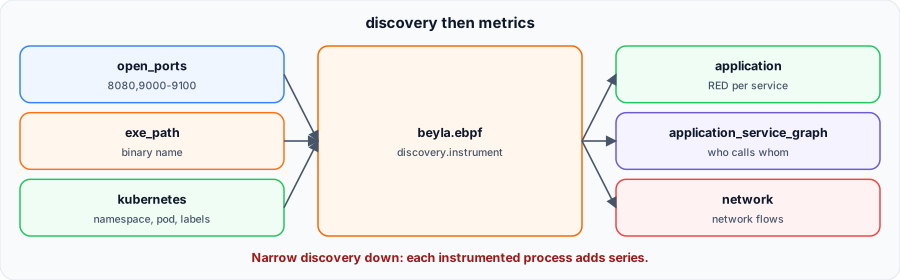
discovery.instrument: which processes to instrument, by open ports (open_ports), executable name or Kubernetes selectors.metrics.features:application(RED),application_service_graph,network,application_runtime…targets: Beyla exposes its metrics;prometheus.scrapecollects them withhonor_labels = trueto keepjobandinstance.output.traces: without it, traces are dropped.
3. Privileges and deployment #
The tricky part.
Required capabilities #
eBPF needs elevated privileges. The documentation recommends running as root with privileged: false and only the needed capabilities, keeping seccomp and AppArmor active:
securityContext:
  privileged: false
  capabilities:
    add: [BPF, NET_ADMIN, NET_RAW, PERFMON, DAC_READ_SEARCH, SYS_PTRACE, CHECKPOINT_RESTORE]
# Kubernetes Pod: hostPID: true and Unconfined AppArmor profile
Not run here. Our test environment cannot load eBPF programs: the configuration was validated with alloy validate, not executed.