1. Local accounts and groups #
Before the domain, the SAM database.
Local accounts #
Each machine has its local account database (SAM). On a domain, Active Directory accounts are mostly used, but local accounts remain useful for emergency administration and standalone servers. Each account and group is identified by a unique SID: it, not the name, appears in permissions.
$mdp = Read-Host -AsSecureString 'Mot de passe'
New-LocalUser -Name 'adm.secours' -Password $mdp -FullName 'Admin de secours' -PasswordNeverExpires:$false
Add-LocalGroupMember -Group 'Administrateurs' -Member 'adm.secours'   # « Administrators » sur un système anglais
Get-LocalGroupMember -Group 'Administrateurs'
Disable-LocalUser -Name 'Invité' ; Get-LocalUser | Select-Object Name, Enabled, LastLogon
whoami /all # SID, groupes et privilèges de la session| Built-in group | Role |
|---|---|
| Administrators | full control of the machine |
| Users | everyday use, no admin rights |
| Remote Desktop Users | RDP logon without being admin |
| Backup Operators | back up and restore bypassing permissions |
| Event Log Readers | read logs without being admin |
User Account Control (UAC) #
Even as a member of Administrators, a user works with a filtered token; elevation (“Run as administrator”) is requested for sensitive actions. On a server, open an elevated PowerShell console for administration, but do not disable UAC.
Common mistake: Using the same local admin account, with the same password, on every server: one stolen password opens the whole estate. Use Windows LAPS (see updates and security).
2. NTFS permissions #
Who can do what on a file.
ACLs, inheritance and effective permissions #
Each NTFS file and folder carries an ACL: a list of entries (ACEs) that allow or deny rights to SIDs. Standard permissions are Full control, Modify, Read & execute, List folder contents, Read, Write. By default, a folder inherits its parent’s permissions.
- Permissions are cumulative: a user gets the union of their groups’ rights.
- An explicit deny beats an allow; an inherited deny is beaten by an explicit allow.
- The owner can always change permissions.
icacls D:\Data\Compta                                    # lire l'ACL
icacls D:\Data\Compta /inheritance:r                      # couper l'héritage (supprime les ACE héritées)
icacls D:\Data\Compta /grant 'CORP\GG_Compta:(OI)(CI)M'  # Modification, héritée par sous-dossiers (CI) et fichiers (OI)
icacls D:\Data\Compta /grant 'Administrateurs:(OI)(CI)F'
icacls D:\Data /save C:\sauvegarde\acl-data.txt /T       # sauvegarder les ACL ; /restore pour les remettre
(Get-Acl D:\Data\Compta).Access | Format-Table IdentityReference, FileSystemRights, AccessControlType, IsInherited
Good practice: Never grant rights to named users: grant them to groups. On a domain, apply AGDLP: accounts in global groups (business), placed in domain local groups (resource), which receive the permissions.
3. SMB shares #
Making a folder available on the network.
Create and secure a share #
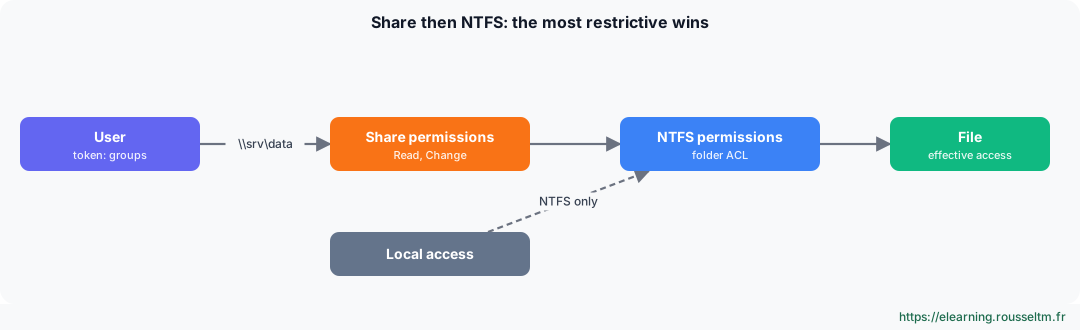
Network access (\\server\share) goes first through share permissions, then through NTFS permissions: effective access is the most restrictive of the two. Common practice: share at “Full control” or “Change” for authenticated users, with fine-grained control in NTFS.
New-SmbShare -Name Compta -Path D:\Data\Compta -ChangeAccess 'CORP\GG_Compta' -FullAccess 'Administrateurs' -FolderEnumerationMode AccessBased
Get-SmbShare ; Get-SmbShareAccess -Name Compta
Get-SmbSession ; Get-SmbOpenFile | Select-Object ClientUserName, Path    # qui est connecté, quels fichiers sont ouverts
Set-SmbServerConfiguration -EncryptData $true -Force                      # chiffrer tout le trafic SMB
New-PSDrive -Name S -PSProvider FileSystem -Root \\SRV-FS01\Compta -Persist   # côté client
Good to know: Access-based enumeration (AccessBased) hides folders the user cannot open. Windows Server 2025 and Windows 11 24H2 require SMB signing by default; SMBv1, obsolete and dangerous, is no longer installed.Commands to know #
| Action | Command |
|---|---|
| Create a local user | New-LocalUser -Name jdupont -Password (Read-Host -AsSecureString) |
| Add to a group | Add-LocalGroupMember -Group 'Utilisateurs du Bureau à distance' -Member jdupont |
| Read an ACL | icacls D:\Data |
| Grant Modify | icacls D:\Data\Projet /grant 'CORP\GG_Projet:(OI)(CI)M' |
| Take ownership | takeown /F D:\Data\Ancien /R /D O |
| Create a share | New-SmbShare -Name Projet -Path D:\Data\Projet -ChangeAccess 'CORP\GG_Projet' |
| Open sessions | Get-SmbSession |
| Session and privileges | whoami /groups |