1. A continuous integration pipeline #
azure-pipelines.yml.
The file #
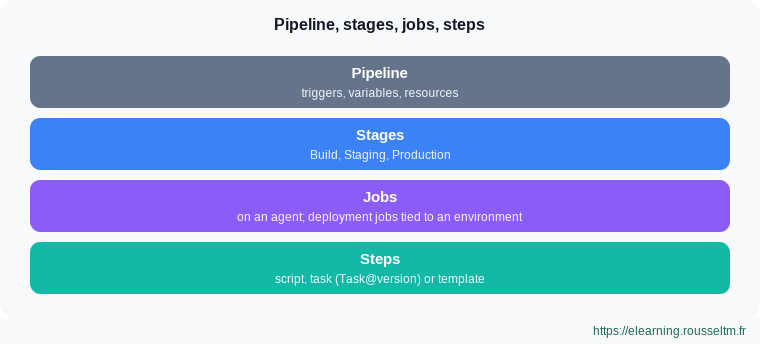
trigger:
  branches:
    include: [main]
pr:
  branches:
    include: [main]

pool:
  name: Default            # self-hosted agent; or vmImage: ubuntu-latest

steps:
  - script: |
      python3 -m venv .venv
      .venv/bin/pip install -r requirements-dev.txt
      .venv/bin/pytest --junitxml=$(Build.ArtifactStagingDirectory)/rapport.xml
    displayName: Tests
  - task: PublishTestResults@2
    condition: succeededOrFailed()
    inputs:
      testResultsFiles: $(Build.ArtifactStagingDirectory)/rapport.xml
      testRunTitle: Shop tests
  - task: PublishPipelineArtifact@1
    inputs:
      targetPath: $(Build.SourcesDirectory)
artifact: boutique- Tasks (
PublishTestResults@2) are ready-made actions, versioned by their major number. - Predefined variables (
$(Build.BuildId),$(Build.SourceBranchName),$(Build.ArtifactStagingDirectory)) describe the run.
2. Variables, expressions and templates #
Parameterize and factor.
Three syntaxes #
| Syntax | Evaluated | Use |
|---|---|---|
| ${{ variables.x }} | when the YAML is compiled | parameters, structural conditions, templates |
| $[ variables.x ] | at runtime, before the job | conditions and computed variables |
| $(x) | at runtime, in the task | values in scripts and task inputs |
# templates/deploy.yml
parameters:
  - name: environment
    type: string
  - name: port
    type: number
jobs:
  - deployment: deploy_${{ parameters.environment }}
    environment: ${{ parameters.environment }}
    strategy:
      runOnce:
        deploy:
          steps:
            - script: ./deploy.sh ${{ parameters.environment }} ${{ parameters.port }}

# azure-pipelines.yml
variables:
  - group: shop-common              # variable group (Library)
stages:
  - stage: Staging
    jobs:
      - template: templates/deploy.yml
parameters: { environment: staging, port: 8081 }- Variable groups (Pipelines › Library) share values across pipelines, optionally linked to Azure Key Vault.
extendsenforces an approved pipeline template: a "required template" check rejects pipelines that do not use it.
Watch out : A secret variable is never passed automatically to scripts: pass it explicitly through env:.Commands to know #
Commands to know
az pipelines create --name boutique-ci --yml-path azure-pipelines.yml: create a pipelineaz pipelines run --name boutique-ci: run a pipelineaz pipelines variable-group create --name boutique-commun --variables REGISTRE=…: create a variable groupaz pipelines runs list --top 5 -o table: latest runs
Sources #
Checked in November 2026: CI/CD platforms change every month, check versions and plans in the vendor's documentation.