1. The key point: Alloy is not an SDK #
Who reads which variable, and why the confusion is common.
Three families of variables not to confuse #
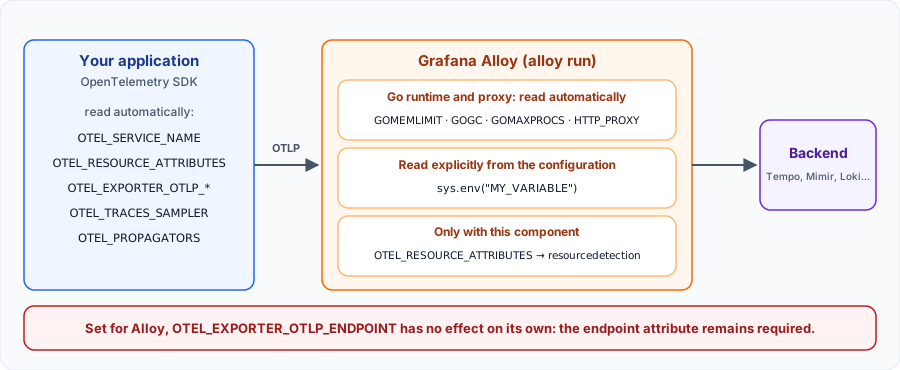
A common misconception: “Alloy is OpenTelemetry compatible, so setting the OTEL_* variables is enough”. That is wrong. These variables are defined by the specification for SDKs, the libraries embedded in your applications. Alloy is a collector: it receives OTLP, but it is configured through its components.
| Family | Examples | Who reads it? |
|---|---|---|
| Native Alloy variables | GOMEMLIMIT, GOGC, HTTP_PROXY | Alloy, automatically |
| Your own variables | TEMPO_ENDPOINT, CLUSTER_NAME | Alloy, only through sys.env() |
| OpenTelemetry variables | OTEL_SERVICE_NAME, OTEL_EXPORTER_OTLP_ENDPOINT | The application SDK |
| The exception | OTEL_RESOURCE_ATTRIBUTES | Alloy, through otelcol.processor.resourcedetection |
How these results were checked: the behaviours in this article were tested on 4 November 2026 with Grafana Alloy v1.21.3, by sending real OTLP traces. The list of variables changes over time: check the documentation of your version.
2. Variables read natively by Alloy #
Memory, Go runtime, proxy and Linux packages.
Memory and Go runtime #
Alloy is written in Go, so it honours the runtime variables. Together with the proxy variables, they are the only ones the Alloy documentation lists as read automatically.
| Variable | Purpose | Default |
|---|---|---|
GOMEMLIMIT | Soft memory limit of the garbage collector (900MiB, 1GiB…) | Computed (see below) |
AUTOMEMLIMIT | Share of the container limit used to compute GOMEMLIMIT (0 to 1) | 0.9 |
AUTOMEMLIMIT_EXPERIMENT | system: base it on total system memory | – |
GOGC | Garbage collection target percentage; off disables it | 100 |
GOMAXPROCS | Number of threads running Go code simultaneously | Not stated |
GOTRACEBACK | Detail of panic output | Not stated |
GODEBUG | Debug options: x509usefallbackroots, netdns | – |
PPROF_MUTEX_PROFILING_PERCENT | Share of sampled mutexes | 0.1% |
PPROF_BLOCK_PROFILING_RATE | Tracking rate of goroutine blocking events | 10000 |
GOMEMLIMIT is not a hard limit: the documentation says so explicitly. Keep a margin below your container limit, or the process can still be killed (OOM).Outbound proxy #
| Variable | Purpose |
|---|---|
HTTP_PROXY | Proxy for HTTP requests |
HTTPS_PROXY | Proxy for HTTPS requests |
NO_PROXY | Comma-separated exclusions: IP addresses, CIDR blocks, domains or * |
Linux packages (systemd) #
With the deb and rpm packages, the service reads its settings from /etc/default/alloy (Debian, Ubuntu) or /etc/sysconfig/alloy (RHEL, Fedora, SUSE). After a change: sudo systemctl restart alloy.
| Variable | Purpose |
|---|---|
CONFIG_FILE | Configuration file of the default engine |
CUSTOM_ARGS | Extra flags, for example --server.http.listen-addr=0.0.0.0:12345 |
ALLOY_OTEL_MODE | Enables the OpenTelemetry engine instead of the default engine |
OTEL_CONFIG_FILE, OTEL_CUSTOM_ARGS | Equivalents for the OpenTelemetry engine |
3. Your variables: sys.env() #
Explicit reads, default values and pitfalls.
Reading a variable in the configuration #
Any other variable must be read explicitly with sys.env(). If it does not exist, the function returns an empty string without an error, which is why it is paired with coalesce() to provide a default value.
otelcol.exporter.otlp "tempo" {
  client {
    // host:port for this gRPC exporter; default value when the variable is missing
    endpoint = coalesce(sys.env("TEMPO_ENDPOINT"), "tempo:4317")
    headers  = { "X-Scope-OrgID" = coalesce(sys.env("TEMPO_TENANT"), "anonymous") }
    tls {
      insecure = true
    }
  }
}
Pitfall: without a default, the failure happens later. Withendpoint = sys.env("MISSING")onotelcol.exporter.otlphttp,alloy runstops with “at least one endpoint must be specified”. The message does not name the variable: think of it first.
An environment variable is only read when the process starts: changing it means restarting Alloy. For a value that must change at runtime, use local.file or remote.http. Secrets are covered in the Secrets Management lesson.
4. OTEL_RESOURCE_ATTRIBUTES: the variable Alloy can read #
The env detector, the override option and its pitfall.
The resourcedetection component #
The otelcol.processor.resourcedetection component has an env detector, enabled by default (detectors = ["env"]). It reads OTEL_RESOURCE_ATTRIBUTES in the key1=value1,key2=value2 format and adds these attributes to all data passing through. This is how you set the environment or cluster once, at collector level.
The override pitfall #
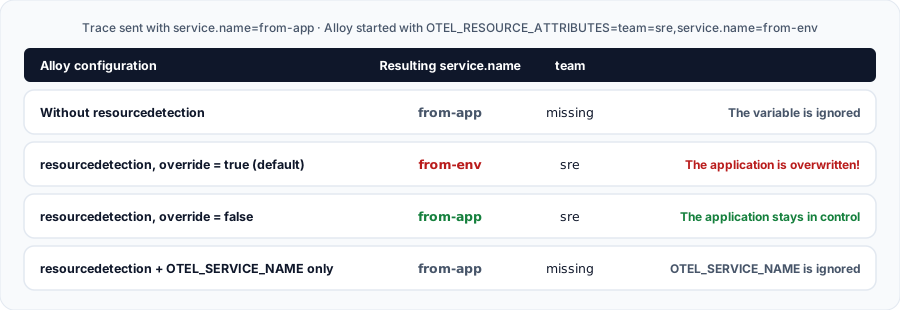
These four results were measured with the same trace sent by an application named from-app. Three lessons:
- Without the component, the variable has no effect. Setting it for Alloy is not enough.
overridedefaults totrue: an existing attribute is replaced. If the variable containsservice.name, every application going through this Alloy takes that name, and your services merge in Tempo.OTEL_SERVICE_NAMEis ignored by this detector, unlike an SDK where it takes precedence.
Best practice: on an Alloy receiving several applications, useoverride = falseand limit the variable to site attributes:deployment.environment.name,k8s.cluster.name,cloud.region. Never includeservice.name.
5. OTEL_* variables on the application side #
Pointing an SDK at Alloy with the standard variables.
General SDK variables #
| Variable | Purpose | Default (specification) |
|---|---|---|
OTEL_SERVICE_NAME | Service name; takes precedence over service.name in OTEL_RESOURCE_ATTRIBUTES | – |
OTEL_RESOURCE_ATTRIBUTES | Resource attributes: key=value,key2=value2 | – |
OTEL_SDK_DISABLED | Disables the SDK | false |
OTEL_LOG_LEVEL | SDK log level | info |
OTEL_PROPAGATORS | Context propagation | tracecontext,baggage |
OTEL_TRACES_SAMPLER | Sampler | parentbased_always_on |
OTEL_TRACES_SAMPLER_ARG | Sampler argument (e.g. 0.1) | – |
OTEL_TRACES_EXPORTER, OTEL_METRICS_EXPORTER, OTEL_LOGS_EXPORTER | Exporter of each signal | otlp |
OTLP exporter variables #
Each one also exists per signal, for example OTEL_EXPORTER_OTLP_TRACES_ENDPOINT, which then overrides the general variable.
| Variable | Purpose | Default |
|---|---|---|
OTEL_EXPORTER_OTLP_ENDPOINT | Target URL | gRPC http://localhost:4317, HTTP http://localhost:4318 |
OTEL_EXPORTER_OTLP_PROTOCOL | grpc, http/protobuf or http/json | http/protobuf |
OTEL_EXPORTER_OTLP_HEADERS | Headers: key=value,key2=value2 | – |
OTEL_EXPORTER_OTLP_TIMEOUT | Maximum time for one export, retries included | 10s |
OTEL_EXPORTER_OTLP_COMPRESSION | gzip or none | SDK choice |
OTEL_EXPORTER_OTLP_CERTIFICATE | Trusted TLS certificate | – |
The path pitfall: withOTEL_EXPORTER_OTLP_ENDPOINT=http://alloy:4318, the SDK appends/v1/traces. With the per-signalOTEL_EXPORTER_OTLP_TRACES_ENDPOINT, the URL is used as is: sethttp://alloy:4318/v1/traces. Another frequent mistake: sendinghttp/protobuf(the default protocol) to the gRPC port4317.
Full example: an application and Alloy #
The application gets its standard variables; Alloy gets those about the site. Its configuration, validated with alloy validate and tested end to end, explicitly reuses the destination:
otelcol.receiver.otlp "default" {
  grpc {
    endpoint = "0.0.0.0:4317"
  }
  http {
    endpoint = "0.0.0.0:4318"
  }
  output {
    traces  = [otelcol.processor.resourcedetection.env.input]
    metrics = [otelcol.processor.resourcedetection.env.input]
    logs    = [otelcol.processor.resourcedetection.env.input]
  }
}

// Adds the OTEL_RESOURCE_ATTRIBUTES attributes without overwriting those of the applications
otelcol.processor.resourcedetection "env" {
  detectors = ["env"]
  override  = false
  output {
    traces  = [otelcol.processor.batch.default.input]
    metrics = [otelcol.processor.batch.default.input]
    logs    = [otelcol.processor.batch.default.input]
  }
}

otelcol.processor.batch "default" {
  output {
    traces  = [otelcol.exporter.otlphttp.backend.input]
    metrics = [otelcol.exporter.otlphttp.backend.input]
    logs    = [otelcol.exporter.otlphttp.backend.input]
  }
}

// Explicitly reuses the standard variable: without sys.env it would not be read
otelcol.exporter.otlphttp "backend" {
  client {
    endpoint = sys.env("OTEL_EXPORTER_OTLP_ENDPOINT")
    headers  = { "X-Scope-OrgID" = coalesce(sys.env("BACKEND_TENANT"), "anonymous") }
  }
}
services:
alloy:
image: grafana/alloy:latest
command: run /etc/alloy/config.alloy --server.http.listen-addr=0.0.0.0:12345 --storage.path=/var/lib/alloy/data
volumes:
- ./config.alloy:/etc/alloy/config.alloy:ro
environment:
OTEL_EXPORTER_OTLP_ENDPOINT: http://tempo:4318
OTEL_RESOURCE_ATTRIBUTES: deployment.environment.name=prod,k8s.cluster.name=eu-west
GOMEMLIMIT: 900MiB
deploy:
resources:
limits:
memory: 1G
app:
image: my-registry/orders:1.4.0
environment:
OTEL_SERVICE_NAME: orders
OTEL_RESOURCE_ATTRIBUTES: service.version=1.4.0,team=payments
OTEL_EXPORTER_OTLP_ENDPOINT: http://alloy:4318
OTEL_EXPORTER_OTLP_PROTOCOL: http/protobuf
OTEL_TRACES_SAMPLER: parentbased_traceidratio
OTEL_TRACES_SAMPLER_ARG: "0.1"In our test, the trace reached /v1/traces on the backend: otelcol.exporter.otlphttp appends each signal path, like an SDK with the general variable.
Mapping:otelcol.exporter.otlphttpexpects a URL (http://tempo:4318) andotelcol.exporter.otlp, over gRPC, ahost:port(tempo:4317). Withoutendpoint, the latter is rejected at load time (“missing required attribute endpoint”), even whenOTEL_EXPORTER_OTLP_ENDPOINTis set.
6. The OpenTelemetry engine: alloy otel #
The Collector ${env:VAR} syntax, in public preview.
A Collector YAML configuration #
The Alloy binary also ships an OpenTelemetry engine, started with alloy otel --config=otel.yaml. It reads a YAML file in the Collector format, which uses the ${env:VARIABLE} syntax instead of sys.env(). We checked this substitution and the env detector on Alloy v1.21.3.
receivers:
  otlp:
    protocols:
      http:
        endpoint: ${env:RECEIVER_ENDPOINT}
processors:
  resourcedetection:
    detectors: [env]
exporters:
  otlphttp:
    endpoint: ${env:OTEL_EXPORTER_OTLP_ENDPOINT}
service:
  pipelines:
    traces:
      receivers: [otlp]
      processors: [resourcedetection]
      exporters: [otlphttp]
This engine is in public preview: the documentation warns that breaking changes are possible. For production, the default engine (alloy run) remains the stable choice.7. Kubernetes and best practices #
Helm, Beyla, common mistakes and commands.
On Kubernetes #
# values.yaml of the grafana/alloy Helm chart
alloy:
  extraEnv:
    - name: OTEL_RESOURCE_ATTRIBUTES
      value: "deployment.environment.name=prod,k8s.cluster.name=eu-west"
    - name: GOMEMLIMIT
      value: "900MiB"
  resources:
    limits:
      memory: 1Gi
The Beyla special case: the beyla.ebpf component can pick up, through extra_resource_labels, attributes supplied by the OTEL_RESOURCE_ATTRIBUTES variable of the observed service. The application's variable is what matters, not Alloy's.
Key takeaways #
- Setting
OTEL_*for Alloy does not configure Alloy, exceptOTEL_RESOURCE_ATTRIBUTESwithresourcedetection. - Read your values with
sys.env()and provide defaults withcoalesce(). - Use
override = falseon a shared Alloy, and neverservice.namein its variable. - Keep
OTEL_SERVICE_NAMEandOTEL_EXPORTER_OTLP_*for the applications. - Set
GOMEMLIMITbelow the container memory limit.
Commands to know #
# Check the configuration with the variables of the current environment
TEMPO_ENDPOINT=tempo:4317 alloy validate config.alloy

# Format a file, then start it
alloy fmt config.alloy
alloy run config.alloy --server.http.listen-addr=127.0.0.1:12345

# See the variables actually received by the process
docker compose exec alloy env | grep -E 'OTEL_|GOMEM'

# Test the pipeline with a minimal trace (OTLP/HTTP)
curl -X POST -H 'Content-Type: application/json' -d @trace.json http://localhost:4318/v1/traces

# OpenTelemetry engine (public preview)
alloy otel --config=otel.yaml
Official sources #
My progress
Sign in to track your progress and take notes. Sign in
Course Glossary
Grafana Alloy
An open-source, vendor-neutral telemetry collector designed to replace Grafana Agent, fully compatible with OpenTelemetry (OTel).
Recommended Articles
Grafana Alloy: Syntax and Configuration (Alloy Language: River)
As part of a Grafana training or observability training, master the declarative syntax of Grafana...
Envoyer des traces vers Tempo : instrumentation OpenTelemetry et Alloy
Produire et acheminer des traces vers Tempo : auto-instrumentation Python/Java/Node, SDK manuel, ...
Grafana Alloy vs OpenTelemetry Collector: Which One Should You Choose?
A detailed comparison between Grafana Alloy and the OpenTelemetry Collector. Discover the strengt...
OpenTelemetry : Instrumentation Automatique vs Manuelle
Comprenez les différences entre l'instrumentation automatique et manuelle avec OpenTelemetry, leu...
Bonnes Pratiques Grafana Alloy : Optimiser sa Collecte de Télémétrie
Découvrez les règles d'or pour configurer Grafana Alloy de manière robuste : modularité, gestion ...
Grafana Alloy: Metrics Collection (Prometheus & Ecosystem)
Learn how to configure Grafana Alloy to collect, transform, and forward metrics using the Prometh...
Instrumenter ses applications pour Jaeger avec OpenTelemetry
Envoyer des traces à Jaeger avec OpenTelemetry : auto-instrumentation (Java, Python, Node.js), SD...
Grafana Alloy : Collecter les métriques système et les logs locaux
Découvrez comment configurer Grafana Alloy pour superviser le serveur sur lequel il s'exécute, av...
Grafana Alloy: The importance of Self-Monitoring
Discover why and how to configure Grafana Alloy so that it monitors itself, collecting its own lo...