1. Log sources #
Reading files, journald, and network receivers.
Where do logs come from? #
Available in: ✓ OSS ✓ Enterprise ✓ Cloud
| Component | Source |
|---|---|
loki.source.file | Files, with rotation handling |
loki.source.journal | systemd journal |
loki.source.docker | Docker containers |
loki.source.kubernetes | Pods, through the Kubernetes API |
loki.source.syslog | Syslog messages received over the network |
loki.source.api | HTTP reception, in Loki format |
otelcol.receiver.otlp | OpenTelemetry logs from applications |
Reading files #
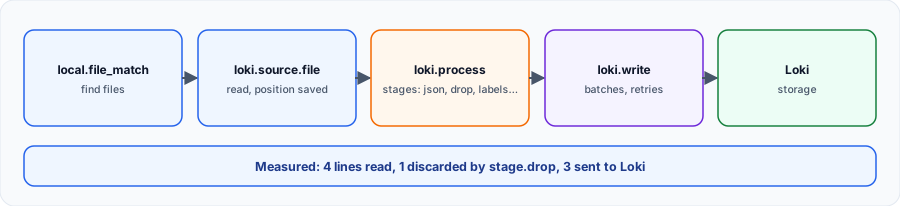
local.file_match finds files, loki.source.file reads them. Target labels, here job, travel with each line; __path__ designates the file and becomes the filename label.
local.file_match "app" {
  path_targets = [{ "__path__" = "/var/log/app/*.log", "job" = "app" }]
}

loki.source.file "app" {
  targets    = local.file_match.app.targets
  forward_to = [loki.write.local.receiver]
}

loki.write "local" {
  endpoint {
    url = "http://loki:3100/loki/api/v1/push"
  }
}
Alloy remembers its position in --storage.path: at restart, it resumes where it stopped. If this folder is not kept, the whole file is re-read and Loki receives duplicates.
Nothing arrives? Check permissions first: thealloyuser must be able to read the files. On Debian, add it to theadmgroup for/var/log.
The systemd journal #
loki.source.journal "systeme" {
  forward_to = [loki.write.local.receiver]
  labels     = { job = "journal" }
}

loki.write "local" {
  endpoint {
    url = "http://loki:3100/loki/api/v1/push"
  }
}
loki.source.journal can also transform internal journal fields with relabel_rules, for example to keep the unit name.
Checking without Loki #
To see what Alloy sees, plug loki.echo into forward_to: each line is written to Alloy's logs with its labels. The tests for this course relied on this component.
My progress
Sign in to track your progress and take notes. Sign in
💬 Recent discussions about this course
- Alloy : recevoir de l'OTLP et l'envoyer vers Tempo et Mimir✓ solved · 1 reply(ies)
Ask a question about this lesson →See all discussions about this course
Course Glossary
Grafana Alloy
An open-source, vendor-neutral telemetry collector designed to replace Grafana Agent, fully compatible with OpenTelemetry (OTel).
Recommended Articles
Collecting logs into Loki: Alloy, Promtail, Docker and OpenTelemetry
Send logs to Loki: Grafana Alloy, Promtail, the Docker driver, OTLP, good labels, parsing and enr...
Grafana Alloy: collecting and transforming telemetry
Learn how to use Grafana Alloy to collect, transform and route logs, metrics and traces. Discover...
Grafana Alloy vs Grafana Agent vs Promtail: which one to choose?
Discover how telemetry collectors have evolved in the Grafana ecosystem. A detailed comparison of...
Grafana Alloy: collecting system metrics and local logs
Learn how to configure Grafana Alloy to monitor the server it runs on, with a focus on configurat...
Grafana Alloy: The importance of Self-Monitoring
Discover why and how to configure Grafana Alloy so that it monitors itself, collecting its own lo...
Grafana Alloy components reference
A complete reference guide to all the components available in Grafana Alloy, organized by categor...
The LGTM stack (Loki, Grafana, Tempo, Mimir): architecture and setup
Grafana Labs' LGTM stack: Loki for logs, Grafana for visualization, Tempo for traces, Mimir for m...
Cribl Edge: collecting close to the sources
Deploying Cribl Edge on Linux, Windows and Kubernetes: the agent's role, Fleets and Subfleets, co...
OpenTelemetry Collector, Grafana Alloy and Bindplane: comparing three approaches to telemetry pipelines
Detailed comparison of three ways to manage telemetry pipelines: the OpenTelemetry Collector in Y...