1. Multi-stage pipelines #
Build, staging, production.
The pipeline #
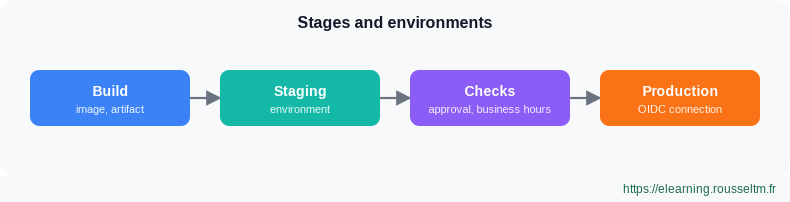
stages:
  - stage: Build
    jobs:
      - job: image
        steps:
          - task: Docker@2
            inputs:
              containerRegistry: acr-boutique
              repository: boutique
              command: buildAndPush
              tags: $(Build.BuildId)
  - stage: Production
    dependsOn: Build
    condition: and(succeeded(), eq(variables['Build.SourceBranch'], 'refs/heads/main'))
    jobs:
      - deployment: web
        environment: production
        strategy:
          runOnce:
            deploy:
              steps:
                - task: AzureWebAppContainer@1
                  inputs:
                    azureSubscription: azure-production
                    appName: boutique-prod
containers: monacr.azurecr.io/boutique:$(Build.BuildId)- A deployment job records history in the environment and offers the
runOnce,rolling(virtual machines) andcanary(Kubernetes) strategies. - Classic release pipelines (graphical UI) are legacy: prefer multi-stage YAML, versioned with the code.
2. Environments and connections #
Who can deploy, with which rights.
Checks #
| Check | Effect |
|---|---|
| Approvals | a person or group validates before deployment |
| Business hours | deployments only within a time window |
| Exclusive lock | only one run at a time on the environment |
| REST call or Azure Monitor query | blocks if an alert is active |
| Required template | only pipelines extending the approved template pass |
A service connection gives the pipeline access to Azure, a registry or Kubernetes. Workload identity federation (OIDC) replaces service principal secrets: no more password that expires or leaks.
Best practice : Put approvals on the production environment and service connection, not in the YAML: a developer cannot remove them by editing the pipeline.
Azure Artifacts #
Feeds host npm, NuGet, pip, Maven and universal packages, with cached upstream sources (npmjs, PyPI) and views (prerelease, release) to promote a package.
Commands to know #
Commands to know
az devops service-endpoint list -o table: service connectionsaz artifacts universal publish --feed … --name … --version 1.0.0 --path .: publish a universal packageaz pipelines runs show --id <id>: run details
Sources #
Checked in November 2026: CI/CD platforms change every month, check versions and plans in the vendor's documentation.
My progress
Sign in to track your progress and take notes. Sign in
💬 Questions about this lesson
No questions yet: be the first to ask for help or share your configuration.
Recommended Articles
Terraform in CI/CD: pipelines, plan review, OIDC and GitOps
Automate Terraform: plan pipeline on merge requests and apply after approval, posting the plan as...
Kubernetes: Pods, ReplicaSets and Deployments (deploying and updating)
Master Kubernetes workloads: anatomy of a pod, ReplicaSet, Deployment, RollingUpdate and Recreate...
End-to-end CI/CD (1/5): principles and anatomy of a pipeline
Understand end-to-end CI/CD: continuous integration, continuous delivery and continuous deploymen...
End-to-end CI/CD (4/5): deployment strategies and rollback
Deploy without downtime and without risk: recreate, rolling update, blue/green, canary, feature f...
Writing a .gitlab-ci.yml: jobs, rules, cache and artifacts
Mastering .gitlab-ci.yml syntax: stages, jobs and images, rules and workflow, needs (DAG), cache ...
GitHub Actions: concepts and how it works
Discover GitHub Actions: events, workflows, jobs, steps and actions, the Marketplace, hosted runn...
GitLab CI/CD: concepts and architecture
Discover GitLab CI/CD: the DevSecOps platform, the .gitlab-ci.yml file, pipelines, stages and job...
Writing GitHub Actions workflows
Mastering workflow syntax: triggers and filters, jobs and needs, matrices, if conditions, context...
Infrastructure as Code on Azure: Bicep, Terraform, Cost Management and Well-Architected
Describe and deploy Azure as code with Bicep (modules, parameters, what-if, pipeline deployments)...