1. The REST API #
Everything the UI does.
The journey #
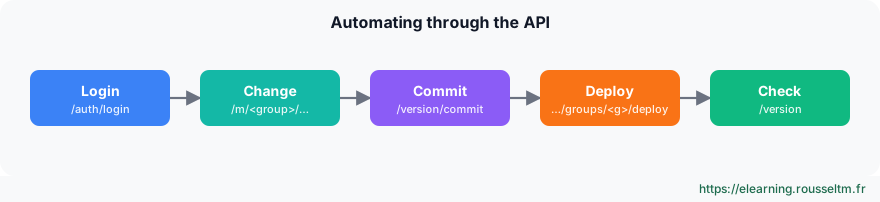
CRIBL=http://localhost:19000
TOKEN=$(curl -s -X POST $CRIBL/api/v1/auth/login -H 'Content-Type: application/json' \
  -d '{"username":"admin","password":"'"$CRIBL_PASSWORD"'"}' | jq -r .token)
H=(-H "Authorization: Bearer $TOKEN" -H 'Content-Type: application/json')

curl -s "${H[@]}" $CRIBL/api/v1/m/default/system/outputs | jq -r '.items[].id'
curl -s "${H[@]}" $CRIBL/api/v1/m/default/routes | jq '.items[0].routes[] | {name, filter, output}'

COMMIT=$(curl -s "${H[@]}" -X POST $CRIBL/api/v1/version/commit \
  -d '{"message":"ci: new archive destination","group":"default"}' | jq -r '.items[0].commit')
curl -s "${H[@]}" -X PATCH $CRIBL/api/v1/products/stream/groups/default/deploy -d "{\"version\":\"$COMMIT\"}"
curl -s "${H[@]}" -X POST $CRIBL/api/v1/version/commit -d '{"message":"sync leader"}' >/dev/null
POST /api/v1/auth/loginreturns a token to pass asAuthorization: Bearer.- A group's resources live under
/api/v1/m/<group>/(system/inputs,system/outputs,pipelines,routes). - Group commit, deploy with the resulting hash, then a Leader commit to keep both in sync.
Good to know : The/api/v1/master/groups/…/deploypath in older docs is replaced by/api/v1/products/stream/groups/…/deploy; on Cribl.Cloud, the address is the workspace URL and authentication uses an API client.
2. Packs #
Reuse and share.
Principle #
- A Pack bundles routes, pipelines, lookup tables and samples, with its own internal routing table.
- You use it like a pipeline (in a route or QuickConnect), export it as a
.crblfile and import it into another group or environment. - The Cribl Packs Dispensary offers ready-made Packs (Palo Alto, Windows, AWS, Cisco…): a useful starting point, to review and adapt.
Best practice : One Pack per source or vendor, versioned: the best way to ship the same logic to staging then production.
3. Git, environments and Terraform #
Configuration as code.
The options #
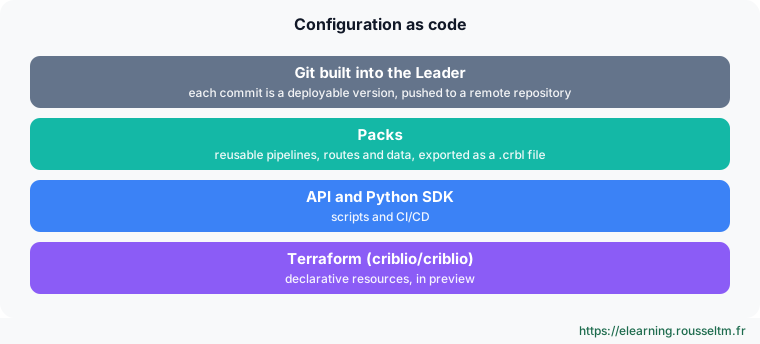
- Built-in Git: every Leader commit is versioned; push to a remote repository and protect the branch.
- Environments: separate groups (or separate deployments) for staging and production, with promotion via Pack, API or Terraform.
- Terraform: official
criblio/criblioprovider, still in preview, with an exporter to migrate an existing configuration. - SDK: the Python SDK remains available; the “Cribl as Code” TypeScript and Go SDKs are discontinued since 4.20.
terraform {
  required_providers {
    criblio = { source = "criblio/criblio", version = "~> 1.25" }
  }
}
# Resources and authentication: see the provider documentation (preview)
Watch out : The Terraform provider is in preview: pin its version and test each upgrade in staging.
Copilot #
Cribl Copilot helps write expressions, build pipelines and draft searches. Since 4.20, you can route it through your own AI provider; an admin can disable the chat widget independently of other AI features. Always review what it suggests before deploying.
Commands to know #
Commands to know
POST /api/v1/auth/login: get a tokenGET /api/v1/m/default/system/outputs: list group destinationsPOST /api/v1/version/commit: commit a versionPATCH /api/v1/products/stream/groups/default/deploy: deploy to a groupsource = "criblio/criblio": official Terraform provider
Sources #
Checked in November 2026 (Cribl 4.20): Cribl ships a minor release about every two months, check the release notes before relying on a detail.
My progress
Sign in to track your progress and take notes. Sign in
💬 Questions about this lesson
No questions yet: be the first to ask for help or share your configuration.
Recommended Articles
Cribl: the data pipeline for observability and security
Discover Cribl: why a telemetry data pipeline, the Cribl suite (Stream, Edge, Lake, Search, Cribl...
Sources, destinations and routes in Cribl Stream
Receiving and sending data with Cribl Stream: push, pull, collector and internal sources, event b...
Reducing, transforming and optimizing volumes with Cribl
Reducing the volume sent to SIEMs and observability tools without losing useful information: Drop...
Archiving, replaying and searching: S3, Replay, Cribl Lake and Cribl Search
Keeping all data cheaply and finding it on demand: partitioned S3 destination, JSON and Parquet f...
Cribl Stream in production: distributed architecture, persistent queues and monitoring
Taking Cribl Stream to production: Leader, Worker Groups and processes, commit and deploy, scalin...
Cribl Stream and Edge best practices
Best practices for running Cribl in production: route and pipeline design, naming, performance, c...
Automation and infrastructure as code for Elasticsearch: API, Terraform, Ansible and CI/CD
Automate Elasticsearch administration: REST API and clients, the elasticstack Terraform provider ...
Installing and administering Cribl Stream
Installing Cribl Stream with Docker or on Linux, running it as a service, understanding $CRIBL_HO...
Cribl Edge: collecting close to the sources
Deploying Cribl Edge on Linux, Windows and Kubernetes: the agent's role, Fleets and Subfleets, co...