1. Designing #
A readable configuration.
Rules #
- Name systematically:
in_syslog_fw,out_s3_archive,pl_fw_reduce, explicitly named routes. - One pipeline per source or use, chained if needed (Chain function); one Pack per vendor.
- Routes: most specific at the top, an explicit final route at the bottom, comments on each route.
- Normalize early (source pre-processing) common fields:
sourcetype,env, timestamp.
Performance #
- Filter and drop as early as possible; avoid unanchored regexes on
_raw. - Prefer Parser and native functions to Code; reasonably sized in-memory lookup tables.
- Monitor CPU per process and time spent per pipeline in Monitoring.
2. Reducing methodically #
Without breaking detections.
Rules #
- Archive 100% of raw data before any reduction (non-final route to object storage).
- Validate each reduction rule with the teams consuming the data, and measure before/after.
- Document what is filtered and why (function comments, commit message).
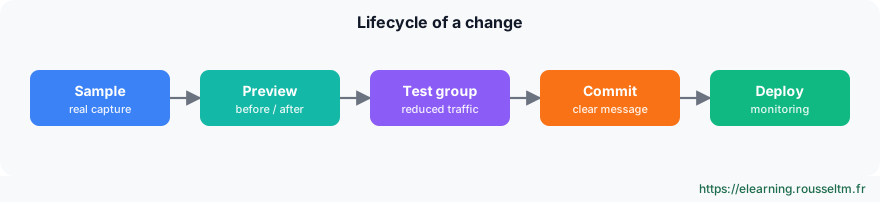
Change cycle #
3. Reliability and security #
In production.
Rules #
| Area | Practice |
|---|---|
| Reliability | at least two Workers per group, load balancer for push sources, persistent queues on critical destinations |
| Monitoring | internal logs and metrics sent to an external tool, notifications on silent sources and queues |
| Security | TLS everywhere, named accounts and SSO, centralized secrets, personal data masking |
| Changes | remote Git, explicit commits, test on samples then on a small group |
| Costs | weekly tracking of volume per source and destination, licence and credits |
Best practice : Treat Cribl as critical infrastructure: if it stops, the SIEM and observability go blind.
Checklist #
Before go-live.
Checks #
| Item | Check |
|---|---|
| Archive | non-final route to S3, replay tested |
| Reduction | gain measured, validated by security |
| Reliability | persistent queues tested by cutting the destination |
| Monitoring | alert received when a source goes silent |
| Security | TLS, named accounts, no personal data in clear on output |
| Configuration | remote Git up to date, versioned Packs |
Commands to know #
Commands to know
/opt/cribl/bin/cribl status: node statuscurl -s http://localhost:9000/api/v1/health: healthgit -C /opt/cribl log --oneline | head: configuration historydu -sh /opt/cribl/state/queues: persistent queues
Sources #
Checked in November 2026 (Cribl 4.20): Cribl ships a minor release about every two months, check the release notes before relying on a detail.
My progress
Sign in to track your progress and take notes. Sign in
💬 Questions about this lesson
No questions yet: be the first to ask for help or share your configuration.
Recommended Articles
Cribl: the data pipeline for observability and security
Discover Cribl: why a telemetry data pipeline, the Cribl suite (Stream, Edge, Lake, Search, Cribl...
Sources, destinations and routes in Cribl Stream
Receiving and sending data with Cribl Stream: push, pull, collector and internal sources, event b...
Cribl Stream in production: distributed architecture, persistent queues and monitoring
Taking Cribl Stream to production: Leader, Worker Groups and processes, commit and deploy, scalin...
Cribl Edge: collecting close to the sources
Deploying Cribl Edge on Linux, Windows and Kubernetes: the agent's role, Fleets and Subfleets, co...
Archiving, replaying and searching: S3, Replay, Cribl Lake and Cribl Search
Keeping all data cheaply and finding it on demand: partitioned S3 destination, JSON and Parquet f...
Automating Cribl: REST API, Packs, Git and Terraform
Managing Cribl as code: REST API (authentication, group paths, commit and deploy), reusable Packs...
Reducing, transforming and optimizing volumes with Cribl
Reducing the volume sent to SIEMs and observability tools without losing useful information: Drop...
Installing and administering Cribl Stream
Installing Cribl Stream with Docker or on Linux, running it as a service, understanding $CRIBL_HO...
Pipelines and functions: parse, enrich, mask
Building Cribl Stream pipelines: pre-processing, processing and post-processing, the function cat...