1. The role of Cribl Edge #
The same engine, as an agent.
Principle #
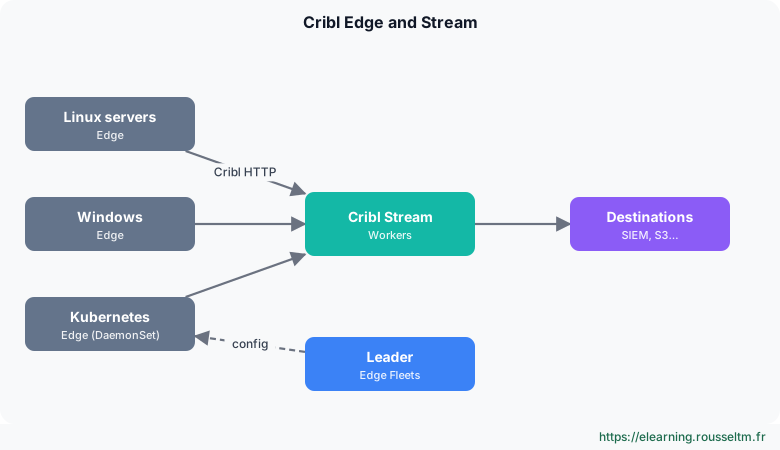
Cribl Edge is an agent installed on hosts or as a Kubernetes DaemonSet. It embeds the same engine as Stream (sources, routes, pipelines, destinations) and can therefore filter, mask and reduce at the source, saving bandwidth. Edge Nodes are driven by the Leader, grouped in Fleets (and Subfleets) sharing a configuration.
2. What Edge collects #
Local sources.
Sources #
| Source | Collects |
|---|---|
| File Monitor | log files, with automatic discovery and rotation tracking |
| Journal Files | journald (systemd) |
| Windows Event Logs | Application, System, Security, Sysmon logs… |
| System Metrics / Windows Metrics | CPU, memory, disks, network, processes |
| Kubernetes Logs / Metrics / Events | container logs, node and pod metrics, cluster events |
| Exec | output of a scheduled command (inventory, check) |
Edge also offers local exploration: from the Leader, you browse a host's files and processes to choose what to collect.
3. Deploying #
Linux, Windows, Kubernetes.
Methods #
- Linux: in the Leader, Add/Update Edge Node generates a command (install script with token and Fleet) to run on the host.
- Windows: MSI installer, with the same parameters (Leader, token, Fleet), deployable by GPO or endpoint management tool.
- Kubernetes: Edge Helm chart, deployed as a DaemonSet (one agent per node); the Leader UI provides the Helm command with the right parameters.
Watch out : Use the commands generated by your Leader: they contain the token, address and Fleet. Do not copy a command found online with a sample token.
Sending to Stream #
The Cribl HTTP destination (on Edge) and Cribl HTTP source (on Stream) pair is the recommended link: compressed, authenticated, and designed so data is not counted twice in the licence between Edge and Stream. Cribl TCP is the TCP equivalent.
4. Best practices #
A discreet agent.
Rules #
- One Fleet per host type (web servers, databases, Windows endpoints) and Subfleets per environment.
- Filter and mask on Edge; keep multi-tool routing and heavy enrichment on Stream.
- Limit the agent's resources (CPU, memory) and monitor its own metrics from the Leader.
- Test any new configuration on a small Subfleet before rolling it out.
Commands to know #
Commands to know
systemctl status cribl-edge: agent status on Linuxkubectl -n cribl get pods -o wide: cluster Edge agentsManage › Edge › Add/Update Edge Node: generate the install commandCribl HTTP (destination → source): Edge to Stream link
Sources #
Checked in November 2026 (Cribl 4.20): Cribl ships a minor release about every two months, check the release notes before relying on a detail.
My progress
Sign in to track your progress and take notes. Sign in
💬 Questions about this lesson
No questions yet: be the first to ask for help or share your configuration.
Recommended Articles
Cribl Stream and Edge best practices
Best practices for running Cribl in production: route and pipeline design, naming, performance, c...
Sources, destinations and routes in Cribl Stream
Receiving and sending data with Cribl Stream: push, pull, collector and internal sources, event b...
Cribl: the data pipeline for observability and security
Discover Cribl: why a telemetry data pipeline, the Cribl suite (Stream, Edge, Lake, Search, Cribl...
Installing and administering Cribl Stream
Installing Cribl Stream with Docker or on Linux, running it as a service, understanding $CRIBL_HO...
Cribl Stream in production: distributed architecture, persistent queues and monitoring
Taking Cribl Stream to production: Leader, Worker Groups and processes, commit and deploy, scalin...
Reducing, transforming and optimizing volumes with Cribl
Reducing the volume sent to SIEMs and observability tools without losing useful information: Drop...
Archiving, replaying and searching: S3, Replay, Cribl Lake and Cribl Search
Keeping all data cheaply and finding it on demand: partitioned S3 destination, JSON and Parquet f...
Automating Cribl: REST API, Packs, Git and Terraform
Managing Cribl as code: REST API (authentication, group paths, commit and deploy), reusable Packs...
Vector: sources in detail
Vector sources: files, Kubernetes logs, journald, syslog, sockets, HTTP, OpenTelemetry, Kafka, th...