1. Choosing a mode #
Single instance, distributed, cloud or hybrid.
The modes #
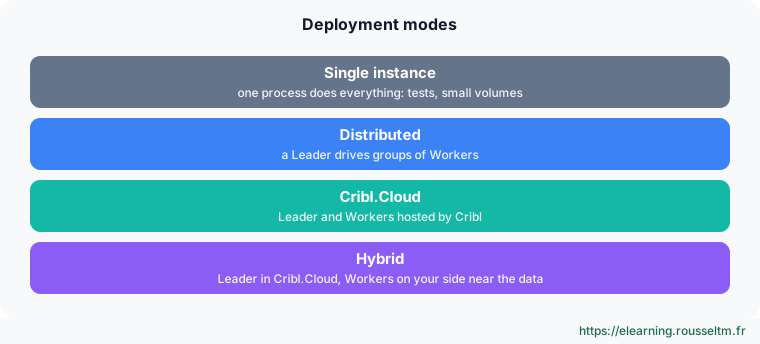
To learn and test, a single instance is enough: it receives, processes and sends data. In production, you move to distributed (a Leader and Workers, see the dedicated chapter), or use Cribl.Cloud, possibly with hybrid Workers installed near the sources.
2. Installing #
Docker or Linux.
Docker #
docker run -d --name cribl --restart unless-stopped \
  -p 9000:9000 -p 9514:9514 -p 9514:9514/udp -p 8088:8088 \
  -e CRIBL_VOLUME_DIR=/opt/cribl/config-volume \
  -v "$HOME/cribl-config:/opt/cribl/config-volume" \
  cribl/cribl:latest
docker logs -f cribl
CRIBL_VOLUME_DIR puts configuration and state on a persistent volume. Publish the ports of the sources you will create (here 9514 for syslog and 8088 for HEC). Pin a specific version in production (cribl/cribl:4.20.0) rather than latest.
Linux #
sudo useradd -r -m -d /opt/cribl cribl
curl -Lso - https://cdn.cribl.io/dl/latest-x64 | sudo tar -xz -C /opt
sudo chown -R cribl:cribl /opt/cribl
sudo /opt/cribl/bin/cribl boot-start enable -m systemd -u cribl
sudo systemctl start cribl && systemctl status cribl
Watch out : Check the download URL and checksum on the official download page before running a production installation.
3. Understanding $CRIBL_HOME #
Where configuration and state live.
Layout #
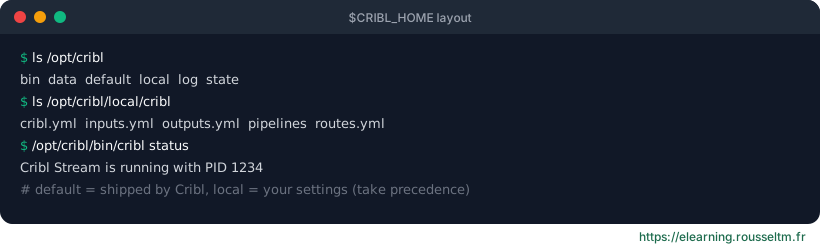
| Directory | Content |
|---|---|
bin/ | cribl binary (start, stop, status, version, boot-start) |
default/ | configuration shipped by Cribl: do not edit, replaced on each upgrade |
local/ | your settings, taking precedence over default: inputs.yml, outputs.yml, routes.yml, pipelines/ |
state/ | runtime state: persistent queues, collector cursors |
log/ | internal logs (cribl.log) |
data/ | reference data: lookup tables, samples |
Best practice : Back up local/ (or better, use the built-in Git): it is your whole configuration. Only edit YAML by hand with Cribl stopped, or go through the UI and API.4. First steps in the UI #
Login, settings, security.
First login #
- Open
http://localhost:9000and log in withadmin/admin: Cribl forces a password change. - Accept the free licence (or load a licence) in Settings › Licensing.
- Find the menus: Data (Sources, Destinations), Routing (Data Routes, QuickConnect), Processing (Pipelines, Packs, Knowledge), Monitoring.
- Enable UI TLS (Settings › General › API Server) and create named accounts; LDAP, OIDC or SAML authentication and fine-grained RBAC depend on the licence.
Common ports #
| Port | Use |
|---|---|
| 9000 | UI and REST API |
| 4200 | Leader ↔ Workers communication (distributed mode) |
| 9514 | syslog source (TCP/UDP), common value |
| 8088 | Splunk HEC source |
| 10080 | Cribl HTTP source |
| 4317 / 4318 | OpenTelemetry source (gRPC / HTTP) |
Good to know : Source ports are chosen when creating each source; these are usual values, not requirements.
Upgrading #
- Read the release notes (deprecated functions, behaviour changes).
- In distributed mode: upgrade the Leader first, then Workers per group; the Leader can drive Worker upgrades.
- With Docker: change the image tag and recreate the container, the volume keeps the configuration.
Commands to know #
Commands to know
/opt/cribl/bin/cribl start|stop|restart|status: control the service/opt/cribl/bin/cribl version: installed versionsudo /opt/cribl/bin/cribl boot-start enable -m systemd -u cribl: start at boottail -f /opt/cribl/log/cribl.log: internal logdocker run -d -p 9000:9000 -e CRIBL_VOLUME_DIR=/opt/cribl/config-volume cribl/cribl: Docker with persistent configuration
Sources #
Checked in November 2026 (Cribl 4.20): Cribl ships a minor release about every two months, check the release notes before relying on a detail.
My progress
Sign in to track your progress and take notes. Sign in
💬 Questions about this lesson
No questions yet: be the first to ask for help or share your configuration.
Recommended Articles
Sources, destinations and routes in Cribl Stream
Receiving and sending data with Cribl Stream: push, pull, collector and internal sources, event b...
Cribl Stream in production: distributed architecture, persistent queues and monitoring
Taking Cribl Stream to production: Leader, Worker Groups and processes, commit and deploy, scalin...
Cribl Stream and Edge best practices
Best practices for running Cribl in production: route and pipeline design, naming, performance, c...
Cribl: the data pipeline for observability and security
Discover Cribl: why a telemetry data pipeline, the Cribl suite (Stream, Edge, Lake, Search, Cribl...
Cribl Edge: collecting close to the sources
Deploying Cribl Edge on Linux, Windows and Kubernetes: the agent's role, Fleets and Subfleets, co...
Installing Jaeger v2: all-in-one, configuration and storage
Run Jaeger v2 as all-in-one, understand its configuration file (jaeger_storage and jaeger_query e...
Reducing, transforming and optimizing volumes with Cribl
Reducing the volume sent to SIEMs and observability tools without losing useful information: Drop...
Archiving, replaying and searching: S3, Replay, Cribl Lake and Cribl Search
Keeping all data cheaply and finding it on demand: partitioned S3 destination, JSON and Parquet f...
Automating Cribl: REST API, Packs, Git and Terraform
Managing Cribl as code: REST API (authentication, group paths, commit and deploy), reusable Packs...