1. Architecture #
One agent per node.
The DaemonSet #
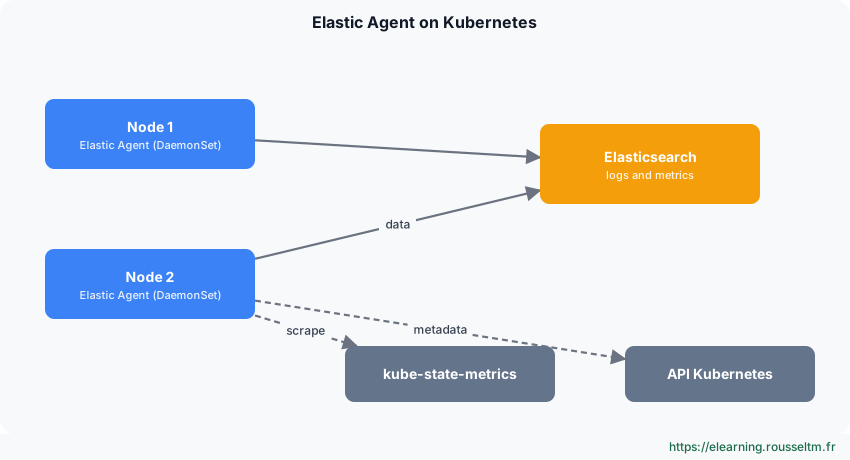
Elastic Agent runs as a DaemonSet: one pod per node reads container logs (/var/log/containers) and kubelet metrics. The Kubernetes integration also queries kube-state-metrics for object state (deployments, failing pods, restarts).
2. Deploying #
Fleet manifest or ECK.
Fleet-managed manifest #
helm repo add prometheus-community https://prometheus-community.github.io/helm-charts
helm install kube-state-metrics prometheus-community/kube-state-metrics -n kube-system
# Kibana › Fleet › Add agent › Kubernetes : télécharger le manifeste prérempli (FLEET_URL, FLEET_ENROLLMENT_TOKEN)
kubectl apply -f elastic-agent-managed-kubernetes.yml
kubectl -n kube-system get pods -l app.kubernetes.io/name=elastic-agent
Good to know: The manifest creates the service account, read-only RBAC roles and the DaemonSet; it mounts host log directories read-only.
With ECK #
apiVersion: agent.k8s.elastic.co/v1alpha1
kind: Agent
metadata:
  name: elastic-agent
spec:
  version: 9.x.y
  kibanaRef: { name: kibana }
  fleetServerRef: { name: fleet-server }
  mode: fleet
  policyID: eck-agent
  daemonSet:
    podTemplate:
      spec:
        serviceAccountName: elastic-agent
        automountServiceAccountToken: true
3. Autodiscovery #
Configuring through annotations.
Annotations and hints #
With hints, the agent reads pod annotations to automatically enable an integration (e.g. Redis) or a multiline parser for a given container, without changing the policy.
metadata:
  annotations:
    co.elastic.hints/package: redis
    co.elastic.hints/host: '${kubernetes.pod.ip}:6379'
    co.elastic.hints/period: 30s
Good practice: Set memory and CPU limits on the DaemonSet and watch its restarts: an agent killed for lack of memory loses collection continuity.
My progress
Sign in to track your progress and take notes. Sign in
💬 Questions about this lesson
No questions yet: be the first to ask for help or share your configuration.
Recommended Articles
Elastic Agent: architecture, Fleet and integrations
Understand Elastic Agent: single collection agent, Fleet and Fleet Server, agent policies, integr...
Standalone Elastic Agent, Logstash and Kafka outputs, and OpenTelemetry (EDOT)
Write a standalone configuration, ship to Logstash or Kafka, and use Elastic Agent as an OpenTele...
Installing Fleet Server and enrolling Elastic Agents
Set up Fleet Server, create a policy, enroll Linux, Windows and Docker agents, understand tokens ...
Elastic Agent or Beats? Choosing and migrating
Compare Elastic Agent and Beats (Filebeat, Metricbeat, Winlogbeat), know when to keep Beats, and ...
Monitoring, upgrading and troubleshooting Elastic Agent
Operate an Elastic Agent fleet: states in Fleet, agent monitoring, batch upgrades, diagnostics, l...
Elastic Agent in production: best practices
Elastic Agent best practices: security, policy organisation, volume control, Fleet Server high av...
Agent policies, integrations, data streams and pipelines
Build agent policies, add integrations (System, Nginx, Custom Logs), choose namespaces, customise...
Elastic Observability: logs, infrastructure, APM and synthetics
Elastic Observability features: log exploration, infrastructure inventory with Elastic Agent and ...
Elastic path project: centralising and using logs
The validation project of the "Elastic Stack mastery" path: Elastic Agent and Fleet, Logstash, El...