1. Designing policies #
One policy per role.
Breakdown #
A policy groups what a set of hosts must collect. Split by role (web servers, databases, Windows desktops) and by environment through the namespace, rather than one giant policy for the whole fleet.
| Policy | Integrations | Namespace |
|---|---|---|
| web-prod | System, Nginx | prod |
| db-prod | System, PostgreSQL | prod |
| windows-postes | System, Windows, Elastic Defend | corp |
Policy settings #
- Default namespace, data output and monitoring output.
- Collection of the agent's own logs and metrics (monitoring).
- Unenrollment timeout for inactive agents, uninstall protection (Elastic Defend).
2. Integrations #
System, Nginx, Custom Logs.
What an integration contains #
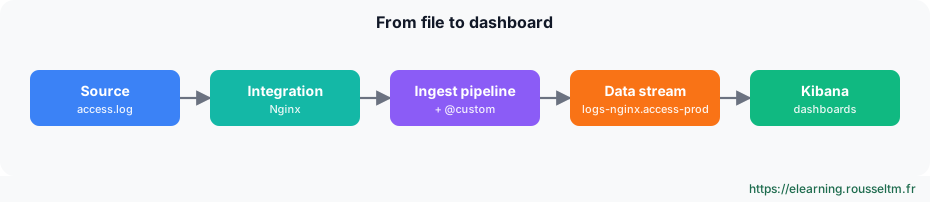
An integration provides the collection configuration, the ingest pipelines that structure data (ECS), the mappings and dashboards. Its assets are installed in Elasticsearch and Kibana as soon as it is added to a policy.
Custom logs #
# Intégration « Custom Logs (Filestream) » : paramètres principaux
paths:
  - /var/log/monapp/*.log
data_stream.dataset: monapp
parsers:
  - multiline:
      type: pattern
      pattern: '^\d{4}-\d{2}-\d{2}'
      negate: true
      match: after
processors:
  - add_fields:
      target: ''
      fields:
        service.name: monapp
3. Customising ingestion #
Without changing managed assets.
The @custom pipeline #
Each integration data stream calls a <type>-<dataset>@custom pipeline if it exists. This is where to add your processing: it survives integration upgrades.
PUT _ingest/pipeline/logs-nginx.access@custom
{
  "processors": [
    { "set": { "field": "labels.equipe", "value": "web" } },
    { "drop": { "if": "ctx.url?.original?.startsWith('/health') == true" } }
  ]
}
Common mistake: Editing the integration's managed pipeline (logs-nginx.access-1.x.y) directly: the next upgrade overwrites it.Variables and secrets #
Good practice: For integration passwords (databases, APIs), use Fleet secret fields: they are stored encrypted and do not appear in the exported policy.
My progress
Sign in to track your progress and take notes. Sign in
💬 Questions about this lesson
No questions yet: be the first to ask for help or share your configuration.
Recommended Articles
Elastic Agent: architecture, Fleet and integrations
Understand Elastic Agent: single collection agent, Fleet and Fleet Server, agent policies, integr...
Installing Fleet Server and enrolling Elastic Agents
Set up Fleet Server, create a policy, enroll Linux, Windows and Docker agents, understand tokens ...
Elastic Agent or Beats? Choosing and migrating
Compare Elastic Agent and Beats (Filebeat, Metricbeat, Winlogbeat), know when to keep Beats, and ...
Elastic Agent in production: best practices
Elastic Agent best practices: security, policy organisation, volume control, Fleet Server high av...
Elasticsearch ingestion: Bulk API, ingest pipelines, enrich and reindex
Ingest and transform data in Elasticsearch: Bulk API, ingest pipelines and processors (grok, diss...
Elastic Agent on Kubernetes
Deploy Elastic Agent on Kubernetes: Fleet-managed DaemonSet, Kubernetes integration, kube-state-m...
Standalone Elastic Agent, Logstash and Kafka outputs, and OpenTelemetry (EDOT)
Write a standalone configuration, ship to Logstash or Kafka, and use Elastic Agent as an OpenTele...
Monitoring, upgrading and troubleshooting Elastic Agent
Operate an Elastic Agent fleet: states in Fleet, agent monitoring, batch upgrades, diagnostics, l...
Feeding OpenSearch: ingest pipelines and Data Prepper
Transform data with ingest pipelines, collect with Data Prepper, receive OTLP and avoid the dynam...