1. Concepts #
A directory for the whole company.
Logical structure #
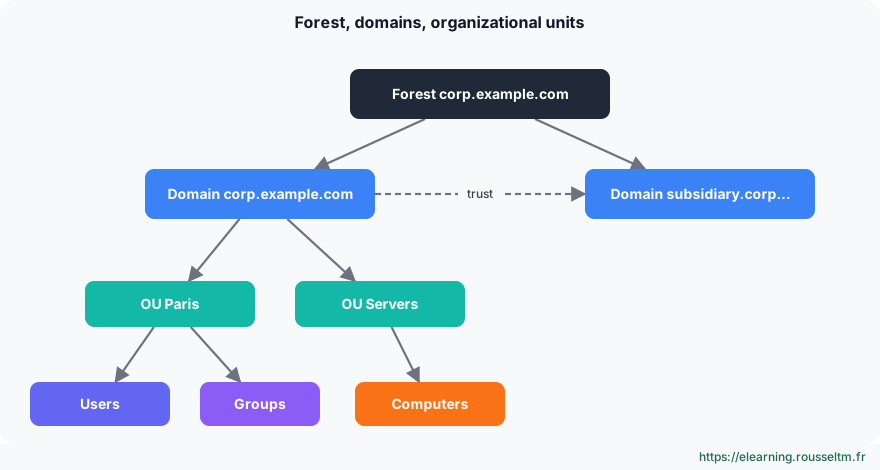
Active Directory Domain Services (AD DS) is the directory of Windows networks: it centralizes accounts, authentication (Kerberos), computers and policies. The forest is the security boundary; it contains one or more domains (often just one today). Organizational units (OUs) structure objects to delegate administration and apply Group Policy.
Domain controllers and FSMO roles #
Domain controllers (DCs) host a copy of the directory and replicate it between them (multi-master). Five operations are reserved to a single DC, the FSMO roles:
| Role | Scope | Function |
|---|---|---|
| Schema master | forest | schema changes |
| Domain naming master | forest | adding and removing domains |
| PDC emulator | domain | time source, passwords, lockouts, GPOs |
| RID master | domain | hands out SID identifier pools |
| Infrastructure master | domain | cross-domain references |
Good practice: Always deploy at least two domain controllers, ideally on different hosts, and make them global catalog and DNS servers. A domain with a single DC loses everything at the first failure.
DNS: the foundation #
Clients find domain controllers thanks to DNS SRV records (_ldap._tcp.dc._msdcs.domain). Bad DNS is the first cause of AD problems: domain PCs and servers must use only the domain controllers’ DNS, which then forward to the Internet (forwarders).
Common mistake: Setting a public DNS (8.8.8.8, 1.1.1.1) as secondary server on a domain PC: the PC sometimes queries it, cannot find the domain, and logons or GPOs fail randomly.
2. Deploy and administer #
From forest to accounts.
Create the forest and add a DC #
# Premier contrôleur de domaine : nouvelle forêt
Install-WindowsFeature AD-Domain-Services -IncludeManagementTools
Install-ADDSForest -DomainName 'corp.exemple.fr' -DomainNetbiosName 'CORP' -InstallDns `
    -SafeModeAdministratorPassword (Read-Host -AsSecureString 'Mot de passe DSRM')

# Second contrôleur de domaine
Install-WindowsFeature AD-Domain-Services -IncludeManagementTools
Install-ADDSDomainController -DomainName 'corp.exemple.fr' -InstallDns -Credential (Get-Credential CORP\Administrateur)

# Joindre un poste ou un serveur au domaine
Add-Computer -DomainName corp.exemple.fr -OUPath 'OU=Serveurs,DC=corp,DC=exemple,DC=fr' -Restart
Depending on the version: Windows Server 2025 introduces a new forest and domain functional level, a database with 32 KB pages and LDAP encryption by default. Only raise the functional level once all DCs are migrated.
Manage objects with PowerShell #
New-ADOrganizationalUnit -Name 'Paris' -Path 'DC=corp,DC=exemple,DC=fr'
New-ADUser -Name 'Jeanne Dupont' -SamAccountName jdupont -UserPrincipalName jdupont@corp.exemple.fr `
    -Path 'OU=Paris,DC=corp,DC=exemple,DC=fr' -AccountPassword (Read-Host -AsSecureString) -Enabled $true -ChangePasswordAtLogon $true
New-ADGroup -Name GG_Compta -GroupScope Global -Path 'OU=Paris,DC=corp,DC=exemple,DC=fr'
Add-ADGroupMember -Identity GG_Compta -Members jdupont

# Création en masse depuis un CSV (colonnes : Prenom;Nom;Login;Service)
Import-Csv .\arrivees.csv -Delimiter ';' | ForEach-Object {
    New-ADUser -Name "$($_.Prenom) $($_.Nom)" -SamAccountName $_.Login -Department $_.Service `
        -Path 'OU=Paris,DC=corp,DC=exemple,DC=fr' -AccountPassword (ConvertTo-SecureString 'Temp!2026-Chg' -AsPlainText -Force) `
        -Enabled $true -ChangePasswordAtLogon $true
}
Search-ADAccount -AccountInactive -TimeSpan 90.00:00:00 -UsersOnly | Select-Object Name, LastLogonDate
Unlock-ADAccount jdupont ; Set-ADAccountPassword jdupont -Reset -NewPassword (Read-Host -AsSecureString)
Health, replication and recycle bin #
dcdiag /v /c /e > dcdiag.txt          # diagnostic complet de tous les DC
repadmin /replsummary                    # état de la réplication
repadmin /showrepl SRV-DC02
netdom query fsmo                        # qui détient les rôles FSMO
Get-ADDomainController -Filter * | Select-Object Name, Site, IsGlobalCatalog, OperatingSystem
Enable-ADOptionalFeature 'Recycle Bin Feature' -Scope ForestOrConfigurationSet -Target corp.exemple.fr
Get-ADObject -Filter 'isDeleted -eq $true' -IncludeDeletedObjects | Restore-ADObject   # restaurer un objet supprimé
Good to know: AD sites describe the network topology (one site per location connected by a fast link): clients authenticate against a nearby DC, and inter-site replication is scheduled and compressed.
3. Hybrid identity and security #
AD and the Microsoft cloud.
Microsoft Entra ID #
Microsoft Entra ID (formerly Azure AD) is the cloud directory of Microsoft 365 and Azure. It is not AD in the cloud: it knows neither OUs nor GPOs, and uses OAuth, SAML and OpenID Connect. Entra Connect Sync or Entra Cloud Sync synchronize AD accounts to Entra ID (with password hash sync or pass-through authentication) for a single identity.
Common mistake: Using the domain Administrator account for daily work or logging on to PCs with it. Apply the tier model: separate admin accounts, “Domain Admins” limited to a few people, who only log on to DCs and dedicated admin workstations.
Commands to know #
| Action | Command |
|---|---|
| Create a forest | Install-ADDSForest -DomainName corp.exemple.fr -InstallDns |
| Join the domain | Add-Computer -DomainName corp.exemple.fr -Restart |
| Create a user | New-ADUser -Name "Jeanne Dupont" -SamAccountName jdupont |
| Find inactive accounts | Search-ADAccount -AccountInactive -UsersOnly |
| FSMO roles | netdom query fsmo |
| Replication | repadmin /replsummary |
| DC diagnostics | dcdiag /e /q |
| Find a DC (SRV) | Resolve-DnsName -Type SRV _ldap._tcp.dc._msdcs.corp.exemple.fr |
| Locate the DC in use | nltest /dsgetdc:corp.exemple.fr |
My progress
Sign in to track your progress and take notes. Sign in
💬 Questions about this lesson
No questions yet: be the first to ask for help or share your configuration.
Recommended Articles
Windows updates and security: WSUS, Defender, BitLocker, LAPS and hardening
Maintain and secure a Windows estate: update strategy (Windows Update, WSUS, Azure Update Manager...
Linux system architecture: kernel, boot and directory tree
Understand how a Linux server works: kernel and user space, the UEFI, GRUB, initramfs and systemd...
Kubernetes Services: ClusterIP, NodePort, LoadBalancer and ExternalName
Kubernetes Services explained: the role of a Kubernetes service, the ClusterIP, NodePort, LoadBal...
Networking on Linux: configuration, diagnosis, firewall and SSH
Configure and troubleshoot Linux networking: ip, ss, netplan and NetworkManager, DNS, layered dia...
The ACME protocol: ACME server, http-01 and dns-01 challenges, TLS automation
Understand the ACME protocol: the role of the ACME server (Let's Encrypt, ZeroSSL, step-ca), the ...
Linux administration best practices
Checklist for administering Linux servers: accounts and sudo, SSH, updates, systemd services, sto...
Packages, systemd services, logs and scheduled tasks
Install and update software with apt and dnf, manage services with systemctl, write a systemd uni...
Google Cloud networking: global VPC, subnets, firewall and load balancing
Design networking on Google Cloud: global VPC and regional subnets, firewall rules based on tags ...
Processes, memory and performance: monitoring and troubleshooting a Linux server
Understand and control Linux processes (ps, top, signals, nice, jobs), interpret load, memory and...