1. Configure and troubleshoot #
Networking cmdlets.
IP configuration #
Get-NetIPConfiguration                     # vue d'ensemble (équivalent moderne d'ipconfig /all)
Get-NetAdapter | Format-Table Name, Status, LinkSpeed, MacAddress
New-NetIPAddress -InterfaceAlias 'Ethernet' -IPAddress 10.0.10.21 -PrefixLength 24 -DefaultGateway 10.0.10.1
Set-DnsClientServerAddress -InterfaceAlias 'Ethernet' -ServerAddresses 10.0.10.10, 10.0.10.11
Set-NetIPInterface -InterfaceAlias 'Ethernet' -Dhcp Enabled                         # repasser en DHCP
Rename-NetAdapter -Name 'Ethernet' -NewName 'LAN'
Good practice: Give servers a static IP address (or a DHCP reservation), and use internal DNS (domain controllers) on every domain machine.
Layered troubleshooting #
| Layer | Question | Command |
|---|---|---|
| Link | is the adapter connected? | Get-NetAdapter |
| IP | do I have an address and a gateway? | Get-NetIPConfiguration |
| Routing | does the target answer? | Test-NetConnection 10.0.10.1, tracert |
| DNS | does the name resolve? | Resolve-DnsName srv-fs01 |
| Port | is the service listening, does the firewall allow it? | Test-NetConnection srv-fs01 -Port 445 |
| Local service | which process listens? | Get-NetTCPConnection -State Listen |
Test-NetConnection srv-web01 -Port 443 -InformationLevel Detailed
Get-NetTCPConnection -State Listen | Sort-Object LocalPort |
    Select-Object LocalAddress, LocalPort, @{n='Processus'; e={(Get-Process -Id $_.OwningProcess).Name}}
Resolve-DnsName corp.exemple.fr -Type SOA ; Clear-DnsClientCache
Get-NetRoute -AddressFamily IPv4 | Where-Object DestinationPrefix -eq '0.0.0.0/0'
2. The DHCP service #
Handing out addresses automatically.
Install and configure DHCP #
Install-WindowsFeature DHCP -IncludeManagementTools
Add-DhcpServerInDC -DnsName srv-dc01.corp.exemple.fr -IPAddress 10.0.10.10      # autoriser le serveur dans AD
Add-DhcpServerv4Scope -Name 'LAN Paris' -StartRange 10.0.20.100 -EndRange 10.0.20.250 -SubnetMask 255.255.255.0 -LeaseDuration 8.00:00:00
Set-DhcpServerv4OptionValue -ScopeId 10.0.20.0 -Router 10.0.20.1 -DnsServer 10.0.10.10, 10.0.10.11 -DnsDomain corp.exemple.fr
Add-DhcpServerv4Reservation -ScopeId 10.0.20.0 -IPAddress 10.0.20.50 -ClientId 'AA-BB-CC-11-22-33' -Name 'Imprimante-RDC'
Get-DhcpServerv4ScopeStatistics                                                  # taux d'occupation
Add-DhcpServerv4Failover -Name 'FO-Paris' -PartnerServer srv-dc02 -ScopeId 10.0.20.0 -LoadBalancePercent 50 -SharedSecret (Read-Host)
Good to know: DHCP failover shares scopes between two servers, in load balancing or hot standby: no more “80/20” rule. On another subnet, a DHCP relay (IP helper) on the router forwards requests.
3. Windows Firewall #
Block by default, open precisely.
Profiles and rules #
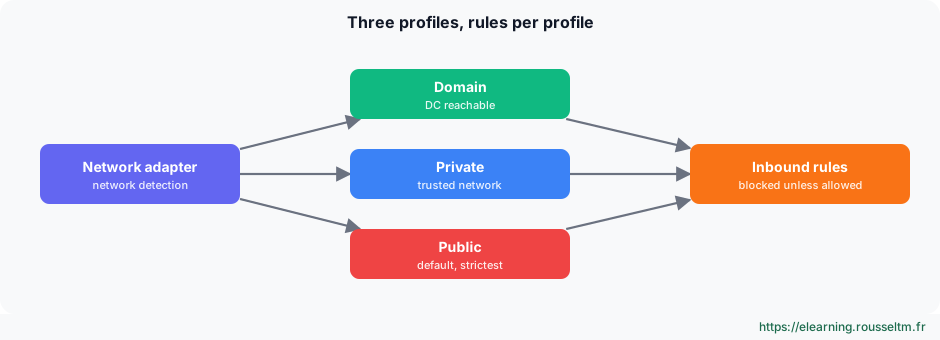
Get-NetFirewallProfile | Format-Table Name, Enabled, DefaultInboundAction, DefaultOutboundAction
Get-NetConnectionProfile                                              # profil actif de chaque réseau
New-NetFirewallRule -DisplayName 'APP - API métier 8443' -Direction Inbound -Protocol TCP -LocalPort 8443 `
    -RemoteAddress 10.0.20.0/24 -Profile Domain -Action Allow
Get-NetFirewallRule -DisplayGroup 'Bureau à distance' | Enable-NetFirewallRule      # « Remote Desktop » en anglais
Set-NetFirewallProfile -Profile Domain, Private, Public -LogBlocked True -LogFileName '%SystemRoot%\System32\LogFiles\Firewall\pfirewall.log'
Common mistake: Disabling the firewall “to test” and forgetting to turn it back on, or opening a port to every address. Create a precise rule (port, protocol, source addresses, profile) and manage the firewall by GPO across the estate.
4. Remote access #
RDP, WinRM and SSH.
Remote Desktop, WinRM and OpenSSH #
| Access | Port | Use |
|---|---|---|
| Remote Desktop (RDP) | 3389 | graphical session; require NLA authentication |
| WinRM / PowerShell Remoting | 5985 / 5986 | PowerShell administration, Windows Admin Center |
| OpenSSH Server | 22 | remote shell, scp and sftp, PowerShell 7 over SSH |
# Bureau à distance avec NLA
Set-ItemProperty 'HKLM:\System\CurrentControlSet\Control\Terminal Server' -Name fDenyTSConnections -Value 0
Set-ItemProperty 'HKLM:\System\CurrentControlSet\Control\Terminal Server\WinStations\RDP-Tcp' -Name UserAuthentication -Value 1
Enable-NetFirewallRule -DisplayGroup 'Bureau à distance'

# OpenSSH Server
Get-WindowsCapability -Online -Name OpenSSH.Server*                  # préinstallé sur Windows Server 2025
Add-WindowsCapability -Online -Name OpenSSH.Server~~~~0.0.1.0       # versions antérieures
Set-Service sshd -StartupType Automatic ; Start-Service sshd
ssh admin@srv-fs01 ; scp .\outil.zip admin@srv-fs01:C:/Temp/
Common mistake: Exposing port 3389 (RDP) to the Internet: it is one of the main ransomware entry points. Go through a VPN, a Remote Desktop Gateway or a bastion, with multi-factor authentication.
Commands to know #
| Action | Command |
|---|---|
| IP configuration | Get-NetIPConfiguration |
| Test a port | Test-NetConnection srv01 -Port 3389 |
| Resolve a name | Resolve-DnsName srv01.corp.exemple.fr |
| Listening ports | Get-NetTCPConnection -State Listen |
| Create a DHCP scope | Add-DhcpServerv4Scope -Name LAN -StartRange 10.0.20.100 -EndRange 10.0.20.250 -SubnetMask 255.255.255.0 |
| Open a port | New-NetFirewallRule -DisplayName 'HTTPS' -Direction Inbound -Protocol TCP -LocalPort 443 -Action Allow |
| Enable PowerShell Remoting | Enable-PSRemoting -Force |
| Flush the DNS cache | Clear-DnsClientCache |
My progress
Sign in to track your progress and take notes. Sign in
💬 Questions about this lesson
No questions yet: be the first to ask for help or share your configuration.
Recommended Articles
Users, groups, NTFS permissions and SMB shares
Manage local accounts and groups, understand UAC, apply NTFS permissions with inheritance, create...
Group Policy (GPO): configuring the estate from Active Directory
Design and troubleshoot Group Policy: computer and user configuration, OU linking, LSDOU order, i...
Services, scheduled tasks, event logs and performance
Control Windows services and their recovery, automate with Task Scheduler, use event logs with Ge...
Azure networking: VNet, NSG, peering, load balancing and hybrid connectivity
Design networking on Azure: virtual networks and subnets, network security groups (NSG), peering ...
OVHcloud Public Cloud networking: private networks, vRack, Gateway, Floating IP and Load Balancer
Design networking on OVHcloud Public Cloud: public network and OpenStack private networks, vRack,...
Linux administration best practices
Checklist for administering Linux servers: accounts and sudo, SSH, updates, systemd services, sto...
Linux server security and hardening
Harden a Linux server: least privilege, updates, secure SSH, firewall, fail2ban, SELinux and AppA...
Processes, memory and performance: monitoring and troubleshooting a Linux server
Understand and control Linux processes (ps, top, signals, nice, jobs), interpret load, memory and...
Backup, monitoring and troubleshooting of a Linux server
Operate a Linux server day to day: 3-2-1 backup strategy with rsync, tar, LVM snapshots and resti...