1. Services #
Programs that run without a session.
Control a service #
A service is a program started by the service control manager, under an account (LocalSystem, NetworkService, LocalService, a domain account or a group managed service account gMSA). Its startup type is Automatic, Automatic (delayed start), Manual or Disabled.
Get-Service | Where-Object { $_.StartType -eq 'Automatic' -and $_.Status -ne 'Running' }   # services auto arrêtés : suspects
Restart-Service Spooler -Force ; Get-Service Spooler -DependentServices
Set-Service -Name W3SVC -StartupType Automatic
Get-CimInstance Win32_Service -Filter "Name='W3SVC'" | Select-Object Name, StartName, PathName, ProcessId
sc.exe failure MonAppli reset= 86400 actions= restart/60000/restart/60000/none/0    # redémarrage automatique après échec
sc.exe qfailure MonAppli
Good practice: Run applications under a gMSA rather than a regular domain account: its long password is rotated automatically by AD and nobody knows it.
Task Scheduler #
$action  = New-ScheduledTaskAction -Execute 'pwsh.exe' -Argument '-NoProfile -File C:\Scripts\Nettoyer-Logs.ps1 -Dossier D:\Logs'
$trigger = New-ScheduledTaskTrigger -Daily -At 02:30
$princ   = New-ScheduledTaskPrincipal -UserId 'SYSTEM' -LogonType ServiceAccount -RunLevel Highest
Register-ScheduledTask -TaskName 'Nettoyage logs' -TaskPath '\Exploitation\' -Action $action -Trigger $trigger -Principal $princ
Start-ScheduledTask -TaskName 'Nettoyage logs' -TaskPath '\Exploitation\'
Get-ScheduledTask -TaskPath '\Exploitation\' | Get-ScheduledTaskInfo | Select-Object TaskName, LastRunTime, LastTaskResult, NextRunTime
Good to know: LastTaskResult is 0 on success; any other value is the script’s exit code or a scheduler error (0x41301 = running, 0x1 = program failure).2. Event logs #
The system’s memory.
Reading logs with Get-WinEvent #
The main logs are System, Application and Security, plus hundreds of “Applications and Services” logs (Microsoft-Windows-…/Operational). Get-WinEvent with -FilterHashtable filters at the source: much faster than Where-Object.
Get-WinEvent -FilterHashtable @{ LogName = 'System'; Level = 1, 2; StartTime = (Get-Date).AddDays(-1) } |
    Select-Object TimeCreated, Id, ProviderName, Message -First 20
Get-WinEvent -FilterHashtable @{ LogName = 'Security'; Id = 4625; StartTime = (Get-Date).AddHours(-1) } |
    ForEach-Object { $_.Properties[5].Value } | Group-Object | Sort-Object Count -Descending   # comptes visés par des échecs d'ouverture
Get-WinEvent -ListLog * | Where-Object RecordCount -gt 0 | Sort-Object RecordCount -Descending | Select-Object -First 10
wevtutil epl System C:\rapports\system.evtx # exporter un journal pour analyse| ID | Log | Meaning |
|---|---|---|
| 4624 / 4625 | Security | successful / failed logon |
| 4740 | Security (DC) | account locked out |
| 4720 / 4728 | Security (DC) | account created / added to a global security group |
| 7034 / 7036 | System | service terminated unexpectedly / state change |
| 41 / 6008 | System | reboot without clean shutdown (power loss, crash) |
| 1074 | System | shutdown or restart requested (by whom and why) |
| 1000 | Application | application crash (faulting module) |
Good practice: Increase the Security and System log sizes (by GPO), enable advanced audit policy and centralize logs: Windows Event Forwarding (WEF), Azure Monitor or a SIEM. A local log is wiped by an attacker or overwritten in a few hours.
3. Performance #
Measure before concluding.
Counters and method #
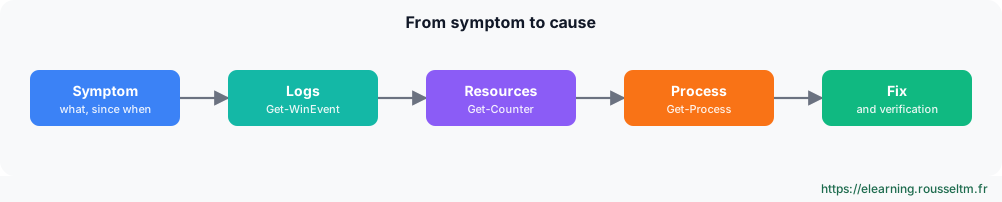
Get-Counter '\Processor(_Total)\% Processor Time', '\Memory\Available MBytes', '\LogicalDisk(_Total)\Avg. Disk sec/Transfer', '\Network Interface(*)\Bytes Total/sec' -SampleInterval 2 -MaxSamples 5
Get-Process | Sort-Object WorkingSet64 -Descending | Select-Object -First 5 Name, Id, @{n='Mo'; e={[int]($_.WorkingSet64/1MB)}}, CPU
logman create counter Perf-Base -c '\Processor(_Total)\% Processor Time' '\Memory\Available MBytes' -si 00:00:15 -o C:\PerfLogs\base
logman start Perf-Base # collecte continue, à analyser dans perfmon| Resource | Counter | Indicative alert threshold |
|---|---|---|
| CPU | % Processor Time | > 85% sustained |
| Memory | Available MBytes | < 10% of RAM |
| Disk | Avg. Disk sec/Transfer | > 20 ms (HDD), > 5 ms (SSD) |
| Network | Bytes Total/sec | > 70% of adapter bandwidth |
Graphical tools: Task Manager, Resource Monitor (resmon) to see which process uses which file or port, Performance Monitor (perfmon) for data collection, and Reliability Monitor (perfmon /rel) for the history of crashes and installations.
Commands to know #
| Action | Command |
|---|---|
| Stopped automatic services | Get-Service | Where-Object { $_.StartType -eq 'Automatic' -and $_.Status -ne 'Running' } |
| Restart a service | Restart-Service W3SVC |
| Failure recovery | sc.exe failure MonAppli reset= 86400 actions= restart/60000 |
| Create a scheduled task | Register-ScheduledTask -TaskName Sauvegarde -Action $a -Trigger $t |
| System errors of the last 24 h | Get-WinEvent -FilterHashtable @{LogName='System'; Level=2; StartTime=(Get-Date).AddDays(-1)} |
| Failed logons | Get-WinEvent -FilterHashtable @{LogName='Security'; Id=4625} -MaxEvents 20 |
| Performance counters | Get-Counter '\Processor(_Total)\% Processor Time' -Continuous |
| Reliability Monitor | perfmon /rel |