1. Install and configure #
Start on the right foot.
Checklist #
- Supported Windows Server version, Server Core by default, minimal roles.
- Consistent naming (
SRV-ROLE-NN), static IP, internal DNS, time synced on the PDC emulator. - Configuration described as code: PowerShell scripts, DSC, or Ansible for Windows, versioned in Git.
- Remote administration (Windows Admin Center, PowerShell Remoting) from a dedicated admin workstation.
2. Identity and access #
Protecting Active Directory protects everything else.
The tier model #
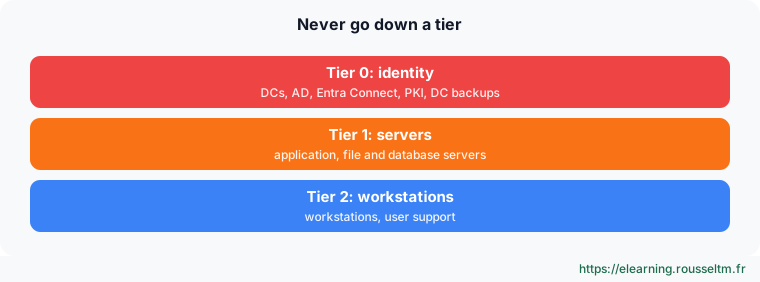
- At least two domain controllers, backed up (system state) and monitored (
dcdiag,repadmin). - Named admin accounts separate from mailbox accounts, “Domain Admins” almost empty, MFA for privileged access.
- Windows LAPS on all servers and PCs, gMSAs for services, AD Recycle Bin enabled.
- Rights granted to groups (AGDLP), delegation on OUs rather than domain admin rights.
- Quarterly review: inactive accounts, privileged group members, PingCastle score.
3. Operate #
Day to day.
Updates, security, backup #
| Area | Practice | Check |
|---|---|---|
| Updates | monthly rings after Patch Tuesday | Get-HotFix, WSUS or Azure Update Manager report |
| Security | Microsoft baseline, SMBv1 absent, BitLocker, Defender up to date | Get-MpComputerStatus, manage-bde -status |
| GPOs | one GPO per topic, pilot OU, GPO backups | gpresult /h, Backup-GPO -All |
| Storage | mirror for live data, alerts at 80% | Get-Volume, Get-VirtualDisk |
| Backup | 3-2-1 with an immutable copy, monthly restore test | wbadmin get versions |
| Logs | larger sizes, advanced audit, centralization | Get-WinEvent, SIEM |
| Monitoring | CPU, memory, disk, services, certificates, AD replication | Prometheus windows_exporter, Zabbix, Azure Monitor, Dynatrace |
Good practice: Document each server (role, owner, dependencies, restart and restore procedure) and each change. A written, tested procedure beats one person’s expertise.
Commands to know #
| Action | Command |
|---|---|
| Quick server check | Get-ComputerInfo -Property OsName, OsUptime, CsTotalPhysicalMemory |
| Stopped automatic services | Get-Service | Where-Object { $_.StartType -eq 'Automatic' -and $_.Status -ne 'Running' } |
| Disk space | Get-Volume | Where-Object DriveLetter |
| AD health | dcdiag /e /q ; repadmin /replsummary |
| Inactive accounts | Search-ADAccount -AccountInactive -TimeSpan 90.00:00:00 |
| Certificates expiring soon | Get-ChildItem Cert:\LocalMachine\My | Where-Object NotAfter -lt (Get-Date).AddDays(30) |
| Recent errors | Get-WinEvent -FilterHashtable @{LogName='System'; Level=2; StartTime=(Get-Date).AddDays(-1)} |
My progress
Sign in to track your progress and take notes. Sign in
💬 Questions about this lesson
No questions yet: be the first to ask for help or share your configuration.
Recommended Articles
Services, scheduled tasks, event logs and performance
Control Windows services and their recovery, automate with Task Scheduler, use event logs with Ge...
Linux administration best practices
Checklist for administering Linux servers: accounts and sudo, SSH, updates, systemd services, sto...
Linux system architecture: kernel, boot and directory tree
Understand how a Linux server works: kernel and user space, the UEFI, GRUB, initramfs and systemd...
Linux server security and hardening
Harden a Linux server: least privilege, updates, secure SSH, firewall, fail2ban, SELinux and AppA...
Processes, memory and performance: monitoring and troubleshooting a Linux server
Understand and control Linux processes (ps, top, signals, nice, jobs), interpret load, memory and...
Backup, monitoring and troubleshooting of a Linux server
Operate a Linux server day to day: 3-2-1 backup strategy with rsync, tar, LVM snapshots and resti...
Networking on Linux: configuration, diagnosis, firewall and SSH
Configure and troubleshoot Linux networking: ip, ss, netplan and NetworkManager, DNS, layered dia...
Essential Dynatrace settings: owners, maintenance, naming, key requests and tags
Configure Dynatrace's cross-cutting settings: entity ownership, maintenance windows, naming rules...
Using the Dynatrace API v2: a complete guide to automation
Learn how to use the Dynatrace API to automate your observability: managing scopes, routing throu...