1. Data #
Quality starts at ingest.
Rules #
| Area | Practice |
|---|---|
| Sourcetypes | one per format, the six essential settings set explicitly; reuse add-on sourcetypes |
| Timestamp | check time zone and format: a wrong _time makes data unfindable |
| Index | per permission and retention population; stable naming (org_web_prod) |
| Volume | filter DEBUG and noise before indexing (TRANSFORMS, Ingest actions, Edge Processor); mask personal data |
| CIM | map security sources to the CIM for Enterprise Security |
Best practice : Test each new sourcetype in a staging index with the Add Data wizard before opening it in production.
2. Searches and content #
Frugality and readability.
Rules #
- Always
index,sourcetypeand a time range;statsrather thantransactionorjoin;tstatswhenever possible. - Scheduled rather than real-time alerts; offset windows (
-6mto-1m) to allow for indexing delay; throttling on. - Spread scheduled search times (not all at
*/5on the same minute) and watch skipped searches. - Dashboards: base searches and chains, scheduled reports for shared views.
Watch out : A real-time index=* over all time, run by a user, can slow the whole platform: limit these capabilities per role.3. Platform and security #
Running sustainably.
Regular review #
- Configuration in apps versioned in Git, deployed by the deployment server, cluster manager and deployer.
- SAML or LDAP authentication, team roles limited to their indexes, dedicated service accounts for integrations.
- TLS on the UI, port 9997 (S2S) and HEC; HEC tokens per source with allowed indexes.
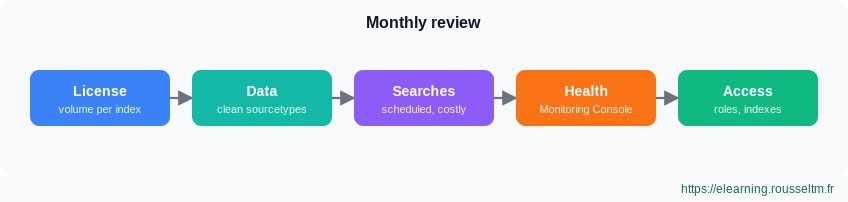
- Monitoring Console and alerts on blocked queues, silent forwarders and license overage.
Checklist #
| Item | Check |
|---|---|
| Data | clean sourcetypes, correct _time, no personal data in clear |
| License | volume per index tracked, alert at 80% of license |
| Retention | each index retention matches requirements (security, legal) |
| Searches | no continuously skipped scheduled search, no needless real-time alert |
| Availability | suitable RF/SF, rolling restart tested, configuration backup |
| Access | SSO, roles reviewed quarterly, sensitive capabilities reserved |
Commands to know #
Commands to know
splunk btool check: validate configurationindex=_internal source=*license_usage.log type=Usage: license usageindex=_internal sourcetype=scheduler status=skipped: skipped searches| rest /services/data/indexes | table title frozenTimePeriodInSecs maxTotalDataSizeMB: index retention
Sources #
Checked in November 2026 (Splunk Enterprise 10.6): check the release notes before relying on a detail, Splunk Cloud Platform evolves faster than the on-premises version.