1. Install and configure #
Start on the right foot.
Checklist #
- Supported Windows Server version, Server Core by default, minimal roles.
- Consistent naming (
SRV-ROLE-NN), static IP, internal DNS, time synced on the PDC emulator. - Configuration described as code: PowerShell scripts, DSC, or Ansible for Windows, versioned in Git.
- Remote administration (Windows Admin Center, PowerShell Remoting) from a dedicated admin workstation.
2. Identity and access #
Protecting Active Directory protects everything else.
The tier model #
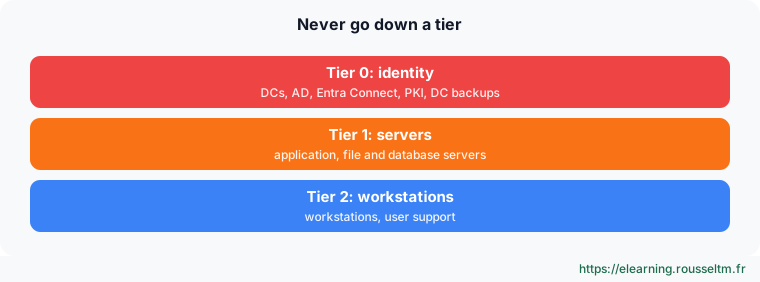
- At least two domain controllers, backed up (system state) and monitored (
dcdiag,repadmin). - Named admin accounts separate from mailbox accounts, “Domain Admins” almost empty, MFA for privileged access.
- Windows LAPS on all servers and PCs, gMSAs for services, AD Recycle Bin enabled.
- Rights granted to groups (AGDLP), delegation on OUs rather than domain admin rights.
- Quarterly review: inactive accounts, privileged group members, PingCastle score.
3. Operate #
Day to day.
Updates, security, backup #
| Area | Practice | Check |
|---|---|---|
| Updates | monthly rings after Patch Tuesday | Get-HotFix, WSUS or Azure Update Manager report |
| Security | Microsoft baseline, SMBv1 absent, BitLocker, Defender up to date | Get-MpComputerStatus, manage-bde -status |
| GPOs | one GPO per topic, pilot OU, GPO backups | gpresult /h, Backup-GPO -All |
| Storage | mirror for live data, alerts at 80% | Get-Volume, Get-VirtualDisk |
| Backup | 3-2-1 with an immutable copy, monthly restore test | wbadmin get versions |
| Logs | larger sizes, advanced audit, centralization | Get-WinEvent, SIEM |
| Monitoring | CPU, memory, disk, services, certificates, AD replication | Prometheus windows_exporter, Zabbix, Azure Monitor, Dynatrace |
Good practice: Document each server (role, owner, dependencies, restart and restore procedure) and each change. A written, tested procedure beats one person’s expertise.
Commands to know #
| Action | Command |
|---|---|
| Quick server check | Get-ComputerInfo -Property OsName, OsUptime, CsTotalPhysicalMemory |
| Stopped automatic services | Get-Service | Where-Object { $_.StartType -eq 'Automatic' -and $_.Status -ne 'Running' } |
| Disk space | Get-Volume | Where-Object DriveLetter |
| AD health | dcdiag /e /q ; repadmin /replsummary |
| Inactive accounts | Search-ADAccount -AccountInactive -TimeSpan 90.00:00:00 |
| Certificates expiring soon | Get-ChildItem Cert:\LocalMachine\My | Where-Object NotAfter -lt (Get-Date).AddDays(30) |
| Recent errors | Get-WinEvent -FilterHashtable @{LogName='System'; Level=2; StartTime=(Get-Date).AddDays(-1)} |