1. Configure and troubleshoot #
Networking cmdlets.
IP configuration #
Get-NetIPConfiguration                     # vue d'ensemble (équivalent moderne d'ipconfig /all)
Get-NetAdapter | Format-Table Name, Status, LinkSpeed, MacAddress
New-NetIPAddress -InterfaceAlias 'Ethernet' -IPAddress 10.0.10.21 -PrefixLength 24 -DefaultGateway 10.0.10.1
Set-DnsClientServerAddress -InterfaceAlias 'Ethernet' -ServerAddresses 10.0.10.10, 10.0.10.11
Set-NetIPInterface -InterfaceAlias 'Ethernet' -Dhcp Enabled                         # repasser en DHCP
Rename-NetAdapter -Name 'Ethernet' -NewName 'LAN'
Good practice: Give servers a static IP address (or a DHCP reservation), and use internal DNS (domain controllers) on every domain machine.
Layered troubleshooting #
| Layer | Question | Command |
|---|---|---|
| Link | is the adapter connected? | Get-NetAdapter |
| IP | do I have an address and a gateway? | Get-NetIPConfiguration |
| Routing | does the target answer? | Test-NetConnection 10.0.10.1, tracert |
| DNS | does the name resolve? | Resolve-DnsName srv-fs01 |
| Port | is the service listening, does the firewall allow it? | Test-NetConnection srv-fs01 -Port 445 |
| Local service | which process listens? | Get-NetTCPConnection -State Listen |
Test-NetConnection srv-web01 -Port 443 -InformationLevel Detailed
Get-NetTCPConnection -State Listen | Sort-Object LocalPort |
    Select-Object LocalAddress, LocalPort, @{n='Processus'; e={(Get-Process -Id $_.OwningProcess).Name}}
Resolve-DnsName corp.exemple.fr -Type SOA ; Clear-DnsClientCache
Get-NetRoute -AddressFamily IPv4 | Where-Object DestinationPrefix -eq '0.0.0.0/0'
2. The DHCP service #
Handing out addresses automatically.
Install and configure DHCP #
Install-WindowsFeature DHCP -IncludeManagementTools
Add-DhcpServerInDC -DnsName srv-dc01.corp.exemple.fr -IPAddress 10.0.10.10      # autoriser le serveur dans AD
Add-DhcpServerv4Scope -Name 'LAN Paris' -StartRange 10.0.20.100 -EndRange 10.0.20.250 -SubnetMask 255.255.255.0 -LeaseDuration 8.00:00:00
Set-DhcpServerv4OptionValue -ScopeId 10.0.20.0 -Router 10.0.20.1 -DnsServer 10.0.10.10, 10.0.10.11 -DnsDomain corp.exemple.fr
Add-DhcpServerv4Reservation -ScopeId 10.0.20.0 -IPAddress 10.0.20.50 -ClientId 'AA-BB-CC-11-22-33' -Name 'Imprimante-RDC'
Get-DhcpServerv4ScopeStatistics                                                  # taux d'occupation
Add-DhcpServerv4Failover -Name 'FO-Paris' -PartnerServer srv-dc02 -ScopeId 10.0.20.0 -LoadBalancePercent 50 -SharedSecret (Read-Host)
Good to know: DHCP failover shares scopes between two servers, in load balancing or hot standby: no more “80/20” rule. On another subnet, a DHCP relay (IP helper) on the router forwards requests.
3. Windows Firewall #
Block by default, open precisely.
Profiles and rules #
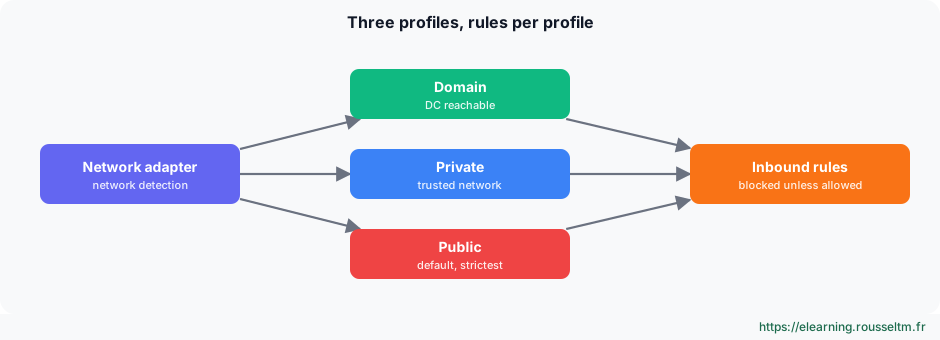
Get-NetFirewallProfile | Format-Table Name, Enabled, DefaultInboundAction, DefaultOutboundAction
Get-NetConnectionProfile                                              # profil actif de chaque réseau
New-NetFirewallRule -DisplayName 'APP - API métier 8443' -Direction Inbound -Protocol TCP -LocalPort 8443 `
    -RemoteAddress 10.0.20.0/24 -Profile Domain -Action Allow
Get-NetFirewallRule -DisplayGroup 'Bureau à distance' | Enable-NetFirewallRule      # « Remote Desktop » en anglais
Set-NetFirewallProfile -Profile Domain, Private, Public -LogBlocked True -LogFileName '%SystemRoot%\System32\LogFiles\Firewall\pfirewall.log'
Common mistake: Disabling the firewall “to test” and forgetting to turn it back on, or opening a port to every address. Create a precise rule (port, protocol, source addresses, profile) and manage the firewall by GPO across the estate.
4. Remote access #
RDP, WinRM and SSH.
Remote Desktop, WinRM and OpenSSH #
| Access | Port | Use |
|---|---|---|
| Remote Desktop (RDP) | 3389 | graphical session; require NLA authentication |
| WinRM / PowerShell Remoting | 5985 / 5986 | PowerShell administration, Windows Admin Center |
| OpenSSH Server | 22 | remote shell, scp and sftp, PowerShell 7 over SSH |
# Bureau à distance avec NLA
Set-ItemProperty 'HKLM:\System\CurrentControlSet\Control\Terminal Server' -Name fDenyTSConnections -Value 0
Set-ItemProperty 'HKLM:\System\CurrentControlSet\Control\Terminal Server\WinStations\RDP-Tcp' -Name UserAuthentication -Value 1
Enable-NetFirewallRule -DisplayGroup 'Bureau à distance'

# OpenSSH Server
Get-WindowsCapability -Online -Name OpenSSH.Server*                  # préinstallé sur Windows Server 2025
Add-WindowsCapability -Online -Name OpenSSH.Server~~~~0.0.1.0       # versions antérieures
Set-Service sshd -StartupType Automatic ; Start-Service sshd
ssh admin@srv-fs01 ; scp .\outil.zip admin@srv-fs01:C:/Temp/
Common mistake: Exposing port 3389 (RDP) to the Internet: it is one of the main ransomware entry points. Go through a VPN, a Remote Desktop Gateway or a bastion, with multi-factor authentication.
Commands to know #
| Action | Command |
|---|---|
| IP configuration | Get-NetIPConfiguration |
| Test a port | Test-NetConnection srv01 -Port 3389 |
| Resolve a name | Resolve-DnsName srv01.corp.exemple.fr |
| Listening ports | Get-NetTCPConnection -State Listen |
| Create a DHCP scope | Add-DhcpServerv4Scope -Name LAN -StartRange 10.0.20.100 -EndRange 10.0.20.250 -SubnetMask 255.255.255.0 |
| Open a port | New-NetFirewallRule -DisplayName 'HTTPS' -Direction Inbound -Protocol TCP -LocalPort 443 -Action Allow |
| Enable PowerShell Remoting | Enable-PSRemoting -Force |
| Flush the DNS cache | Clear-DnsClientCache |