1. Back up and restore #
The only real protection against data loss.
Windows Server Backup #
Install-WindowsFeature Windows-Server-Backup
wbadmin start backup -backupTarget:E: -include:C:,D: -allCritical -vssFull -quiet     # sauvegarde complète restaurable « bare metal »
wbadmin start systemstatebackup -backupTarget:E: -quiet                                # état du système (AD sur un DC)
wbadmin get versions -backupTarget:E:
wbadmin start recovery -version:11/14/2026-02:00 -itemType:File -items:D:\Data\Compta -recoveryTarget:D:\Restau -recursive
# Planification quotidienne
wbadmin enable backup -addtarget:E: -include:C:,D: -allCritical -schedule:02:00 -quiet
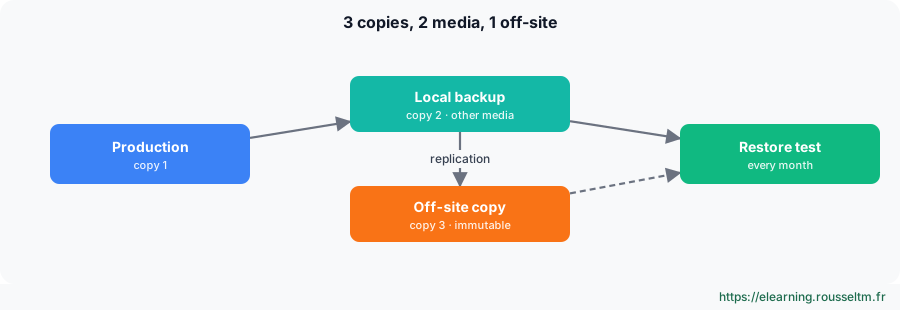
Good to know: To restore a deleted AD object, use the AD Recycle Bin first. A domain controller system state restore is done in Directory Services Restore Mode (DSRM), non-authoritatively or authoritatively (ntdsutil).Common mistake: Never testing restores. A backup that has never been restored is only a hypothesis: schedule a monthly test (a file, a whole server every quarter) and keep at least one offline or immutable copy, out of reach of ransomware that would also encrypt the backup server.
2. Hyper-V #
The hypervisor built into Windows.
Virtual machines and networks #
Install-WindowsFeature Hyper-V -IncludeManagementTools -Restart
New-VMSwitch -Name 'Externe' -NetAdapterName 'LAN' -AllowManagementOS $true      # commutateur relié au réseau physique
New-VMSwitch -Name 'Lab' -SwitchType Internal                                     # réseau isolé hôte + VM
New-VM -Name SRV-LAB01 -Generation 2 -MemoryStartupBytes 4GB -NewVHDPath D:\VM\SRV-LAB01.vhdx -NewVHDSizeBytes 80GB -SwitchName Lab
Set-VMProcessor SRV-LAB01 -Count 2 ; Set-VMMemory SRV-LAB01 -DynamicMemoryEnabled $true -MaximumBytes 8GB
Add-VMDvdDrive SRV-LAB01 -Path D:\ISO\WindowsServer2025.iso ; Set-VMFirmware SRV-LAB01 -FirstBootDevice (Get-VMDvdDrive SRV-LAB01)
Start-VM SRV-LAB01 ; Get-VM | Format-Table Name, State, CPUUsage, MemoryAssigned, Uptime| Switch | Access |
|---|---|
| External | VMs on the physical network |
| Internal | VMs and host, no physical network |
| Private | VMs among themselves only |
Checkpoints, export and replica #
Set-VM SRV-LAB01 -CheckpointType Production          # point de contrôle cohérent (VSS dans la VM)
Checkpoint-VM SRV-LAB01 -SnapshotName 'Avant mise à jour'
Get-VMSnapshot SRV-LAB01 ; Restore-VMSnapshot -VMName SRV-LAB01 -Name 'Avant mise à jour' -Confirm:$false
Remove-VMSnapshot -VMName SRV-LAB01 -Name 'Avant mise à jour'    # fusionne le fichier AVHDX
Export-VM SRV-LAB01 -Path E:\Exports
Enable-VMReplication SRV-APP01 -ReplicaServerName HV-SECOURS -ReplicaServerPort 80 -AuthenticationType Kerberos
Common mistake: Keeping checkpoints for weeks: AVHDX files grow, degrade performance and do not replace a backup. A checkpoint is kept for the duration of a change, then removed.
3. Troubleshooting Windows #
When the system is not well.
Repair the system #
sfc /scannow                                          # vérifie et répare les fichiers système protégés
DISM /Online /Cleanup-Image /ScanHealth
DISM /Online /Cleanup-Image /RestoreHealth            # répare le magasin de composants (puis relancer sfc)
chkdsk D: /scan                                       # analyse en ligne ; /f /r au prochain redémarrage pour C:
Get-WinEvent -FilterHashtable @{ LogName = 'System'; ProviderName = 'Microsoft-Windows-WindowsUpdateClient'; Level = 2 } -MaxEvents 10
shutdown /r /o /t 0 # redémarrer dans l'environnement de récupération (WinRE)| Symptom | First action |
|---|---|
| No longer boots after an update | WinRE: uninstall the latest update, or boot in safe mode |
| Blue screen | stop code + faulting module in C:\Windows\Minidump (WinDbg, !analyze -v); often a driver |
| Recently slow | Reliability Monitor, counters, hungry process, full disk |
| Service will not start | System log (7000, 7009, 7034), service account, dependencies |
| Domain logon failure | DNS, time (Kerberos: 5 min max skew), secure channel: Test-ComputerSecureChannel -Repair |
Good practice: Keep an operations log: each incident, its cause and resolution. In most cases, the decisive question is “what changed?”: update, driver, GPO, expired certificate, full disk.
Commands to know #
| Action | Command |
|---|---|
| Full backup | wbadmin start backup -backupTarget:E: -allCritical -quiet |
| Available versions | wbadmin get versions |
| Create a VM | New-VM -Name VM1 -Generation 2 -MemoryStartupBytes 4GB -NewVHDPath D:\VM\VM1.vhdx -NewVHDSizeBytes 60GB |
| Checkpoint | Checkpoint-VM VM1 -SnapshotName 'Avant changement' |
| Repair system files | sfc /scannow |
| Repair the image | DISM /Online /Cleanup-Image /RestoreHealth |
| Repair the secure channel | Test-ComputerSecureChannel -Repair -Credential CORP\admin |
| Restart into WinRE | shutdown /r /o /t 0 |