1. Governance #
Protecting what matters.
Guardrails #
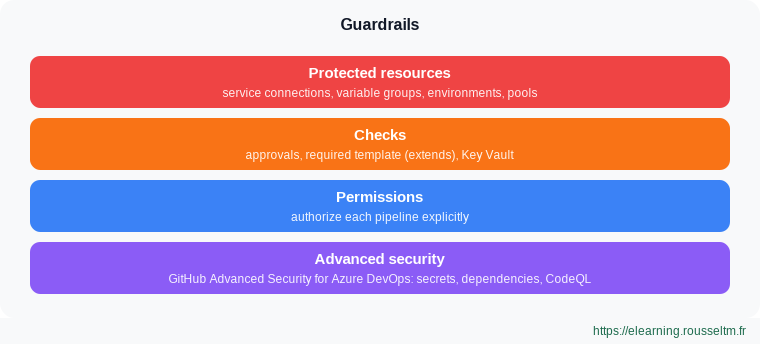
- Access through Microsoft Entra ID, groups and access levels (Stakeholder, Basic, Basic + Test Plans); short-lived, minimal-scope personal access tokens.
- Secrets come from Azure Key Vault (linked variable group or
AzureKeyVault@2task) and are never written in the YAML. - The organization audit log traces permission, policy and connection changes; it can be streamed to a SIEM.
2. Troubleshooting and checking #
The most common errors.
Frequent errors #
| Symptom | Likely cause |
|---|---|
| No hosted parallelism has been purchased or granted | free grant not requested: use a self-hosted agent or request it |
| "This pipeline needs permission to access a resource" | protected resource: authorize the pipeline once |
| Job waiting without agent | no online agent with the requested capabilities |
| Empty secret variable in a script | not passed through env: |
The system.debug: true variable enables detailed logs; the "Download logs" view retrieves the whole run.
Checklist #
| Item | Check |
|---|---|
| Repos | policies on main: reviewer, build validation, linked items |
| Pipelines | multi-stage YAML, shared templates, versioned tasks |
| Security | OIDC, Key Vault, protected resources, separate pools |
| Delivery | environments with approvals, same artifact promoted |
Good to know : GitHub Advanced Security for Azure DevOps brings secret scanning with push protection, dependency scanning and code scanning (CodeQL) directly into Azure Repos (paid option per active committer).
Commands to know #
Commands to know
az devops security group list -o table: security groupsaz pipelines variable-group variable create --secret true …: secret variableaz devops invoke --area audit --resource auditlog: query the audit log
Sources #
Checked in November 2026: CI/CD platforms change every month, check versions and plans in the vendor's documentation.
My progress
Sign in to track your progress and take notes. Sign in
💬 Questions about this lesson
No questions yet: be the first to ask for help or share your configuration.
Recommended Articles
Azure Pipelines agents: hosted, self-hosted and managed pools
Choosing and running Azure Pipelines agents: Microsoft-hosted agents and images, self-hosted agen...
Deploying with Azure Pipelines: environments, approvals and service connections
Delivering with Azure Pipelines: multi-stage pipelines, environments, approvals and checks, deplo...
Azure DevOps: services, organization and plans
Discover Azure DevOps: Boards, Repos, Pipelines, Test Plans and Artifacts, organizations and proj...
Azure best practices: landing zone, security, reliability and costs
Best practices for running Azure in production: landing zone and management groups, identities an...
Monitoring and protecting Azure: Monitor, Log Analytics, Defender, Key Vault and Backup
Operate Azure: Azure Monitor (metrics, activity logs, alerts), Log Analytics and KQL, Application...
Advanced OpenSearch security: authentication, roles and audit
Securing OpenSearch in depth: transport and API TLS, internal, LDAP, OpenID Connect and SAML auth...
Dynatrace Credential Vault: securing and managing your secrets
Discover how the Dynatrace Credential Vault app lets you securely manage passwords, tokens and ce...
Azure Boards and Azure Repos: planning and collaborating
Organizing work with Azure Boards (Agile, Scrum, Basic and CMMI processes, work items, backlogs, ...
Azure YAML pipelines: stages, tasks, variables and templates
Writing Azure pipelines in YAML: trigger and pr triggers, stages, jobs and steps, versioned tasks...