1. A complete suite #
Plan, code, build, test, deliver.
The services #
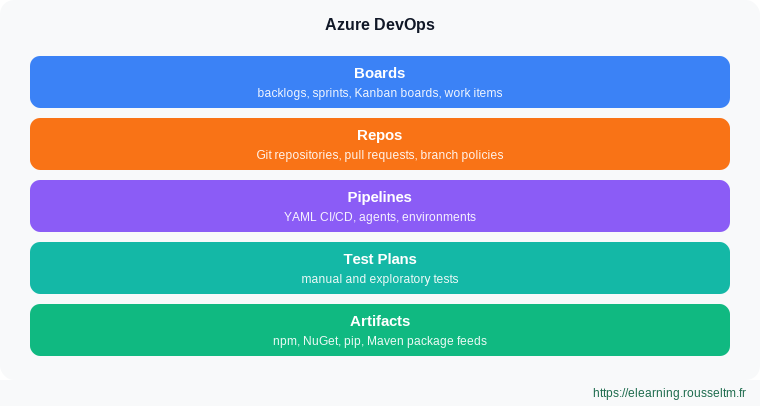
- An organization (
dev.azure.com/my-org) contains projects; each project enables the services it needs. - Azure DevOps Services is the SaaS; Azure DevOps Server is installed on premises (isolated environments, regulatory constraints).
- Services combine with other tools: Pipelines can build a GitHub repository, Boards can track GitHub commits.
2. Plans and alternatives #
What is free.
Free tier #
| Item | Free |
|---|---|
| Basic users | first 5; unlimited Stakeholders |
| Microsoft-hosted agents | 1 parallel job, 1,800 minutes per month, upon a free grant request for new organizations |
| Self-hosted agents | 1 parallel job, unlimited duration |
| Artifacts | 2 GiB of storage |
Good to know : A new organization must request the free hosted parallelism grant (Microsoft form, a few days): meanwhile, a self-hosted agent lets you run pipelines, which is what the labs do.
| Tool | Difference |
|---|---|
| GitHub Actions | action ecosystem, open source community; Microsoft focuses many new features there |
| GitLab CI | single platform with built-in registry and security |
Commands to know #
Commands to know
az extension add --name azure-devops: install the CLI extensionaz devops configure --defaults organization=https://dev.azure.com/<org> project=<projet>: default organization and projectaz devops project list -o table: list projectsaz pipelines list -o table: list pipelines
Sources #
Checked in November 2026: CI/CD platforms change every month, check versions and plans in the vendor's documentation.
My progress
Sign in to track your progress and take notes. Sign in
💬 Questions about this lesson
No questions yet: be the first to ask for help or share your configuration.
Recommended Articles
End-to-end CI/CD (1/5): principles and anatomy of a pipeline
Understand end-to-end CI/CD: continuous integration, continuous delivery and continuous deploymen...
Infrastructure as Code on Azure: Bicep, Terraform, Cost Management and Well-Architected
Describe and deploy Azure as code with Bicep (modules, parameters, what-if, pipeline deployments)...
GitLab CI/CD: concepts and architecture
Discover GitLab CI/CD: the DevSecOps platform, the .gitlab-ci.yml file, pipelines, stages and job...
Reusing and securing GitLab pipelines
Industrializing GitLab CI/CD: extends, anchors and !reference, include, CI/CD components and cata...
End-to-end CI/CD (5/5): GitHub Actions, GitLab CI, Jenkins and Argo CD in practice
Compare and use CI/CD tools: GitHub Actions, GitLab CI, Jenkins, Argo CD and Flux; a complete pip...
Monitoring and protecting Azure: Monitor, Log Analytics, Defender, Key Vault and Backup
Operate Azure: Azure Monitor (metrics, activity logs, alerts), Log Analytics and KQL, Application...
Azure best practices: landing zone, security, reliability and costs
Best practices for running Azure in production: landing zone and management groups, identities an...
GitHub Actions: concepts and how it works
Discover GitHub Actions: events, workflows, jobs, steps and actions, the Marketplace, hosted runn...
Testing continuously and in production: contracts, performance and chaos engineering
Going beyond the test pyramid: component tests with Testcontainers, contract tests (Pact), mutati...