1. The REST API #
Everything the UI does.
The journey #
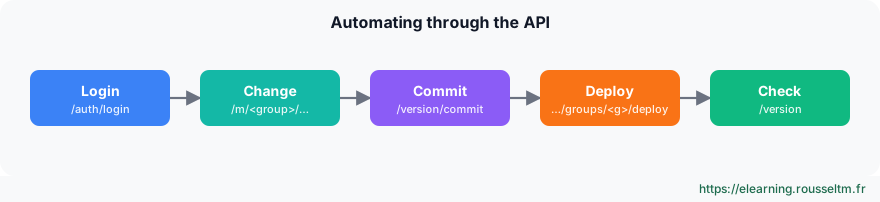
CRIBL=http://localhost:19000
TOKEN=$(curl -s -X POST $CRIBL/api/v1/auth/login -H 'Content-Type: application/json' \
  -d '{"username":"admin","password":"'"$CRIBL_PASSWORD"'"}' | jq -r .token)
H=(-H "Authorization: Bearer $TOKEN" -H 'Content-Type: application/json')

curl -s "${H[@]}" $CRIBL/api/v1/m/default/system/outputs | jq -r '.items[].id'
curl -s "${H[@]}" $CRIBL/api/v1/m/default/routes | jq '.items[0].routes[] | {name, filter, output}'

COMMIT=$(curl -s "${H[@]}" -X POST $CRIBL/api/v1/version/commit \
  -d '{"message":"ci: new archive destination","group":"default"}' | jq -r '.items[0].commit')
curl -s "${H[@]}" -X PATCH $CRIBL/api/v1/products/stream/groups/default/deploy -d "{\"version\":\"$COMMIT\"}"
curl -s "${H[@]}" -X POST $CRIBL/api/v1/version/commit -d '{"message":"sync leader"}' >/dev/null
POST /api/v1/auth/loginreturns a token to pass asAuthorization: Bearer.- A group's resources live under
/api/v1/m/<group>/(system/inputs,system/outputs,pipelines,routes). - Group commit, deploy with the resulting hash, then a Leader commit to keep both in sync.
Good to know : The/api/v1/master/groups/…/deploypath in older docs is replaced by/api/v1/products/stream/groups/…/deploy; on Cribl.Cloud, the address is the workspace URL and authentication uses an API client.
2. Packs #
Reuse and share.
Principle #
- A Pack bundles routes, pipelines, lookup tables and samples, with its own internal routing table.
- You use it like a pipeline (in a route or QuickConnect), export it as a
.crblfile and import it into another group or environment. - The Cribl Packs Dispensary offers ready-made Packs (Palo Alto, Windows, AWS, Cisco…): a useful starting point, to review and adapt.
Best practice : One Pack per source or vendor, versioned: the best way to ship the same logic to staging then production.
3. Git, environments and Terraform #
Configuration as code.
The options #
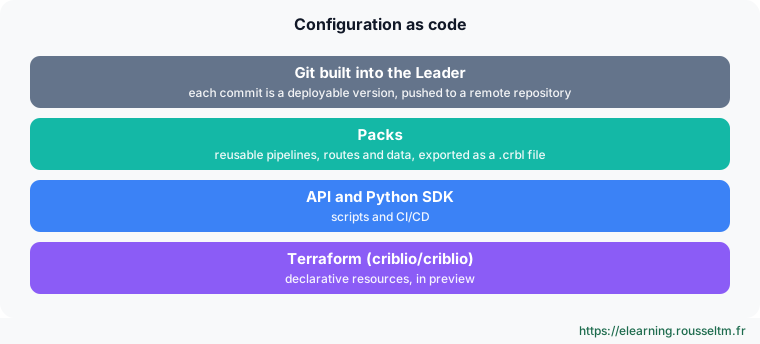
- Built-in Git: every Leader commit is versioned; push to a remote repository and protect the branch.
- Environments: separate groups (or separate deployments) for staging and production, with promotion via Pack, API or Terraform.
- Terraform: official
criblio/criblioprovider, still in preview, with an exporter to migrate an existing configuration. - SDK: the Python SDK remains available; the “Cribl as Code” TypeScript and Go SDKs are discontinued since 4.20.
terraform {
  required_providers {
    criblio = { source = "criblio/criblio", version = "~> 1.25" }
  }
}
# Resources and authentication: see the provider documentation (preview)
Watch out : The Terraform provider is in preview: pin its version and test each upgrade in staging.
Copilot #
Cribl Copilot helps write expressions, build pipelines and draft searches. Since 4.20, you can route it through your own AI provider; an admin can disable the chat widget independently of other AI features. Always review what it suggests before deploying.
Commands to know #
Commands to know
POST /api/v1/auth/login: get a tokenGET /api/v1/m/default/system/outputs: list group destinationsPOST /api/v1/version/commit: commit a versionPATCH /api/v1/products/stream/groups/default/deploy: deploy to a groupsource = "criblio/criblio": official Terraform provider
Sources #
Checked in November 2026 (Cribl 4.20): Cribl ships a minor release about every two months, check the release notes before relying on a detail.
My progress
Sign in to track your progress and take notes. Sign in
💬 Questions about this lesson
No questions yet: be the first to ask for help or share your configuration.
Recommended Articles
Pipelines and functions: parse, enrich, mask
Building Cribl Stream pipelines: pre-processing, processing and post-processing, the function cat...
Automating Grafana: HTTP API, Terraform and dashboard lifecycle
Industrializing Grafana: HTTP API (folders, dashboards, users, data sources), Terraform provider,...
Synthetic monitoring as code: industrializing synthetic scenario management
Learn how to integrate synthetic monitoring into your CI/CD pipelines for automated, resilient pe...
Bindplane in production: high availability, security, Kubernetes and configuration as code
Operate Bindplane in production: active-active servers, PostgreSQL and event bus, TLS for OpAMP, ...
Bindplane best practices
Checklist for operating Bindplane: organizing by labels and fleets, measured reduction, masking a...
Terraform in CI/CD: pipelines, plan review, OIDC and GitOps
Automate Terraform: plan pipeline on merge requests and apply after approval, posting the plan as...
Monitors, SLOs, dashboards and Datadog as code
Create effective monitors (metrics, logs, APM, composites, anomalies), SLOs, dashboards, and mana...
Infrastructure as Code on Azure: Bicep, Terraform, Cost Management and Well-Architected
Describe and deploy Azure as code with Bicep (modules, parameters, what-if, pipeline deployments)...
Datadog best practices: tags, costs, alerts and governance
Checklist for using Datadog effectively: unified tagging, cost control (hosts, logs, custom metri...