1. What is Elastic Agent? #
One agent for all collection.
The principle #
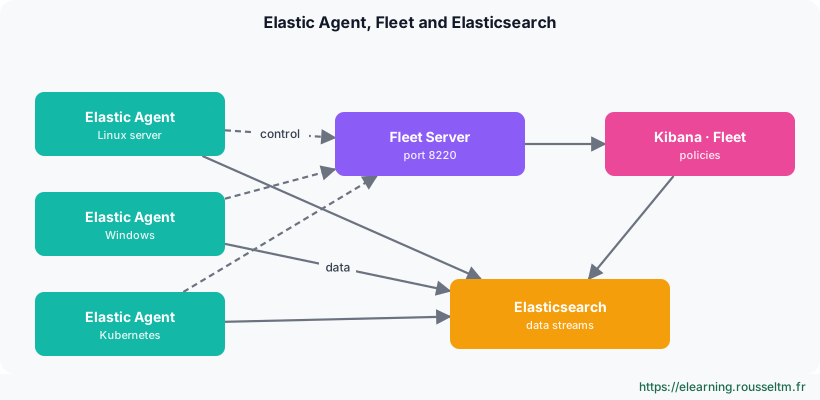
Elastic Agent is Elastic's single agent for collecting logs, metrics, security data and OpenTelemetry telemetry on a host, container or cluster. It replaces installing several Beats (Filebeat, Metricbeat, Winlogbeat…) with one process, configured by a policy listing the integrations to run.
Good to know: Elastic Agent is free and part of Elastic's default distribution; some integrations (Elastic Defend, advanced security connectors) depend on your subscription.
What runs in an agent #
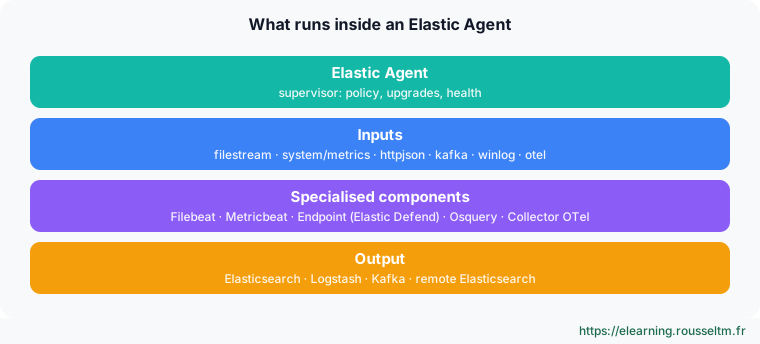
The agent is a supervisor: it receives the policy, starts the required components (derived from Beats, Endpoint for Elastic Defend, Osquery, OpenTelemetry Collector), monitors their health and handles upgrades.
2. Fleet, Fleet Server and policies #
Managing thousands of agents from Kibana.
The roles #
| Component | Role |
|---|---|
| Fleet | Kibana app: policies, integrations, enrollment, upgrades, agent status |
| Fleet Server | Component (a special Elastic Agent) that distributes policies and collects agent status; port 8220 by default |
| Agent policy | Set of integrations and settings applied to a group of agents (e.g. « prod web servers ») |
| Integration | Versioned package: collection config, ingest pipelines, mappings, Kibana dashboards |
| Elastic Package Registry | Integration catalogue (public or self-hosted for air-gapped sites) |
Managed or standalone mode #
| Fleet-managed | Standalone | |
|---|---|---|
| Configuration | Policy in Kibana | elastic-agent.yml file |
| Upgrades | From Fleet, in batches | With your tools (Ansible, image) |
| Prerequisites | Fleet Server | None: direct shipping to Elasticsearch |
| Typical use | Server fleets, many teams | GitOps, ephemeral containers, isolated sites |
Good practice: Start in managed mode to discover integrations, then export the policy as YAML if you want to version it in standalone mode.
3. Where does data go? #
Data streams and outputs.
Data streams #
Each integration writes to data streams named type-dataset-namespace: logs-nginx.access-default, metrics-system.cpu-prod. The namespace, chosen in the policy, separates environments or teams and drives access rights.
GET _data_stream/logs-nginx.access-*
GET logs-nginx.access-default/_search?size=1
Outputs #
- Elasticsearch: default, direct.
- Logstash: heavy transformations, routing, buffering.
- Kafka: decoupling and large-scale buffering.
- Remote Elasticsearch: ship to a cluster other than Fleet's.
Common mistake: Mixing up the Fleet Server URL (control, port 8220) and the Elasticsearch URL (data, port 9200 or 443): the agent enrolls but sends no data.
My progress
Sign in to track your progress and take notes. Sign in
💬 Questions about this lesson
No questions yet: be the first to ask for help or share your configuration.
Recommended Articles
Agent policies, integrations, data streams and pipelines
Build agent policies, add integrations (System, Nginx, Custom Logs), choose namespaces, customise...
Elastic Agent or Beats? Choosing and migrating
Compare Elastic Agent and Beats (Filebeat, Metricbeat, Winlogbeat), know when to keep Beats, and ...
Standalone Elastic Agent, Logstash and Kafka outputs, and OpenTelemetry (EDOT)
Write a standalone configuration, ship to Logstash or Kafka, and use Elastic Agent as an OpenTele...
Installing Fleet Server and enrolling Elastic Agents
Set up Fleet Server, create a policy, enroll Linux, Windows and Docker agents, understand tokens ...
Elastic Agent on Kubernetes
Deploy Elastic Agent on Kubernetes: Fleet-managed DaemonSet, Kubernetes integration, kube-state-m...
Monitoring, upgrading and troubleshooting Elastic Agent
Operate an Elastic Agent fleet: states in Fleet, agent monitoring, batch upgrades, diagnostics, l...
Elastic Agent in production: best practices
Elastic Agent best practices: security, policy organisation, volume control, Fleet Server high av...
Elastic Observability: logs, infrastructure, APM and synthetics
Elastic Observability features: log exploration, infrastructure inventory with Elastic Agent and ...
Elastic path project: centralising and using logs
The validation project of the "Elastic Stack mastery" path: Elastic Agent and Fleet, Logstash, El...