1. What is New Relic? #
A SaaS observability platform.
Overview #
New Relic is a SaaS observability platform born in 2008 around APM (application performance monitoring). Today it collects all telemetry — applications, infrastructure, logs, browsers, mobile, synthetic tests — into a single database, NRDB, queried with the NRQL language.
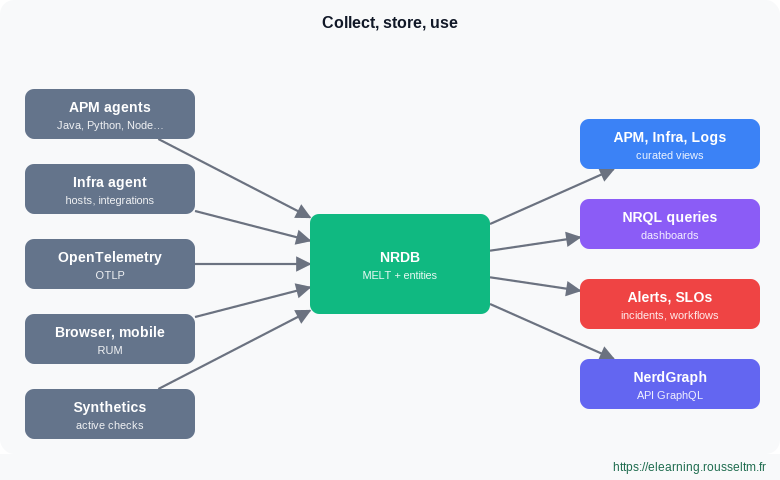
- One database: all signals can be combined in one query, without switching tools.
- Curated experiences: APM, Infrastructure, Logs, Browser, Mobile, Synthetics, Kubernetes, Errors inbox, Service levels.
- Open: accepts OpenTelemetry (OTLP), Prometheus, the Metric, Event, Log and Trace APIs, and more than 700 integrations.
2. Data: MELT and entities #
What New Relic stores.
The four data types #
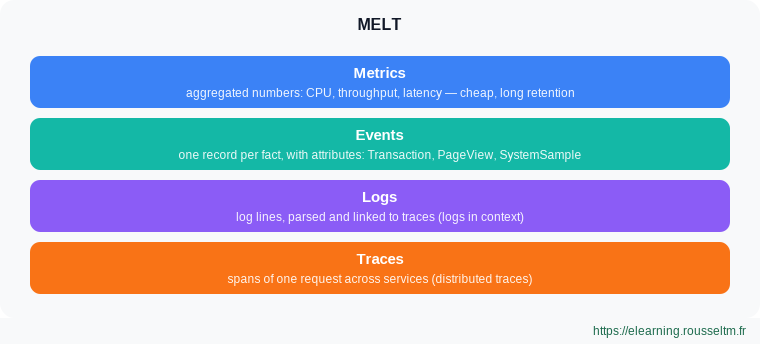
| Event type | Source | Example use |
|---|---|---|
| Transaction / TransactionError | APM agents | response time, error rate per endpoint |
| Span | APM agents, OpenTelemetry | distributed traces |
| Metric | agents, OpenTelemetry, Prometheus, cloud | aggregated time series |
| SystemSample, ProcessSample | infrastructure agent | CPU, memory, disks, processes |
| Log | agents, Fluent Bit, OpenTelemetry, API | log search and patterns |
| PageView, BrowserInteraction | browser agent | real user experience |
| SyntheticCheck | Synthetics | availability from several regions |
Entities and golden signals #
Anything that sends data or is reported on — application, host, container, monitor, Kafka queue — becomes an entity, identified by a GUID. Each entity exposes its golden signals (throughput, latency, errors, saturation depending on type), its tags and its relationships with other entities: this powers the service map and navigation from a symptom to its cause.
Best practice : Tag every entity from day one withteamandenv: filters, workloads and alerts use them everywhere.
3. Accounts, users and keys #
Organizing access.
Organization #
- An organization holds one or more accounts (for example one per environment or business unit); data is stored per account.
- User types: Basic (free, limited access), Core (developers: logs, errors inbox, CodeStream) and Full platform (every experience).
- Permissions are managed with groups, roles and account access; single sign-on (SAML) and SCIM are available depending on plan.
API keys #
| Key | Format | Used for |
|---|---|---|
| License (ingest) | 40 characters, ends with NRAL | sending data: agents, OTLP, ingest APIs |
| Browser | NRJS-… | browser and mobile agents |
| User | NRAK-… | NerdGraph, Terraform, CLI: acts with the user's permissions |
Watch out : Do not mix keys: a user key cannot send data, and a license key must never be used for automation. Store them in a secrets vault, never in Git.
4. Plans, pricing and alternatives #
What New Relic costs.
Pricing model #
- Free tier: 100 GB of ingested data per month and one Full platform user, with no time limit — enough for every lab in this course.
- Beyond that: billing per ingested volume (GB) and per user, or per compute consumed depending on contract; the Data Plus option extends retention and adds compliance features.
- US or EU storage region chosen when the account is created; endpoints (OTLP, APIs) differ by region.
Good to know : Usage can be tracked with NRQL: SELECT sum(GigabytesIngested) FROM NrConsumption WHERE productLine = 'DataPlatform' FACET usageMetric SINCE 30 days ago.Compared with other tools #
| Tool | Strength | Difference with New Relic |
|---|---|---|
| Datadog | integration catalogue, security | billing per host and per product, several query languages |
| Dynatrace | OneAgent and causal AI (Davis) | deeper automatic discovery, DQL instead of NRQL |
| Grafana stack (LGTM) | open source, self-hostable | several databases and languages (PromQL, LogQL, TraceQL) |
Commands to know #
Commands to know
SELECT count(*) FROM Transaction SINCE 1 hour ago: first NRQL querySELECT uniqueCount(entityGuid) FROM SystemSample: number of reporting hostsSELECT sum(GigabytesIngested) FROM NrConsumption SINCE 30 days ago: ingest over 30 dayscurl -Ls https://download.newrelic.com/install/newrelic-cli/scripts/install.sh | bash: install the newrelic CLI
Sources #
Checked in November 2026: New Relic evolves its platform continuously (UI, plans, limits); check the documentation before relying on a detail.
My progress
Sign in to track your progress and take notes. Sign in
💬 Questions about this lesson
No questions yet: be the first to ask for help or share your configuration.
Recommended Articles
New Relic APM: agents, OpenTelemetry and distributed traces
Instrumenting applications with New Relic: language agents, configuration, transactions and Apdex...
New Relic best practices
Best practices to succeed with New Relic: adoption approach, account organization, naming and tag...
Automating New Relic and controlling costs
Managing New Relic as code and keeping the bill under control: NerdGraph API, newrelic CLI, newre...
NRQL: querying all your New Relic data
Mastering NRQL, New Relic's query language: SELECT … FROM structure, filters, aggregation functio...
Datadog: the SaaS observability platform at a glance
What Datadog is, its products (infrastructure, logs, APM, RUM, synthetics, security), its concept...
Infrastructure, logs and Kubernetes with New Relic
Monitoring servers, containers and Kubernetes with New Relic: infrastructure agent, on-host integ...
New Relic dashboards: building, sharing and analysing
Building useful dashboards in New Relic: NRQL widgets, chart choice, template variables, facet li...
Alerts, service levels and incidents in New Relic
Setting up useful alerting in New Relic: policies and NRQL conditions, static and anomaly thresho...
Digital experience: Browser, mobile and Synthetics
Measuring what users experience with New Relic: browser agent (page load, Core Web Vitals, AJAX, ...