1. The principle #
One setting, thousands of machines.
What is a GPO? #
A Group Policy Object (GPO) is a set of settings stored in AD and in the domain controllers’ SYSVOL folder. It is linked to a site, the domain or an OU, and applies to the computers and users located there. Each GPO has two parts: Computer Configuration (applied at startup then about every 90 minutes) and User Configuration (at logon then periodically).
| Type | Examples | Behavior |
|---|---|---|
| Policies | password, firewall, BitLocker, restrictions, scripts | enforced, greyed out for the user, removed when the GPO no longer applies |
| Preferences | network drives, printers, shortcuts, registry keys, local groups | defaults the user can change; fine item-level targeting |
Processing order and inheritance #
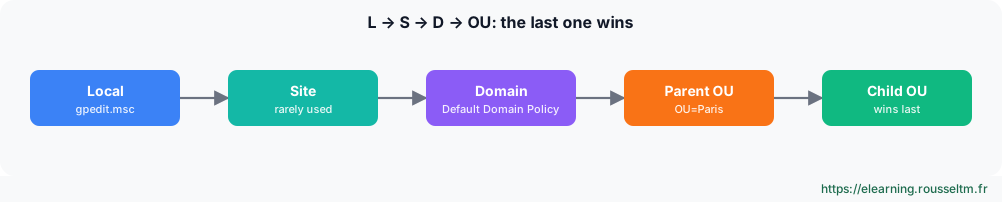
- Enforced on a link: the GPO wins even over lower GPOs and crosses inheritance blocking.
- Block inheritance on an OU: GPOs from higher levels no longer apply (except “Enforced” ones).
- Security filtering: “Authenticated Users” by default; a GPO can be restricted to a group (computers must keep read access).
- WMI filter: condition on the machine (Windows version, laptop…), to use sparingly because it slows processing.
- Loopback mode: applies user configuration based on the computer’s OU (RDS servers, kiosks, training rooms).
Common mistake: Editing the “Default Domain Policy” or the “Default Domain Controllers Policy” for everything. Keep the first for password and account policies, and create dedicated, small, well-named GPOs for the rest.
2. Create and manage #
GPMC console and PowerShell.
With PowerShell #
Import-Module GroupPolicy
New-GPO -Name 'SEC - Pare-feu postes' -Comment 'Profil domaine actif, journalisation'
New-GPLink -Name 'SEC - Pare-feu postes' -Target 'OU=Postes,DC=corp,DC=exemple,DC=fr' -LinkEnabled Yes
Set-GPRegistryValue -Name 'SEC - Pare-feu postes' -Key 'HKLM\Software\Policies\Microsoft\WindowsFirewall\DomainProfile' `
    -ValueName EnableFirewall -Type DWord -Value 1
Set-GPPermission -Name 'SEC - Pare-feu postes' -TargetName 'GG_Postes_Pilote' -TargetType Group -PermissionLevel GpoApply
Backup-GPO -All -Path C:\Sauvegardes\GPO          # sauvegarder toutes les GPO ; Restore-GPO pour revenir en arrière
Get-GPOReport -Name 'SEC - Pare-feu postes' -ReportType Html -Path C:\rapports\gpo.html
Good practice: Name your GPOs by purpose (SEC -,APP -,USR -), one GPO per topic, and test them on a pilot OU before linking them to the whole estate. Disable the unused part (computer or user) to speed up processing.
Administrative templates and central store #
“Administrative Templates” settings come from ADMX/ADML files. Copy them into the central store \\corp.example.com\SYSVOL\corp.example.com\Policies\PolicyDefinitions so that all administrators see the same settings. Microsoft publishes ADMX files for every Windows version, Edge, Office, etc.
3. Troubleshoot #
Why does my GPO not apply?
The method #
gpupdate /force                         # réappliquer immédiatement (ordinateur et utilisateur)
gpresult /r                             # GPO appliquées et filtrées pour la session
gpresult /h C:\rapports\rsop.html /f    # rapport détaillé : réglage gagnant et GPO d'origine
Invoke-GPUpdate -Computer PC-042 -Force -RandomDelayInMinutes 0     # à distance
Get-WinEvent -LogName 'Microsoft-Windows-GroupPolicy/Operational' -MaxEvents 20- Is the object (computer or user) in the OU where the GPO is linked? Computer configuration does not apply to a user, and vice versa.
- Is the link enabled, the GPO not disabled, inheritance not blocked?
- Does security or WMI filtering exclude the machine? (
gpresultshows it under “filtered GPOs”) - Does another GPO, applied later, win? (the HTML report shows the “winning GPO”)
- Can the machine reach a DC and SYSVOL? (DNS, replication, GroupPolicy/Operational log)
Commands to know #
| Action | Command |
|---|---|
| Apply now | gpupdate /force |
| Applied GPO summary | gpresult /r /scope computer |
| Detailed report | gpresult /h rsop.html |
| Create and link a GPO | New-GPO -Name 'APP - Edge' | New-GPLink -Target 'OU=Postes,DC=corp,DC=exemple,DC=fr' |
| OU inheritance | Get-GPInheritance -Target 'OU=Postes,DC=corp,DC=exemple,DC=fr' |
| Back up GPOs | Backup-GPO -All -Path C:\Sauvegardes\GPO |
| Force remotely | Invoke-GPUpdate -Computer PC-042 -Force |
My progress
Sign in to track your progress and take notes. Sign in
💬 Questions about this lesson
No questions yet: be the first to ask for help or share your configuration.
Recommended Articles
Services, scheduled tasks, event logs and performance
Control Windows services and their recovery, automate with Task Scheduler, use event logs with Ge...
Processes, memory and performance: monitoring and troubleshooting a Linux server
Understand and control Linux processes (ps, top, signals, nice, jobs), interpret load, memory and...
Backup, monitoring and troubleshooting of a Linux server
Operate a Linux server day to day: 3-2-1 backup strategy with rsync, tar, LVM snapshots and resti...
Linux system architecture: kernel, boot and directory tree
Understand how a Linux server works: kernel and user space, the UEFI, GRUB, initramfs and systemd...
Understanding Azure: regions, resource hierarchy, tools and pricing
Microsoft Azure basics: geographies, regions, region pairs and availability zones, the hierarchy ...
Microsoft Entra ID, RBAC and Azure Policy: identities, permissions and governance
Manage identities and access on Azure: Microsoft Entra ID (users, groups, MFA, conditional access...
Essential Dynatrace settings: owners, maintenance, naming, key requests and tags
Configure Dynatrace's cross-cutting settings: entity ownership, maintenance windows, naming rules...
Linux administration best practices
Checklist for administering Linux servers: accounts and sudo, SSH, updates, systemd services, sto...
Linux server security and hardening
Harden a Linux server: least privilege, updates, secure SSH, firewall, fail2ban, SELinux and AppA...