1. The principle #
One setting, thousands of machines.
What is a GPO? #
A Group Policy Object (GPO) is a set of settings stored in AD and in the domain controllers’ SYSVOL folder. It is linked to a site, the domain or an OU, and applies to the computers and users located there. Each GPO has two parts: Computer Configuration (applied at startup then about every 90 minutes) and User Configuration (at logon then periodically).
| Type | Examples | Behavior |
|---|---|---|
| Policies | password, firewall, BitLocker, restrictions, scripts | enforced, greyed out for the user, removed when the GPO no longer applies |
| Preferences | network drives, printers, shortcuts, registry keys, local groups | defaults the user can change; fine item-level targeting |
Processing order and inheritance #
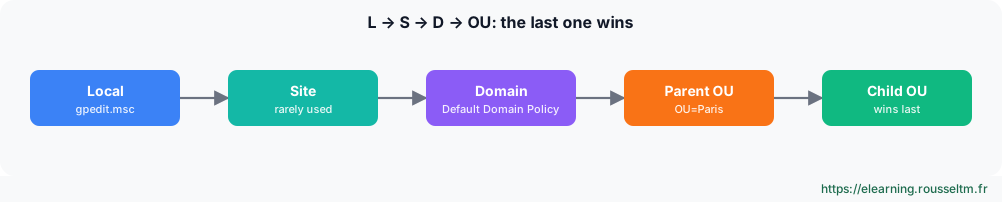
- Enforced on a link: the GPO wins even over lower GPOs and crosses inheritance blocking.
- Block inheritance on an OU: GPOs from higher levels no longer apply (except “Enforced” ones).
- Security filtering: “Authenticated Users” by default; a GPO can be restricted to a group (computers must keep read access).
- WMI filter: condition on the machine (Windows version, laptop…), to use sparingly because it slows processing.
- Loopback mode: applies user configuration based on the computer’s OU (RDS servers, kiosks, training rooms).
Common mistake: Editing the “Default Domain Policy” or the “Default Domain Controllers Policy” for everything. Keep the first for password and account policies, and create dedicated, small, well-named GPOs for the rest.
2. Create and manage #
GPMC console and PowerShell.
With PowerShell #
Import-Module GroupPolicy
New-GPO -Name 'SEC - Pare-feu postes' -Comment 'Profil domaine actif, journalisation'
New-GPLink -Name 'SEC - Pare-feu postes' -Target 'OU=Postes,DC=corp,DC=exemple,DC=fr' -LinkEnabled Yes
Set-GPRegistryValue -Name 'SEC - Pare-feu postes' -Key 'HKLM\Software\Policies\Microsoft\WindowsFirewall\DomainProfile' `
    -ValueName EnableFirewall -Type DWord -Value 1
Set-GPPermission -Name 'SEC - Pare-feu postes' -TargetName 'GG_Postes_Pilote' -TargetType Group -PermissionLevel GpoApply
Backup-GPO -All -Path C:\Sauvegardes\GPO          # sauvegarder toutes les GPO ; Restore-GPO pour revenir en arrière
Get-GPOReport -Name 'SEC - Pare-feu postes' -ReportType Html -Path C:\rapports\gpo.html
Good practice: Name your GPOs by purpose (SEC -,APP -,USR -), one GPO per topic, and test them on a pilot OU before linking them to the whole estate. Disable the unused part (computer or user) to speed up processing.
Administrative templates and central store #
“Administrative Templates” settings come from ADMX/ADML files. Copy them into the central store \\corp.example.com\SYSVOL\corp.example.com\Policies\PolicyDefinitions so that all administrators see the same settings. Microsoft publishes ADMX files for every Windows version, Edge, Office, etc.
3. Troubleshoot #
Why does my GPO not apply?
The method #
gpupdate /force                         # réappliquer immédiatement (ordinateur et utilisateur)
gpresult /r                             # GPO appliquées et filtrées pour la session
gpresult /h C:\rapports\rsop.html /f    # rapport détaillé : réglage gagnant et GPO d'origine
Invoke-GPUpdate -Computer PC-042 -Force -RandomDelayInMinutes 0     # à distance
Get-WinEvent -LogName 'Microsoft-Windows-GroupPolicy/Operational' -MaxEvents 20- Is the object (computer or user) in the OU where the GPO is linked? Computer configuration does not apply to a user, and vice versa.
- Is the link enabled, the GPO not disabled, inheritance not blocked?
- Does security or WMI filtering exclude the machine? (
gpresultshows it under “filtered GPOs”) - Does another GPO, applied later, win? (the HTML report shows the “winning GPO”)
- Can the machine reach a DC and SYSVOL? (DNS, replication, GroupPolicy/Operational log)
Commands to know #
| Action | Command |
|---|---|
| Apply now | gpupdate /force |
| Applied GPO summary | gpresult /r /scope computer |
| Detailed report | gpresult /h rsop.html |
| Create and link a GPO | New-GPO -Name 'APP - Edge' | New-GPLink -Target 'OU=Postes,DC=corp,DC=exemple,DC=fr' |
| OU inheritance | Get-GPInheritance -Target 'OU=Postes,DC=corp,DC=exemple,DC=fr' |
| Back up GPOs | Backup-GPO -All -Path C:\Sauvegardes\GPO |
| Force remotely | Invoke-GPUpdate -Computer PC-042 -Force |
My progress
Sign in to track your progress and take notes. Sign in
💬 Questions about this lesson
No questions yet: be the first to ask for help or share your configuration.
Recommended Articles
Active Directory Domain Services and DNS
Understand and deploy Active Directory: forest, domains, organizational units, domain controllers...
Windows administration best practices
The production checklist for Windows and Windows Server: installation, identity and Active Direct...
Backup, Hyper-V and Windows troubleshooting
Back up and restore with Windows Server Backup (including system state and Active Directory), vir...
PowerShell for Windows administrators
Master PowerShell to administer Windows: cmdlets and help, object pipeline, filters and formats, ...
Windows updates and security: WSUS, Defender, BitLocker, LAPS and hardening
Maintain and secure a Windows estate: update strategy (Windows Update, WSUS, Azure Update Manager...
Windows and Windows Server: versions, editions and architecture
Discover the Windows ecosystem for administrators: Windows 11 and Windows Server 2025, editions a...
Users, groups, NTFS permissions and SMB shares
Manage local accounts and groups, understand UAC, apply NTFS permissions with inheritance, create...
Windows storage: disks, volumes, Storage Spaces and RAID
Manage storage on Windows: GPT and MBR, partitions and volumes with PowerShell, NTFS and ReFS, St...
Windows networking: IP, DNS, DHCP, firewall and remote access
Configure and troubleshoot Windows networking with PowerShell, deploy a DHCP server, master Windo...