1. Local accounts and groups #
Before the domain, the SAM database.
Local accounts #
Each machine has its local account database (SAM). On a domain, Active Directory accounts are mostly used, but local accounts remain useful for emergency administration and standalone servers. Each account and group is identified by a unique SID: it, not the name, appears in permissions.
$mdp = Read-Host -AsSecureString 'Mot de passe'
New-LocalUser -Name 'adm.secours' -Password $mdp -FullName 'Admin de secours' -PasswordNeverExpires:$false
Add-LocalGroupMember -Group 'Administrateurs' -Member 'adm.secours'   # « Administrators » sur un système anglais
Get-LocalGroupMember -Group 'Administrateurs'
Disable-LocalUser -Name 'Invité' ; Get-LocalUser | Select-Object Name, Enabled, LastLogon
whoami /all # SID, groupes et privilèges de la session| Built-in group | Role |
|---|---|
| Administrators | full control of the machine |
| Users | everyday use, no admin rights |
| Remote Desktop Users | RDP logon without being admin |
| Backup Operators | back up and restore bypassing permissions |
| Event Log Readers | read logs without being admin |
User Account Control (UAC) #
Even as a member of Administrators, a user works with a filtered token; elevation (“Run as administrator”) is requested for sensitive actions. On a server, open an elevated PowerShell console for administration, but do not disable UAC.
Common mistake: Using the same local admin account, with the same password, on every server: one stolen password opens the whole estate. Use Windows LAPS (see updates and security).
2. NTFS permissions #
Who can do what on a file.
ACLs, inheritance and effective permissions #
Each NTFS file and folder carries an ACL: a list of entries (ACEs) that allow or deny rights to SIDs. Standard permissions are Full control, Modify, Read & execute, List folder contents, Read, Write. By default, a folder inherits its parent’s permissions.
- Permissions are cumulative: a user gets the union of their groups’ rights.
- An explicit deny beats an allow; an inherited deny is beaten by an explicit allow.
- The owner can always change permissions.
icacls D:\Data\Compta                                    # lire l'ACL
icacls D:\Data\Compta /inheritance:r                      # couper l'héritage (supprime les ACE héritées)
icacls D:\Data\Compta /grant 'CORP\GG_Compta:(OI)(CI)M'  # Modification, héritée par sous-dossiers (CI) et fichiers (OI)
icacls D:\Data\Compta /grant 'Administrateurs:(OI)(CI)F'
icacls D:\Data /save C:\sauvegarde\acl-data.txt /T       # sauvegarder les ACL ; /restore pour les remettre
(Get-Acl D:\Data\Compta).Access | Format-Table IdentityReference, FileSystemRights, AccessControlType, IsInherited
Good practice: Never grant rights to named users: grant them to groups. On a domain, apply AGDLP: accounts in global groups (business), placed in domain local groups (resource), which receive the permissions.
3. SMB shares #
Making a folder available on the network.
Create and secure a share #
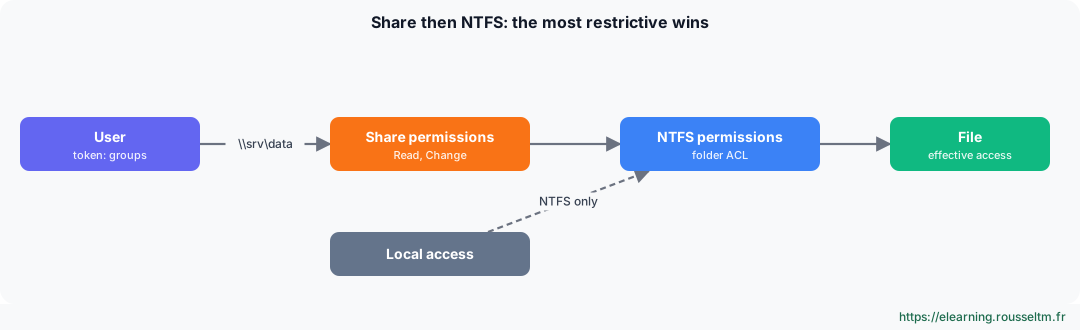
Network access (\\server\share) goes first through share permissions, then through NTFS permissions: effective access is the most restrictive of the two. Common practice: share at “Full control” or “Change” for authenticated users, with fine-grained control in NTFS.
New-SmbShare -Name Compta -Path D:\Data\Compta -ChangeAccess 'CORP\GG_Compta' -FullAccess 'Administrateurs' -FolderEnumerationMode AccessBased
Get-SmbShare ; Get-SmbShareAccess -Name Compta
Get-SmbSession ; Get-SmbOpenFile | Select-Object ClientUserName, Path    # qui est connecté, quels fichiers sont ouverts
Set-SmbServerConfiguration -EncryptData $true -Force                      # chiffrer tout le trafic SMB
New-PSDrive -Name S -PSProvider FileSystem -Root \\SRV-FS01\Compta -Persist   # côté client
Good to know: Access-based enumeration (AccessBased) hides folders the user cannot open. Windows Server 2025 and Windows 11 24H2 require SMB signing by default; SMBv1, obsolete and dangerous, is no longer installed.Commands to know #
| Action | Command |
|---|---|
| Create a local user | New-LocalUser -Name jdupont -Password (Read-Host -AsSecureString) |
| Add to a group | Add-LocalGroupMember -Group 'Utilisateurs du Bureau à distance' -Member jdupont |
| Read an ACL | icacls D:\Data |
| Grant Modify | icacls D:\Data\Projet /grant 'CORP\GG_Projet:(OI)(CI)M' |
| Take ownership | takeown /F D:\Data\Ancien /R /D O |
| Create a share | New-SmbShare -Name Projet -Path D:\Data\Projet -ChangeAccess 'CORP\GG_Projet' |
| Open sessions | Get-SmbSession |
| Session and privileges | whoami /groups |
My progress
Sign in to track your progress and take notes. Sign in
💬 Questions about this lesson
No questions yet: be the first to ask for help or share your configuration.
Recommended Articles
Active Directory Domain Services and DNS
Understand and deploy Active Directory: forest, domains, organizational units, domain controllers...
Services, scheduled tasks, event logs and performance
Control Windows services and their recovery, automate with Task Scheduler, use event logs with Ge...
Microsoft Entra ID, RBAC and Azure Policy: identities, permissions and governance
Manage identities and access on Azure: Microsoft Entra ID (users, groups, MFA, conditional access...
Linux administration best practices
Checklist for administering Linux servers: accounts and sudo, SSH, updates, systemd services, sto...
Storage on Linux: disks, partitions, file systems and LVM
Administer Linux storage: lsblk and blkid, GPT partitioning, ext4 and XFS, mounting and /etc/fsta...
Processes, memory and performance: monitoring and troubleshooting a Linux server
Understand and control Linux processes (ps, top, signals, nice, jobs), interpret load, memory and...
Linux server security and hardening
Harden a Linux server: least privilege, updates, secure SSH, firewall, fail2ban, SELinux and AppA...
Backup, monitoring and troubleshooting of a Linux server
Operate a Linux server day to day: 3-2-1 backup strategy with rsync, tar, LVM snapshots and resti...
Ansible: the inventory (static, dynamic, groups and variables)
Understand and master the Ansible inventory: INI and YAML files, groups, host and group variables...