1. Clients and servers #
Two families, one kernel.
Windows client and Windows Server #
Windows comes in two families that share the same NT kernel: Windows client (Windows 11) for workstations, and Windows Server for servers. Windows Server adds roles (Active Directory, DNS, DHCP, file server, Hyper-V, IIS…) and features (backup, clustering…), and is usually managed remotely.
| Version | Release | Channel | End of support |
|---|---|---|---|
| Windows Server 2025 | November 2024 | LTSC | October 2029 (mainstream), October 2034 (extended) |
| Windows Server 2022 | August 2021 | LTSC | October 2031 (extended) |
| Windows Server 2019 | November 2018 | LTSC | January 2029 (extended) |
| Windows 11 (24H2, 25H2) | yearly update | GA | 24 to 36 months per version depending on edition |
| Windows 10 | 2015 | GA | October 14, 2025 (paid Extended Security Updates afterwards) |
Good to know: End-of-support dates are published on Microsoft’s “Lifecycle” page: check them before planning a migration. An unsupported server no longer receives security fixes.
Editions and installation options #
| Edition | Use | Specifics |
|---|---|---|
| Standard | physical or lightly virtualized servers | 2 Windows Server virtual machines per license |
| Datacenter | dense virtualization, datacenter | unlimited VMs, Storage Spaces Direct, SDN, shielded VMs |
| Datacenter: Azure Edition | Azure and Azure Local | hotpatch, SMB over QUIC |
| Windows 11 Pro / Enterprise | workstations | domain join, BitLocker, Group Policy |
At installation, Windows Server offers Server Core (no graphical interface, managed with PowerShell or remotely) or Desktop Experience. Server Core is recommended for production: fewer components, therefore fewer updates, reboots and attack surface. The sconfig tool configures it on first boot (name, network, domain, updates).
2. System architecture #
What happens under the interface.
User mode and kernel mode #
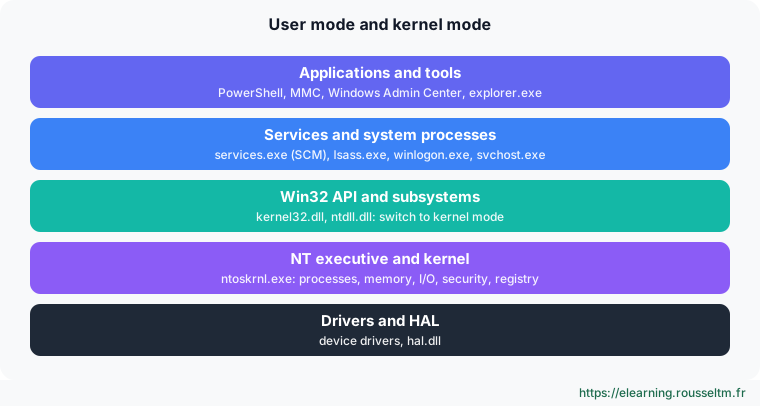
Applications and most services run in user mode, isolated from each other. They use the Win32 API to ask the kernel (ntoskrnl.exe) to access files, memory or the network. Drivers run in kernel mode: a faulty driver causes a blue screen (bug check), whereas a faulty application only closes.
| Process | Role |
|---|---|
| smss.exe | session manager, first user-mode process |
| services.exe | service control manager (SCM): starts and monitors services |
| lsass.exe | authentication, security tokens, Kerberos and NTLM |
| svchost.exe | shared host for many Windows services |
| winlogon.exe | logon and logoff, Ctrl+Alt+Del |
The registry #
The registry is Windows’ hierarchical configuration database. It is organized in hives: HKLM (machine: SYSTEM, SOFTWARE, SAM, SECURITY, stored in C:\Windows\System32\config) and HKCU (logged-on user, the NTUSER.DAT file of their profile). Services, drivers, policies and software store their settings there.
Get-ItemProperty 'HKLM:\SOFTWARE\Microsoft\Windows NT\CurrentVersion' |
    Select-Object ProductName, DisplayVersion, CurrentBuild
Get-ChildItem HKLM:\SYSTEM\CurrentControlSet\Services | Select-Object -First 5
reg export HKLM\SOFTWARE\MonAppli C:\sauvegarde\monappli.reg   # sauvegarder une clé avant de la modifier
Common mistake: Editing the registry by hand without a backup. A wrong value in HKLM\SYSTEM can prevent boot. Prefer Group Policy or dedicated cmdlets, and always export the key before a change.The boot process #

With UEFI and Secure Boot, the firmware only starts signed loaders. The boot manager reads the BCD database (Boot Configuration Data), viewed with bcdedit. When something goes wrong, the WinRE recovery environment gives access to a command prompt, restore and safe mode.
3. Administration tools #
Graphical, command line or remote.
Overview #
| Tool | Use |
|---|---|
| PowerShell | the main tool: everything can be automated, locally or remotely (see PowerShell for administrators) |
| Windows Admin Center | free web console to manage servers, clusters and PCs, including Server Core |
| Server Manager | adding roles and features, overview |
| MMC consoles (RSAT) | AD Users and Computers, DNS, DHCP, GPMC, Event Viewer |
| sconfig | initial Server Core configuration |
| Remote Desktop, OpenSSH | interactive remote connection |
Good practice: Manage from a dedicated admin workstation with RSAT and Windows Admin Center, rather than opening Remote Desktop sessions on every server: it is faster, traceable and safer.
Commands to know #
| Action | Command |
|---|---|
| Version and build | Get-ComputerInfo -Property OsName, OsVersion, OsBuildNumber |
| Name, domain, hardware | Get-CimInstance Win32_ComputerSystem |
| Installed roles and features | Get-WindowsFeature | Where-Object Installed |
| Install a role | Install-WindowsFeature Web-Server -IncludeManagementTools |
| Configure Server Core | sconfig |
| Rename and restart | Rename-Computer -NewName SRV-WEB01 -Restart |
| Boot database | bcdedit /enum |
| Last boot | (Get-CimInstance Win32_OperatingSystem).LastBootUpTime |
To follow the course, build a lab: a Windows Server 2025 virtual machine (free 180-day evaluation) on Hyper-V, VirtualBox or in the cloud, and a Windows 11 workstation.
My progress
Sign in to track your progress and take notes. Sign in
💬 Questions about this lesson
No questions yet: be the first to ask for help or share your configuration.
Recommended Articles
Services, scheduled tasks, event logs and performance
Control Windows services and their recovery, automate with Task Scheduler, use event logs with Ge...
Linux system architecture: kernel, boot and directory tree
Understand how a Linux server works: kernel and user space, the UEFI, GRUB, initramfs and systemd...
Processes, memory and performance: monitoring and troubleshooting a Linux server
Understand and control Linux processes (ps, top, signals, nice, jobs), interpret load, memory and...
Linux server security and hardening
Harden a Linux server: least privilege, updates, secure SSH, firewall, fail2ban, SELinux and AppA...
Backup, monitoring and troubleshooting of a Linux server
Operate a Linux server day to day: 3-2-1 backup strategy with rsync, tar, LVM snapshots and resti...
Git for DevOps: branches, code reviews and versions
Organize work with Git in a DevOps approach: trunk-based development or GitFlow, short-lived bran...
Linux administration best practices
Checklist for administering Linux servers: accounts and sudo, SSH, updates, systemd services, sto...
Understanding Azure: regions, resource hierarchy, tools and pricing
Microsoft Azure basics: geographies, regions, region pairs and availability zones, the hierarchy ...
Installing Fleet Server and enrolling Elastic Agents
Set up Fleet Server, create a policy, enroll Linux, Windows and Docker agents, understand tokens ...