1. On-call for two #
An engineer and an agent.
The principle #
Available in: ✓ Open source ✓ ClickHouse Cloud MCP: open source and cloud; notebooks and agents: ClickHouse Cloud
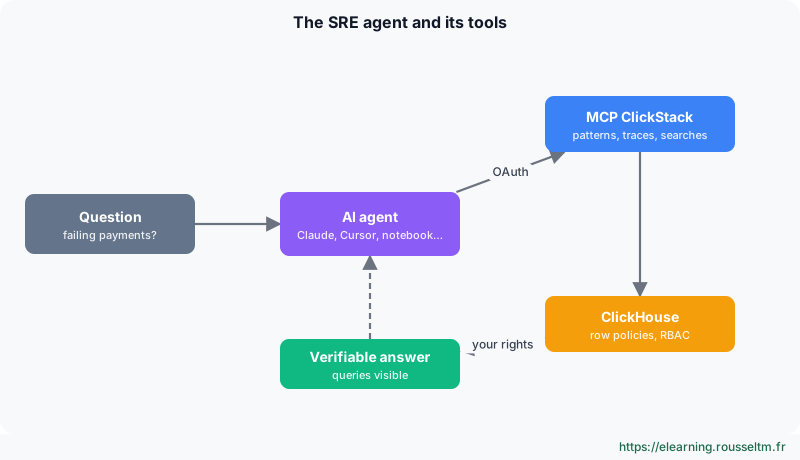
ClickHouse sums up its vision as: “the next on-call shift will be shared by an engineer and an agent”. Three features are designed for the on-call agent, each at a different maturity level.
| Feature | Status | What it changes |
|---|---|---|
| ClickStack MCP server | open source and cloud | the agent investigates with SRE tools (patterns, traces, searches), not raw SQL: it no longer guesses the schema |
| AI Notebooks | public beta | the AI runs the investigation in the UI, step by step, queries and charts visible: you check its reasoning then share |
| Observability Apps | private preview | you describe the screen you need, it is generated on your data: a tailored dashboard per incident |
Good to know : ClickHouse reports, compared with a generic ClickHouse MCP server, 17% more accuracy, 25% fewer tool calls and 2.7 times more consistency. These are vendor measurements.
2. AI Notebooks #
An investigation written in blocks.
Getting started #
- Check that AI is enabled: Team Settings › API & Agents (“Generative AI features are enabled”).
- AI notebooks › New Shared Notebook (visible to the team) or New Private Notebook.
- Ask a precise question, with the time range in UTC: “Why did POST /v1/payments fail between 13:58 and 14:45 UTC? Which version, which pods?”
- Read the blocks: the agent searches logs, opens traces, compares versions; each block (search, chart, table, note) can be edited.
- Compare its conclusion with yours before sharing it.
3. The ClickStack MCP server #
Your AI tools, on your data, with your rights.
Connecting an MCP client #
- Team Settings › API & Agents › Connect your AI agents: enable the remote MCP server.
- Copy the command for your tool (one tab per tool: Claude Code, Cursor, VS Code, Codex CLI…).
- On the first call, the browser opens: OAuth authentication, no API key to store.
- Ask for example: “find the event patterns of payment errors and open the slowest trace”.
claude mcp add clickstack --transport http https://mcp.clickhouse.cloud/clickstack --header "x-service-id: <service id>"Best practice : The same tab offers Export to Terraform: dashboards, alerts, searches and sources downloaded as code, to version.
4. ClickHouse Agents #
An SRE assistant on your tables.
Creating an SRE assistant #
- Document tables with
COMMENTon each table and column: it is the first thing the agent reads. - ClickHouse agents › Create New Agent, with three tools: ClickHouse (queries), Artifacts (charts), Run Code (Python).
- Give instructions: times in UTC, prefer aggregates, always a filter on
Timestampand aLIMIT. - Ask business questions (“how much did the incident cost?”) or request a dashboard (error rate, p99, burn rate); Run Code even allows anomaly detection (Isolation Forest).
Watch out : “AI suggests, we measure and validate”: an agent's conclusion is a hypothesis to check in the data, never an automatic production decision.
5. Governance #
Who may see what.
Two levels of rights #
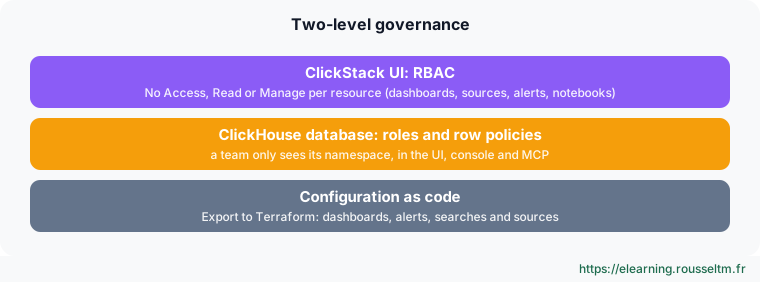
- ClickStack RBAC: Team Settings › Members & Roles › Add Role, No Access, Read or Manage per resource, with fine rules on a name, ID or tag.
- ClickHouse row policies: one role per team and one policy per table. ClickStack queries with the user's rights: the rule applies to the UI, console and MCP, hence to agents too.
- GDPR: a lightweight delete (
DELETE FROM … WHERE) erases a customer from a month of logs in seconds.
Commands to know #
Commands to know
claude mcp add clickstack --transport http https://mcp.clickhouse.cloud/clickstack --header "x-service-id: <id du service>": connect Claude Code to the ClickStack MCP serverALTER TABLE otel_logs COMMENT COLUMN SeverityText '…': document a column for agentsCREATE ROW POLICY … USING ResourceAttributes['k8s.namespace.name'] = 'payments' TO payments_team: restrict a team to its namespaceDELETE FROM otel_logs WHERE …: lightweight delete (GDPR)
Sources #
Also: talks at the ClickHouse Observability Morning, Paris, 17 November 2026. Beta and preview features change fast: check the documentation before relying on a detail.
