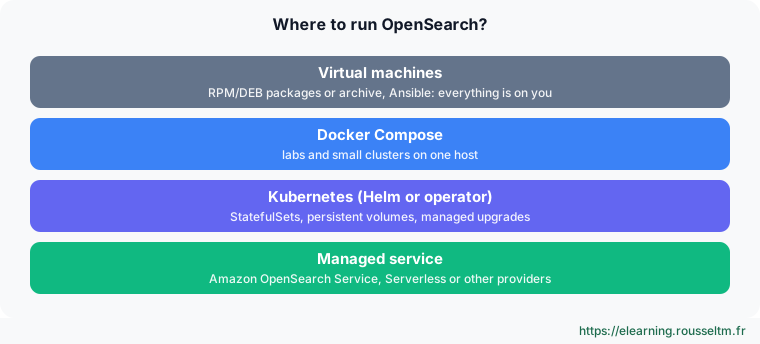
1. Where to run OpenSearch? #
Choosing a deployment mode.
Options #
2. Three nodes with Docker Compose #
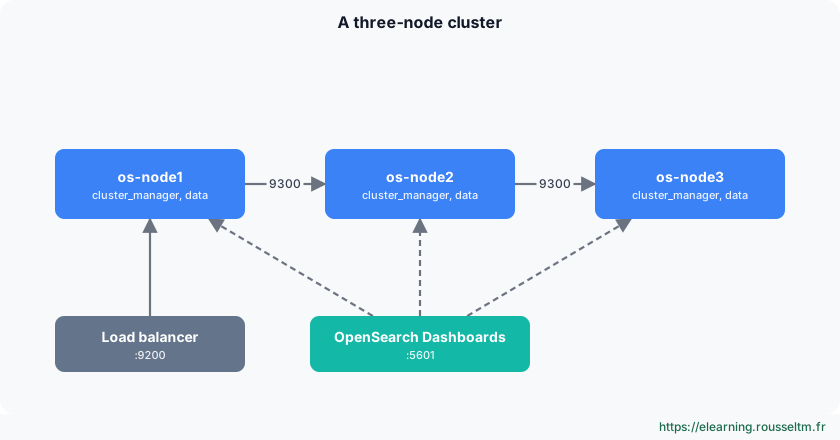
The minimal fault-tolerant cluster.
Architecture #
docker-compose.yml #
x-os: &os
  image: opensearchproject/opensearch:3
  ulimits:
    memlock: {soft: -1, hard: -1}
    nofile: {soft: 65536, hard: 65536}
  networks: [os-net]

x-env: &env
  cluster.name: os-lab
  discovery.seed_hosts: os-node1,os-node2,os-node3
  cluster.initial_cluster_manager_nodes: os-node1,os-node2,os-node3
  bootstrap.memory_lock: "true"
  OPENSEARCH_JAVA_OPTS: -Xms1g -Xmx1g
  OPENSEARCH_INITIAL_ADMIN_PASSWORD: ${OPENSEARCH_INITIAL_ADMIN_PASSWORD}

services:
  os-node1:
    <<: *os
    container_name: os-node1
    environment: {<<: *env, node.name: os-node1}
    volumes: [os-data1:/usr/share/opensearch/data]
    ports: ["9200:9200"]
  os-node2:
    <<: *os
    container_name: os-node2
    environment: {<<: *env, node.name: os-node2}
    volumes: [os-data2:/usr/share/opensearch/data]
  os-node3:
    <<: *os
    container_name: os-node3
    environment: {<<: *env, node.name: os-node3}
    volumes: [os-data3:/usr/share/opensearch/data]
  dashboards:
    image: opensearchproject/opensearch-dashboards:3
    environment:
      OPENSEARCH_HOSTS: '["https://os-node1:9200","https://os-node2:9200","https://os-node3:9200"]'
    ports: ["5601:5601"]
    networks: [os-net]

volumes: {os-data1: {}, os-data2: {}, os-data3: {}}
networks: {os-net: {}}
sudo sysctl -w vm.max_map_count=262144
echo 'OPENSEARCH_INITIAL_ADMIN_PASSWORD=Str0ng!Passw0rd-2026' > .env
docker compose up -d
curl -sk -u 'admin:Str0ng!Passw0rd-2026' 'https://localhost:9200/_cat/nodes?v&h=name,node.role,cluster_manager'YAML anchors (&os, <<: *env) avoid repeating the common configuration. The cluster_manager column shows a star next to the elected node.
Good to know : Here the three nodes share the image's demo certificates, which is enough for a lab. In production, generate per-node certificates with your certificate authority.
3. Kubernetes #
Helm or operator.
Two approaches #
| Tool | Principle | For |
|---|---|---|
| Helm charts | one StatefulSet per node group, configuration in values.yaml | simple deployments, teams already using Helm |
| OpenSearch operator | an OpenSearchCluster resource; the operator handles upgrades, certificates, scaling | long-term operations |
helm repo add opensearch-operator https://opensearch-project.github.io/opensearch-k8s-operator/
helm install opensearch-operator opensearch-operator/opensearch-operator -n opensearch --create-namespace
apiVersion: opensearch.opster.io/v1
kind: OpenSearchCluster
metadata:
name: logs
namespace: opensearch
spec:
general:
serviceName: logs
version: 3.9.0
dashboards:
enable: true
version: 3.9.0
replicas: 1
nodePools:
- component: managers
replicas: 3
diskSize: "10Gi"
roles: ["cluster_manager"]
resources: {requests: {memory: "2Gi", cpu: "500m"}}
- component: data
replicas: 3
diskSize: "200Gi"
roles: ["data", "ingest"]
resources: {requests: {memory: "8Gi", cpu: "2"}}The vm.max_map_count setting must be applied on Kubernetes nodes (the operator can run an init container for this). Use an SSD storage class and a volume retention policy that does not delete data with the pod.
4. Surviving a zone loss #
Spreading replicas.
Zone awareness #
node.attr.zone: zone-a          # zone-b, zone-c sur les autres nœuds
cluster.routing.allocation.awareness.attributes: zone
With this attribute, OpenSearch places a shard's primary and replica in different zones. Also spread the three cluster manager nodes across three zones: losing one zone then leaves the quorum and a copy of each shard.
5. Managed services #
Delegating operations.
Overview #
| Offering | Principle | To check |
|---|---|---|
| Amazon OpenSearch Service | AWS-managed clusters: chosen nodes, upgrades, automatic snapshots, UltraWarm and cold storage | available versions, restricted APIs |
| Amazon OpenSearch Serverless | node-less collections, billed in compute units (OCU) | not all features and APIs available |
| Other providers | several providers offer managed OpenSearch (Aiven, Instaclustr…) | region, plugins, support |
Watch out : A managed service often restricts some APIs (cluster settings, plugins, securityadmin). Check that your tools and labs work before committing.Commands to know #
Commands to know
docker compose up -d: start the lab clusterGET _cat/nodes?v&h=name,node.role,cluster_manager: nodes and elected cluster managerkubectl get opensearchclusters -n opensearch: operator-managed clustersGET _cluster/settings?include_defaults=true&filter_path=**.awareness: zone awarenessdocker stop os-node2: simulate a node failure
Sources #
Checked in November 2026 (OpenSearch 3.x, Data Prepper 2.x): OpenSearch ships a minor release about every six weeks, check the release notes before relying on a detail.