1. Agent types #
Hosted or yours.
Overview #
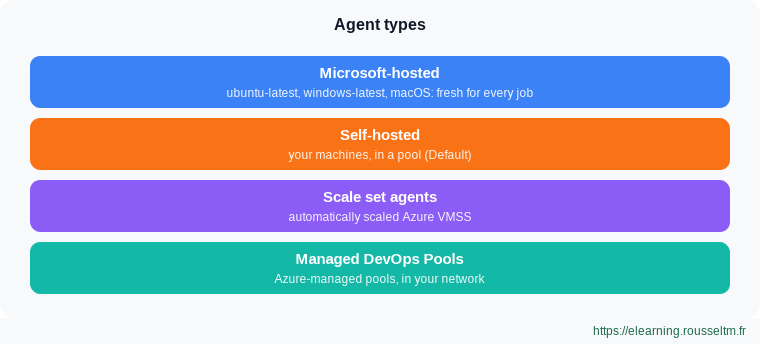
An agent belongs to a pool; a job requests a pool (pool: name: Default or vmImage: ubuntu-latest) and can require capabilities (demands: docker) announced by the agent.
2. Installing a self-hosted agent #
Linux, as a service.
Installation #
mkdir -p ~/azagent && cd ~/azagent
curl -sLO https://download.agent.dev.azure.com/agent/5.282.0/vsts-agent-linux-x64-5.282.0.tar.gz
tar xzf vsts-agent-linux-x64-5.282.0.tar.gz
./config.sh --unattended --url https://dev.azure.com/<organization> --auth pat --token "$AZP_TOKEN" \
  --pool Default --agent poste-local --acceptTeeEula
sudo ./svc.sh install && sudo ./svc.sh start- The personal access token (PAT) only needs the Agent Pools (read, manage) scope and is only used for registration.
- The agent opens an outbound HTTPS connection: no inbound port to open.
- For scaling: scale set agents (VMSS) or Managed DevOps Pools, managed by Azure in your virtual network.
Watch out : A self-hosted agent runs the code of every authorized pipeline: separate pools by trust level and do not authorize all pipelines by default.
Commands to know #
Commands to know
./config.sh --unattended --url … --auth pat --token … --pool Default: register an agent./run.sh: run the agent in the foregroundsudo ./svc.sh status: service status./config.sh remove --auth pat --token …: unregister the agent
Sources #
Checked in November 2026: CI/CD platforms change every month, check versions and plans in the vendor's documentation.
My progress
Sign in to track your progress and take notes. Sign in
💬 Questions about this lesson
No questions yet: be the first to ask for help or share your configuration.
Recommended Articles
AI and SRE agents with ClickStack: AI Notebooks, MCP server, ClickHouse Agents and governance
Investigating with AI in ClickStack: AI Notebooks, the ClickStack MCP server for Claude Code, Cur...
Arize AI: observability and evaluation of LLM applications and agents
Understand Arize AI: Phoenix (open source) and Arize AX (platform), OpenInference traces, LLM-as-...
Compute on OVHcloud: Public Cloud instances and Managed Kubernetes Service
Choose and use OVHcloud compute: instance ranges (General Purpose, CPU, RAM, GPU, Discovery), ima...
Installing Fleet Server and enrolling Elastic Agents
Set up Fleet Server, create a policy, enroll Linux, Windows and Docker agents, understand tokens ...
GitHub Actions: concepts and how it works
Discover GitHub Actions: events, workflows, jobs, steps and actions, the Marketplace, hosted runn...
Arize in production: self-hosted Phoenix, Arize AX, security, costs and monitoring
Going to production: Phoenix with PostgreSQL and authentication, an OpenTelemetry Collector in fr...
GitLab CI/CD: concepts and architecture
Discover GitLab CI/CD: the DevSecOps platform, the .gitlab-ci.yml file, pipelines, stages and job...
Reusing and securing GitLab pipelines
Industrializing GitLab CI/CD: extends, anchors and !reference, include, CI/CD components and cata...
Cloud SRE Agents and autonomous agents in Dynatrace
Entrust part of remediation to governed AI agents, from multicloud to incidents.