1. Distributed architecture #
Leader, groups, Workers.
The roles #
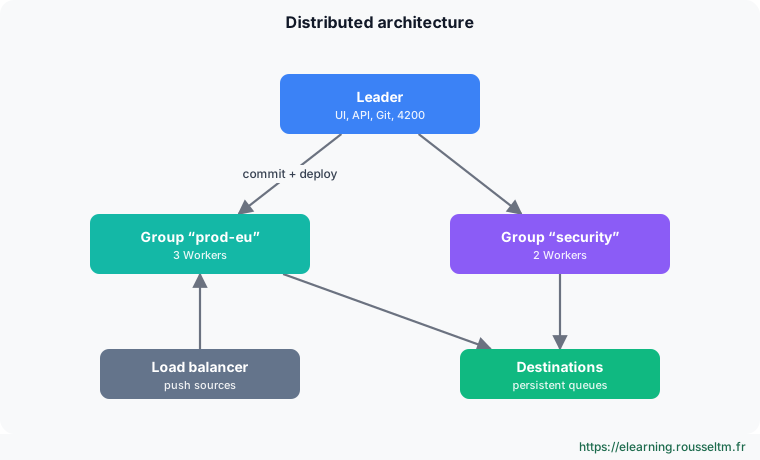
| Role | Responsibility |
|---|---|
| Leader | UI, API, Git-versioned configuration, distribution to Workers (port 4200); does not process data |
| Worker Group | set of Workers sharing exactly the same configuration (per region, per use) |
| Worker | node processing data; runs several processes (usually one per core, minus one or two) |
If the Leader goes down, Workers keep processing with their last configuration: only changes and centralized monitoring are interrupted.
A test cluster #
services:
  leader:
    image: cribl/cribl:4.20.0
    environment:
      CRIBL_DIST_MODE: leader
      CRIBL_DIST_LEADER_URL: tcp://0.0.0.0:4200
      CRIBL_DIST_AUTH_TOKENS: ${CRIBL_TOKEN}
      CRIBL_VOLUME_DIR: /opt/cribl/config-volume
    ports: ["19000:9000"]
    volumes: ["./leader:/opt/cribl/config-volume"]
  workers:
    image: cribl/cribl:4.20.0
    environment:
      CRIBL_DIST_MODE: worker
      CRIBL_DIST_LEADER_URL: tcp://${CRIBL_TOKEN}@leader:4200
    depends_on: [leader]
# docker compose up -d --scale workers=2
Good to know : With the free licence, only one group (default) is available. TheCRIBL_DIST_AUTH_TOKENStoken authenticates Workers: choose a random value and keep it secret.
2. Changing safely #
Commit and deploy.
The cycle #
- You change a group's configuration on the Leader: nothing changes on Workers yet.
- Commit: the change becomes a Git version, with a message.
- Deploy: the group's Workers download the version and reload without cutting the flow.
- If something goes wrong, you redeploy a previous version from the history.
Best practice : Configure a remote Git repository (Settings › Git) to push history automatically: it is your configuration backup and audit trail.
3. Scaling #
Processes, Workers, balancing.
Principles #
- Vertically: more cores = more Worker processes; configurable in group settings.
- Horizontally: add Workers to the group; for push sources (syslog, HEC), put a load balancer in front of them.
- Pull sources (Kafka, SQS) spread naturally across Workers; collectors distribute their tasks.
- Size from measurements: CPU per process, throughput per Worker, and keep headroom for spikes and the loss of a node.
Watch out : UDP syslog behind a load balancer loses flow affinity: prefer TCP, or a local syslog relay forwarding over TCP.
4. Losing nothing #
Backpressure and persistent queues.
Persistent queues #
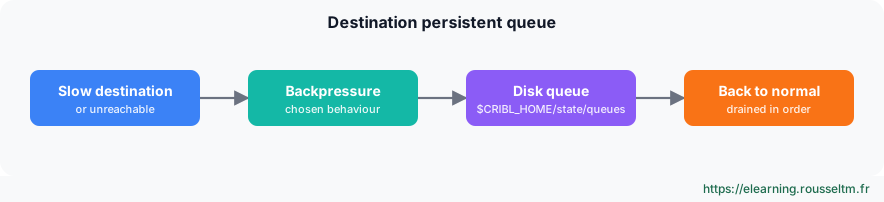
| Destination setting | Effect when the destination cannot keep up |
|---|---|
| Block | Cribl slows source reading (senders wait); risk of loss on the UDP sender side |
| Drop | events are discarded: acceptable for low-criticality data |
| Persistent Queue | events are written to disk, then sent in order when the destination returns |
- Size the maximum queue size (GB) to cover the longest tolerated outage, and monitor disk space.
- Push sources can also have a persistent queue, useful when the sender cannot retry; since 4.20, the “Smart” mode of source queues is deprecated in favour of always-on mode.
Leader high availability #
A standby second Leader, with shared storage (NFS) for configuration, takes over on failure. On Cribl.Cloud, the Leader is managed by Cribl.
5. Monitoring and securing #
Seeing and protecting.
Monitoring #
- Monitoring: throughput per source and destination, Worker CPU and memory, persistent queues, errors.
- Cribl Internal source: send Cribl's internal logs and metrics to your observability tool, to alert even if the UI is unavailable.
- Notifications: alerts on silent sources, failing destinations, filling queues, licence.
- Health endpoint:
GET /api/v1/healthfor load balancer and Kubernetes probes.
Securing #
- TLS on the UI, between Leader and Workers, and on exposed sources.
- Named accounts, roles (RBAC depending on licence), single sign-on; no shared
adminaccount. - Secrets (destination passwords, keys) in Cribl's secrets manager, not in plain text in pipelines.
Commands to know #
Commands to know
docker compose up -d --scale workers=2: add Workers (test)curl -s http://leader:9000/api/v1/health: node healthdu -sh /opt/cribl/state/queues: persistent queue sizeCRIBL_DIST_LEADER_URL=tcp://<jeton>@leader:4200: attach a Worker
Sources #
Checked in November 2026 (Cribl 4.20): Cribl ships a minor release about every two months, check the release notes before relying on a detail.
My progress
Sign in to track your progress and take notes. Sign in
💬 Questions about this lesson
No questions yet: be the first to ask for help or share your configuration.
Recommended Articles
Cribl Stream and Edge best practices
Best practices for running Cribl in production: route and pipeline design, naming, performance, c...
Automating Cribl: REST API, Packs, Git and Terraform
Managing Cribl as code: REST API (authentication, group paths, commit and deploy), reusable Packs...
Logstash in production: persistent queues, DLQ and multiple pipelines
Make Logstash reliable in production: persistent queue, dead letter queue, multiple pipelines and...
Bindplane in production: high availability, security, Kubernetes and configuration as code
Operate Bindplane in production: active-active servers, PostgreSQL and event bus, TLS for OpAMP, ...
Cribl: the data pipeline for observability and security
Discover Cribl: why a telemetry data pipeline, the Cribl suite (Stream, Edge, Lake, Search, Cribl...
Sources, destinations and routes in Cribl Stream
Receiving and sending data with Cribl Stream: push, pull, collector and internal sources, event b...
Installing and administering Cribl Stream
Installing Cribl Stream with Docker or on Linux, running it as a service, understanding $CRIBL_HO...
Reducing, transforming and optimizing volumes with Cribl
Reducing the volume sent to SIEMs and observability tools without losing useful information: Drop...
Archiving, replaying and searching: S3, Replay, Cribl Lake and Cribl Search
Keeping all data cheaply and finding it on demand: partitioned S3 destination, JSON and Parquet f...