1. Building and publishing #
One image per commit.
Continuous delivery #
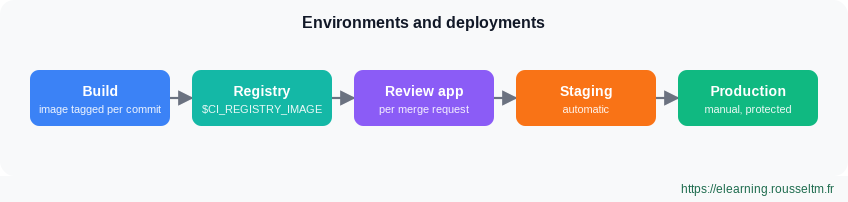
build-image:
  stage: build
  image: docker:29.9.3-cli
  services: [docker:29.9.3-dind]
  variables: { DOCKER_TLS_CERTDIR: "/certs" }
  script:
    - echo "$CI_JOB_TOKEN" | docker login -u gitlab-ci-token --password-stdin $CI_REGISTRY
    - docker build --build-arg VERSION=$CI_COMMIT_SHORT_SHA -t $CI_REGISTRY_IMAGE:$CI_COMMIT_SHORT_SHA .
    - docker push $CI_REGISTRY_IMAGE:$CI_COMMIT_SHORT_SHA

review:
  stage: deploy
  script: ./deploy.sh review-$CI_MERGE_REQUEST_IID
  environment:
    name: review/$CI_COMMIT_REF_SLUG
    url: https://$CI_COMMIT_REF_SLUG.recette.exemple.fr
    on_stop: stop-review
    auto_stop_in: 2 days
  rules: [{ if: $CI_PIPELINE_SOURCE == "merge_request_event" }]

production:
  stage: deploy
  script: ./deploy.sh production $CI_COMMIT_SHORT_SHA
  environment: { name: production, url: https://boutique.exemple.fr }
  resource_group: production
rules: [{ if: $CI_COMMIT_BRANCH == $CI_DEFAULT_BRANCH, when: manual }]- The project container registry is accessible with
CI_JOB_TOKEN: no secret to manage to push images. - Tag per commit (
$CI_COMMIT_SHORT_SHA) and never rebuild for production: promote the same image. - Without privileged mode, build with Buildah or Kaniko; the package registry hosts npm, PyPI, Maven, NuGet and Helm.
2. Environments and deployments #
Knowing what runs where.
Environments #
environmentrecords each deployment: the Operate › Environments page shows the running version and lets you redeploy a previous version in one click (rollback).- Review apps create an environment per merge request, stopped automatically (
on_stop,auto_stop_in). resource_groupprevents two simultaneous deployments to the same environment.- Protected environments and deployment approvals (Premium) restrict who can deploy to production.
Good to know : For Kubernetes, the GitLab agent (installed with Helm) opens an outbound connection to GitLab: jobs deploy with kubectl without exposing the cluster API, or the cluster pulls configuration via GitOps (Flux).Releases #
The release keyword creates a GitLab release (notes, links to artifacts) from a tag; combined with conventional commits, it automates the changelog.
Commands to know #
Commands to know
docker login registry.gitlab.com: log in to the registryglab release create v1.2.0: create a releaseglab ci run -b main --variables DEPLOY=1: pipeline with a variable
Sources #
Checked in November 2026: CI/CD platforms change every month, check versions and plans in the vendor's documentation.
My progress
Sign in to track your progress and take notes. Sign in
💬 Questions about this lesson
No questions yet: be the first to ask for help or share your configuration.
Recommended Articles
Delivering with GitHub Actions: GHCR, environments, OIDC and attestations
Building and deploying with GitHub Actions: publishing an image to GitHub Container Registry with...
GitLab runners: types, executors, installation and security
Running GitLab jobs: instance, group and project runners, docker, kubernetes and docker-autoscale...
End-to-end CI/CD (3/5): artifacts, registries and environments
Deliver continuously: immutable, versioned artifacts, image and package registries, promoting the...
Deploying with Azure Pipelines: environments, approvals and service connections
Delivering with Azure Pipelines: multi-stage pipelines, environments, approvals and checks, deplo...
GitLab CI/CD: concepts and architecture
Discover GitLab CI/CD: the DevSecOps platform, the .gitlab-ci.yml file, pipelines, stages and job...
Writing a .gitlab-ci.yml: jobs, rules, cache and artifacts
Mastering .gitlab-ci.yml syntax: stages, jobs and images, rules and workflow, needs (DAG), cache ...
Reusing and securing GitLab pipelines
Industrializing GitLab CI/CD: extends, anchors and !reference, include, CI/CD components and cata...
GitLab CI/CD best practices and troubleshooting
Running GitLab CI/CD day to day: speeding up pipelines, controlling compute minutes, organizing f...
End-to-end CI/CD (1/5): principles and anatomy of a pipeline
Understand end-to-end CI/CD: continuous integration, continuous delivery and continuous deploymen...