1. Inventory #
Seeing disks, partitions and mount points.
Commands #

lsblk -f                 # disques, partitions, FS, montages
sudo blkid               # UUID et types
df -hT                   # espace par système de fichiers
df -i                    # inodes (nombre de fichiers)
findmnt                  # arbre des montages
sudo fdisk -l            # tables de partitions
cat /proc/partitions
2. Partitioning and formatting #
From a raw disk to a usable directory.
Partitioning #

sudo parted /dev/sdb --script mklabel gpt mkpart data 0% 100%
# ou interactif : sudo fdisk /dev/sdb  (g = GPT, n = nouvelle, w = écrire)
sudo partprobe /dev/sdb
Common mistake: Check the disk name three times withlsblk: partitioning the wrong disk destroys its data.sdXnames can change from one boot to the next.
File systems #
| Type | Strengths | Good to know |
|---|---|---|
| ext4 | robust, versatile, can be shrunk | default on Debian/Ubuntu |
| XFS | large files, parallelism | default on RHEL; cannot be shrunk |
| Btrfs | snapshots, compression, subvolumes | default on openSUSE, Fedora |
| tmpfs | in memory | temporary, lost at reboot |
sudo mkfs.ext4 -L data /dev/sdb1
sudo mkfs.xfs /dev/vg_data/lv_srv
Mounting and making it permanent #
sudo mkdir -p /data
sudo mount /dev/sdb1 /data          # montage immédiat
sudo blkid /dev/sdb1                # récupérer l'UUID
# /etc/fstab : <périphérique> <point de montage> <type> <options> <dump> <fsck>
UUID=7f3e2b1c-... /data ext4 defaults,noatime 0 2
UUID=a91d... /srv xfs defaults,nofail 0 2
192.168.1.10:/exports/partage /mnt/partage nfs defaults,_netdev 0 0sudo findmnt --verify # vérifier fstab
sudo mount -a # monter tout fstab : à faire AVANT de redémarrerGood practice: Use the UUID in fstab, not/dev/sdb1, and addnofailto non-essential disks: a missing disk will no longer block the boot.
3. LVM #
Growing without stopping the service.
Concepts #

LVM groups disks (PV) into a pool (VG) from which resizable volumes (LV) are carved. It also allows snapshots for consistent backups.
Creating #
sudo pvcreate /dev/sdb1
sudo vgcreate vg_data /dev/sdb1
sudo lvcreate -n lv_data -L 80G vg_data
sudo mkfs.ext4 /dev/vg_data/lv_data
sudo pvs ; sudo vgs ; sudo lvs
Growing online #
sudo pvcreate /dev/sdc                         # nouveau disque
sudo vgextend vg_data /dev/sdc                 # l'ajouter à la réserve
sudo lvextend -r -L +50G /dev/vg_data/lv_data  # -r agrandit aussi le système de fichiers
sudo lvextend -r -l +100%FREE /dev/vg_data/lv_data
# disque virtuel agrandi par l'hyperviseur, sans LVM :
sudo growpart /dev/sda 2 && sudo resize2fs /dev/sda2    # ext4 (xfs_growfs / pour XFS)
Good to know: Growing is risk-free and online; shrinking requires unmounting (ext4) and is impossible with XFS. Keep free space in the VG rather than allocating everything.
4. Disk space, swap and RAID #
The most common storage incidents.
Full disk #

df -h                                   # quel système de fichiers ?
sudo du -xh --max-depth=1 /var | sort -h # quel répertoire ?
sudo ncdu -x /                           # explorateur interactif
sudo lsof +L1                            # fichiers supprimés encore ouverts
sudo journalctl --vacuum-time=7d
sudo apt clean
Common mistake: Deleting a large log file still open by a process does not free the space: the process keeps the file. Empty it (: > file.log) or restart the service.Swap #
sudo fallocate -l 2G /swapfile && sudo chmod 600 /swapfile
sudo mkswap /swapfile && sudo swapon /swapfile
echo '/swapfile none swap sw 0 0' | sudo tee -a /etc/fstab
swapon --show ; free -h
sudo sysctl vm.swappiness=10
Software RAID #
sudo mdadm --create /dev/md0 --level=1 --raid-devices=2 /dev/sdb /dev/sdc   # miroir
cat /proc/mdstat
sudo mdadm --detail /dev/md0
5. RAID: the different levels #
Striping, mirroring or parity protection: what each level does and what it costs.
Principle and vocabulary #
A RAID (Redundant Array of Independent Disks) combines several disks into a single logical volume to gain performance, availability, or both. Three mechanisms are combined:
- Striping: data is cut into blocks (chunks, 512 KiB by default with mdadm) written in turn on each disk; reads and writes happen in parallel.
- Mirroring: each block is written identically on two or more disks.
- Parity: a computed block (XOR, and a second code for RAID 6) lets you rebuild the content of a lost disk from the others.
Good to know: A stripe is the set of blocks at the same position on all disks. A hot spare disk waits in reserve and automatically replaces a failed disk.
RAID 0 : striping #
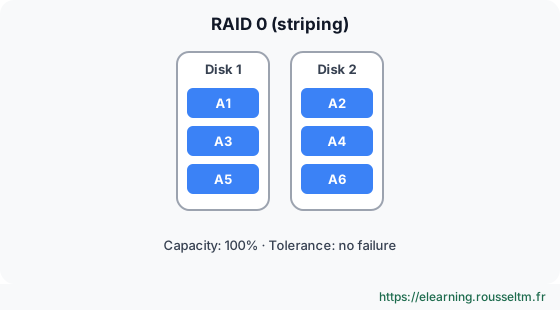
Blocks are spread over all disks (at least 2). Capacity is the sum of the disks and throughput adds up. However, losing a single disk destroys the whole volume: the risk of loss grows with the number of disks.
Use: temporary or rebuildable data (cache, scratch space, video editing). Never for unique data.
RAID 1 : mirroring #
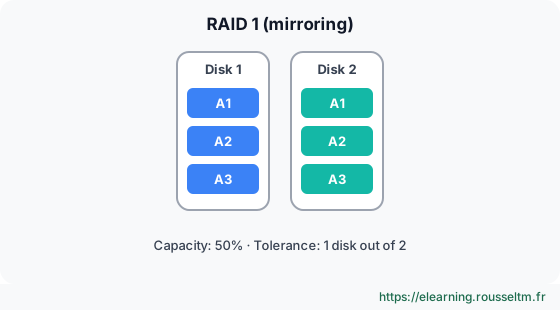
Each block is written on every disk of the mirror (2 or more). Usable capacity is that of a single disk. The volume survives as long as one healthy disk remains; reads can be spread, writes are no faster than a single disk.
Use: system disk, small servers, /boot partition. Simple and fast to rebuild (plain copy).
RAID 5 : distributed parity #
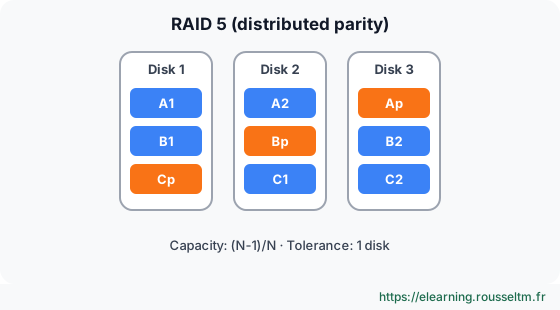
At least 3 disks. For each stripe, one block holds the parity (XOR) of the others; its position rotates to spread the load. You lose the equivalent of one disk: 4 disks of 4 TB give 12 TB usable. The volume survives the loss of one disk.
Each small write requires reading the old data and old parity, then rewriting both: this is the write penalty (4 I/O per write).
Common mistake: Using RAID 5 with large disks. Rebuilding a 16 TB disk often takes more than a day, during which all other disks are read entirely: a second failure or a read error loses the volume. Beyond a few TB per disk, prefer RAID 6 or RAID 10.
RAID 6 : double parity #
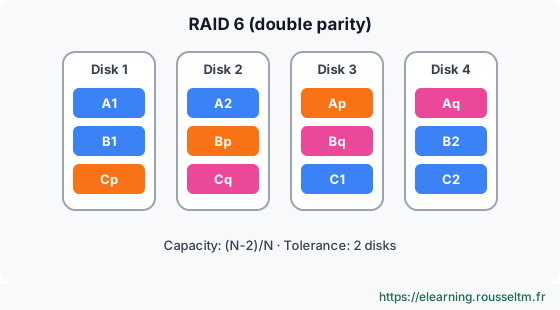
At least 4 disks. Two independent parities (P with XOR, Q with a Reed-Solomon code) let you survive the loss of any two disks. You lose the equivalent of two disks and the write penalty rises to 6 I/O.
Use: bulk storage, backups, archives, NAS with large disks.
RAID 10 : striped mirrors #
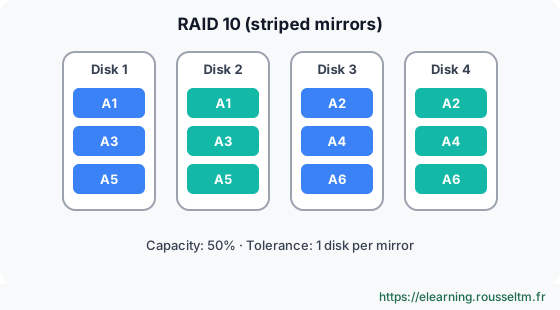
At least 4 disks, an even number: mirrored pairs (RAID 1) over which data is striped (RAID 0). You get striping performance, with no parity penalty, and fast rebuilds (copy from the twin disk). Usable capacity is 50%. The volume survives one failure per pair, but not the loss of both disks of the same pair.
Use: databases and applications with many random writes.
Good to know: With mdadm,--level=10directly creates a “native” RAID 10, which also works with an odd number of disks (near,faroroffsetlayout). RAID 01 (a mirror of two RAID 0 arrays) exists but tolerates failures less well: it is not used.
Nested and historical levels #
- RAID 50 and RAID 60: a RAID 0 on top of several RAID 5 or RAID 6 groups. Found on hardware controllers with many disks, to limit rebuild time to a single group.
- RAID 2, 3 and 4: historical levels (Hamming code, byte-level parity, parity on a dedicated disk). RAID 4’s single parity disk becomes a bottleneck, hence RAID 5. Only RAID 4 still exists in mdadm, and some NetApp arrays use a variant (RAID-DP).
- JBOD / linear: plain concatenation of disks, with no performance or redundancy (
--level=linear, not recommended; LVM does better). - RAIDZ (ZFS) and Btrfs profiles: RAIDZ1, RAIDZ2 and RAIDZ3 are ZFS equivalents of RAID 5, 6 and “triple parity”, without RAID 5’s “write hole” thanks to copy-on-write. Btrfs offers raid1, raid1c3 and raid10; its raid5/6 profiles are still not recommended in production.
Comparison table #
| Level | Min. disks | Usable capacity | Failures tolerated | Read | Write | Typical use |
|---|---|---|---|---|---|---|
| RAID 0 | 2 | N × D | 0 | +++ | +++ | cache, disposable data |
| RAID 1 | 2 | D | N − 1 | ++ | = | system, /boot |
| RAID 5 | 3 | (N − 1) × D | 1 | ++ | − | files, small volumes |
| RAID 6 | 4 | (N − 2) × D | 2 | ++ | −− | bulk storage, backups |
| RAID 10 | 4 | (N / 2) × D | 1 per mirror | +++ | ++ | databases, virtualization |
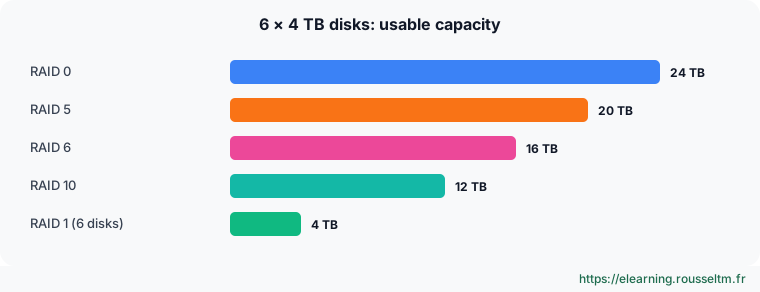
N: number of disks, D: capacity of one disk. Example with 6 disks of 4 TB: RAID 0 = 24 TB, RAID 5 = 20 TB, RAID 6 = 16 TB, RAID 10 = 12 TB.
Software, hardware or “fake RAID” #
| Type | How it works | Pros | Cons |
|---|---|---|---|
| Software (mdadm, LVM RAID, ZFS) | the kernel manages RAID | free, portable across machines, standard monitoring | uses some CPU |
| Hardware (RAID controller) | a dedicated card presents a single disk to the OS | battery-backed cache, transparent to the OS | proprietary tools, an identical controller is needed to read the disks |
| “Fake RAID” (BIOS / firmware) | the BIOS configures, a driver does the work | Windows / Linux dual boot | combines the drawbacks of both, avoid on a Linux server |
Common mistake: Confusing RAID with backup. RAID protects against a disk failure, not against deletion, ransomware, software corruption or fire: a mistake is instantly replicated on all disks. Keep separate backups (see backup, monitoring and troubleshooting).
6. Managing software RAID with mdadm #
Create, monitor, replace a disk, grow.
Create each level #
sudo apt install mdadm            # ou : sudo dnf install mdadm
# RAID 0, 1, 5, 6 et 10
sudo mdadm --create /dev/md0 --level=0  --raid-devices=2 /dev/sdb /dev/sdc
sudo mdadm --create /dev/md1 --level=1  --raid-devices=2 /dev/sdb /dev/sdc
sudo mdadm --create /dev/md5 --level=5  --raid-devices=3 /dev/sdb /dev/sdc /dev/sdd --spare-devices=1 /dev/sde
sudo mdadm --create /dev/md6 --level=6  --raid-devices=4 /dev/sd[b-e]
sudo mdadm --create /dev/md10 --level=10 --raid-devices=4 /dev/sd[b-e]
# Système de fichiers et montage
sudo mkfs.ext4 /dev/md5 && sudo mkdir -p /srv/data && sudo mount /dev/md5 /srv/data
To have the array reassembled at boot, save its definition then regenerate the initramfs:
sudo mdadm --detail --scan | sudo tee -a /etc/mdadm/mdadm.conf   # RHEL : /etc/mdadm.conf
sudo update-initramfs -u                                          # RHEL : sudo dracut -f
echo 'UUID=<uuid-du-fs> /srv/data ext4 defaults,nofail 0 2' | sudo tee -a /etc/fstab   # uuid : blkid /dev/md5
Good practice: Use partitions of type “Linux RAID” rather than whole disks when the disk must also be readable by other tools, and choose disks of the same size: each member’s capacity is reduced to that of the smallest.
Monitor #
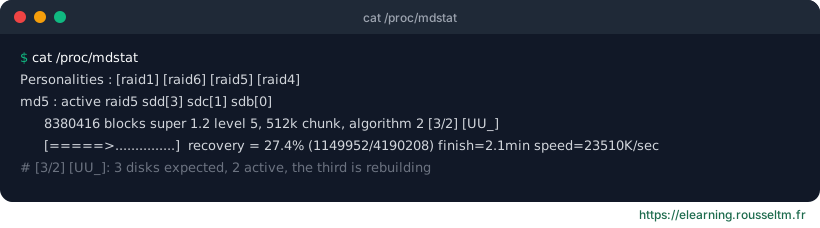
cat /proc/mdstat                       # état de toutes les grappes
sudo mdadm --detail /dev/md5           # état détaillé, disques défaillants, UUID
sudo mdadm --examine /dev/sdb          # superbloc RAID d'un membre
# Alertes par e-mail : MAILADDR admin@exemple.fr dans mdadm.conf, puis
sudo systemctl enable --now mdmonitor  # Debian : mdadm --monitor est lancé par le paquet
sudo mdadm --monitor --scan --test --oneshot   # envoie un message de test
Replace a failed disk #
# 1. Marquer le disque défaillant et le retirer
sudo mdadm /dev/md5 --fail /dev/sdc --remove /dev/sdc
# 2. Changer physiquement le disque, puis copier la table de partitions d'un membre sain si besoin
sudo sfdisk -d /dev/sdb | sudo sfdisk /dev/sdc
# 3. Ajouter le nouveau disque : la reconstruction démarre seule
sudo mdadm /dev/md5 --add /dev/sdc
watch -n 5 cat /proc/mdstat
Common mistake: Pulling the wrong disk. Identify the disk by its serial number (lsblk -o NAME,SERIAL,SIZE,smartctl -i /dev/sdc) before opening the machine, and monitor disk health withsmartctl -H.
Grow and change level #
# Ajouter un 4e disque à un RAID 5 de 3 disques
sudo mdadm /dev/md5 --add /dev/sde
sudo mdadm --grow /dev/md5 --raid-devices=4
# Une fois la remise en forme terminée, agrandir le système de fichiers
sudo resize2fs /dev/md5          # XFS : sudo xfs_growfs /srv/data
# Convertir un RAID 5 de 4 disques en RAID 6 (un disque supplémentaire requis)
sudo mdadm --grow /dev/md5 --level=6 --raid-devices=5 --backup-file=/root/md5.bak
Good to know: RAID and LVM are often combined: RAID brings redundancy, LVM flexibility (resizable volumes, snapshots). LVM can also create RAID volumes directly: lvcreate --type raid1 -m 1 -L 10G -n data vg0.Commands to know #
| Action | Command |
|---|---|
| Create a RAID | mdadm --create /dev/md0 --level=1 --raid-devices=2 /dev/sdb /dev/sdc |
| Quick status | cat /proc/mdstat |
| Detailed status | mdadm --detail /dev/md0 |
| Make the array persistent | mdadm --detail --scan >> /etc/mdadm/mdadm.conf |
| Mark a disk as failed | mdadm /dev/md0 --fail /dev/sdc |
| Remove / add a disk | mdadm /dev/md0 --remove /dev/sdc ; mdadm /dev/md0 --add /dev/sdd |
| Add a disk and grow | mdadm --grow /dev/md0 --raid-devices=4 |
| Stop an array | mdadm --stop /dev/md0 |
| Reassemble arrays | mdadm --assemble --scan |
| Wipe an old member’s superblock | mdadm --zero-superblock /dev/sdc |
Lab: simulate a failure on a RAID 5 #
Without extra disks, files attached as loop devices are enough:
for i in 1 2 3 4; do truncate -s 1G /tmp/d$i.img; sudo losetup -fP /tmp/d$i.img; done
losetup -a                          # repérer /dev/loopX
sudo mdadm --create /dev/md50 --level=5 --raid-devices=3 /dev/loop0 /dev/loop1 /dev/loop2- Create the RAID 5 above, format it as ext4, mount it and copy a few files into it; note their
sha256sum. - Simulate a failure:
mdadm /dev/md50 --fail /dev/loop1. Check/proc/mdstat([UU_]or[U_U]) and that the files are still readable. - Remove the disk, add
/dev/loop3and follow the rebuild. - Check the checksums, then fail two disks at once: observe that RAID 5 does not survive.
- Clean up:
umount,mdadm --stop /dev/md50,losetup -D, delete the image files.
Expected result: you can read an array’s status, replace a disk without data loss and explain the limits of RAID 5.
My progress
Sign in to track your progress and take notes. Sign in
💬 Questions about this lesson
No questions yet: be the first to ask for help or share your configuration.
Recommended Articles
Bash scripts for administrators: writing robust scripts
Automate Linux administration with Bash: variables and quoting, conditions, loops, functions, exi...
Linux vs Unix: the complete guide to commands and distributions
Understand the differences between Linux and Unix, explore distributions (server, desktop, lightw...
Processes, memory and performance: monitoring and troubleshooting a Linux server
Understand and control Linux processes (ps, top, signals, nice, jobs), interpret load, memory and...
Measuring DevOps performance: DORA metrics, SPACE and continuous improvement
Measure and improve delivery performance: the DORA metrics (deployment frequency, lead time, chan...
Users, groups, NTFS permissions and SMB shares
Manage local accounts and groups, understand UAC, apply NTFS permissions with inheritance, create...
Windows networking: IP, DNS, DHCP, firewall and remote access
Configure and troubleshoot Windows networking with PowerShell, deploy a DHCP server, master Windo...
Google Cloud storage: Cloud Storage, persistent disks and Filestore
Store data on Google Cloud: Cloud Storage (classes, regional, dual-region and multi-region locati...
Azure storage: storage accounts, Blob, Files, disks and redundancy
Store data on Azure: storage accounts, Blob (hot, cool, archive tiers, lifecycle), Files, Queue a...
Windows administration best practices
The production checklist for Windows and Windows Server: installation, identity and Active Direct...