1. Alerts #
From stream to notification.
The chain #
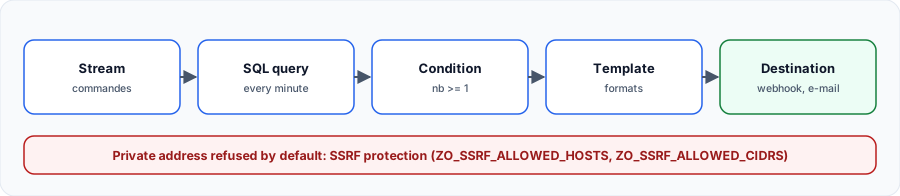
Creation order matters: the template, then the destination using it, then the alert. We tested this chain with a real webhook, which received: {"alerte":"erreurs_paiement","flux":"commandes","nb":"1"}.
A='root@example.com:Complexpass#123'
curl -u "$A" -H 'Content-Type: application/json' \
  http://localhost:5080/api/default/alerts/templates \
  -d '{"name":"tpl_simple","type":"http","title":"",
       "body":"{\"alerte\":\"{alert_name}\",\"flux\":\"{stream_name}\",\"nb\":\"{alert_count}\"}"}'

curl -u "$A" -H 'Content-Type: application/json' \
  http://localhost:5080/api/default/alerts/destinations \
  -d '{"name":"webhook_tp","url":"http://echo:8080/alerte","method":"post",
       "skip_tls_verify":false,"template":"tpl_simple","headers":{},"type":"http"}'
A='root@example.com:Complexpass#123'
curl -u "$A" -H 'Content-Type: application/json' \
http://localhost:5080/api/v2/default/alerts \
-d '{"name":"erreurs_paiement","stream_type":"logs","stream_name":"commandes",
"is_real_time":false,"enabled":true,"owner":"root@example.com","folder_id":"default",
"description":"Au moins une erreur en une minute","row_template":"","context_attributes":{},
"query_condition":{"type":"sql","conditions":null,"promql":null,"promql_condition":null,
"aggregation":null,"vrl_function":null,"multi_time_range":null,
"sql":"SELECT count(*) AS nb FROM commandes WHERE level='"'"'error'"'"'"},
"trigger_condition":{"period":1,"threshold":1,"frequency":1,"cron":"","operator":">=",
"silence":0,"frequency_type":"minutes","timezone":null,"tolerance_in_seconds":null},
"destinations":["webhook_tp"]}'Scheduled or real-time #
| Type | Evaluation | Use |
|---|---|---|
| Scheduled | A SQL or PromQL query run at a regular interval | Thresholds and aggregates: error rate, percentile |
| Real-time | Evaluated at ingestion, event by event | A specific event to report immediately |
The local webhook pitfall #
Destination URL blocked by SSRF guardmessage? For security, OpenObserve refuses webhooks to a private address: neighbouring container, internal network, 127.0.0.1. Allow your targets precisely withZO_SSRF_ALLOWED_HOSTSorZO_SSRF_ALLOWED_CIDRS.ZO_SKIP_SSRF_CHECKS=truedisables the protection: keep it for a lab.
2. Pipelines #
Processing data before storing it.
Real-time and scheduled #
A pipeline chains a source, conditions, functions and one or more destinations. It is built graphically in the UI.
| Type | Source | Typical use |
|---|---|---|
| Real-time | A stream, at ingestion | Mask a field, enrich, route to another stream |
| Scheduled | A query run periodically | Produce a stream of aggregates, like a recording rule |
Best practice: filter and mask sensitive data in a real-time pipeline, before storage. A read-time filter removes nothing from disk.
My progress
Sign in to track your progress and take notes. Sign in
Recommended Articles
Exploring data in OpenObserve: SQL, PromQL and VRL
Search with SQL, query metrics with PromQL, optimize a stream (indexes, partitions, retention) an...
Installing OpenObserve and ingesting your first data
Install OpenObserve with Docker Compose or the binary, configure it with its ZO_* variables, send...
OpenObserve: architecture and concepts
Understanding OpenObserve: Parquet storage, deployment modes, roles (router, ingester, querier, c...
Sending logs, metrics and traces to OpenObserve
OpenObserve receiving endpoints: JSON, bulk, OTLP with the OpenTelemetry Collector, Prometheus re...
OpenObserve in production: best practices
Choose your deployment mode, organize streams, secure, back up and monitor OpenObserve in product...
Feeding OpenSearch: ingest pipelines and Data Prepper
Transform data with ingest pipelines, collect with Data Prepper, receive OTLP and avoid the dynam...
Grafana Alloy: The importance of Self-Monitoring
Discover why and how to configure Grafana Alloy so that it monitors itself, collecting its own lo...
Configurations Bindplane : sources, processeurs, destinations et versions
Construire des configurations Bindplane : sources, processeurs et destinations, éditeur de pipeli...
Grafana Provisioning : Automatisez la gestion de vos tableaux de bord et sources de données
Découvrez comment utiliser le provisioning de Grafana pour gérer vos configurations (dashboards, ...