1. Where to transform data? #
Data Prepper or ingest pipeline.
Two levels #
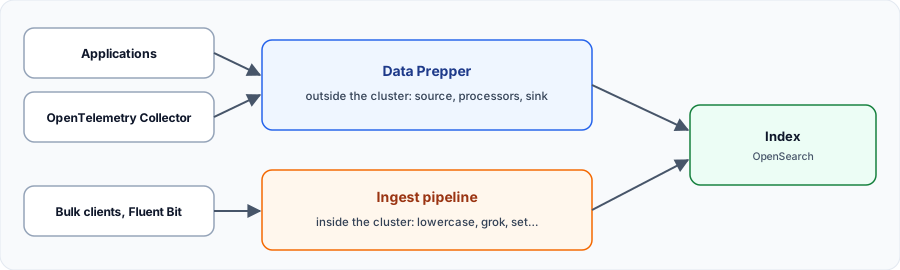
| Ingest pipeline | Data Prepper | |
|---|---|---|
| Where? | Inside the cluster | Separate service |
| For | Simple transformations | Heavy processing, OpenTelemetry, routing |
| Sources | Indexing requests | HTTP, OTLP, S3, Kafka… |
| Load | On OpenSearch nodes | On its own servers |
2. Ingest pipelines #
Transforming at indexing time.
Create and simulate #
curl -sk -u 'admin:Str0ng!Passw0rd-2026' -H 'Content-Type: application/json' -X PUT https://localhost:9200/_ingest/pipeline/logs_nettoyage -d '{
  "description": "Normalizes the level and extracts the user",
  "processors": [
    {"lowercase": {"field": "level"}},
    {"set": {"field": "environnement", "value": "prod"}},
    {"grok": {"field": "message", "patterns": ["utilisateur=%{WORD:utilisateur}"], "ignore_failure": true}}
  ]
}'

# Try without indexing anything
curl -sk -u 'admin:Str0ng!Passw0rd-2026' -H 'Content-Type: application/json' -X POST https://localhost:9200/_ingest/pipeline/logs_nettoyage/_simulate \
  -d '{"docs":[{"_source":{"level":"ERROR","message":"refus utilisateur=alice"}}]}'
The simulation result contains level: error, environnement: prod and utilisateur: alice. To use it: _bulk?pipeline=logs_nettoyage, or the index.default_pipeline setting in the template.
Best practice: always test with_simulate, and planignore_failureoron_failure: otherwise a single failinggrokrejects the document.
3. Data Prepper #
The OpenSearch project collector.
A log pipeline #
A pipeline has a source, processors and a sink. This one was tested end to end on Data Prepper 2.16:
log-pipeline:
  source:
    http:
      ssl: false
      port: 2021
      path: /log/ingest
  processor:
    - grok:
        match:
          log: ['%{COMMONAPACHELOG}']
    - date:
        match:
          - key: timestamp
            patterns: ["dd/MMM/yyyy:HH:mm:ss Z"]
        destination: "@timestamp"
    - convert_type:
        key: response
        type: integer
    - delete_entries:
        with_keys: ["log"]
  sink:
    - opensearch:
        hosts: ["https://opensearch:9200"]
        insecure: true
        username: admin
        password: "Str0ng!Passw0rd-2026"
        index: web-logs
        flush_timeout: 5000
curl -s -X POST -H 'Content-Type: application/json' http://localhost:2021/log/ingest -d '[
{"log":"127.0.0.1 - frank [04/Nov/2026:10:00:00 +0100] \"GET /index.html HTTP/1.1\" 200 2326"},
{"log":"10.0.0.8 - alice [04/Nov/2026:10:00:01 +0100] \"GET /admin HTTP/1.1\" 403 120"}
]'The mapping pitfall #
Without an index template, types are guessed. In our test,clientipandbytesended up astext: no network search, no sum possible. Create the template before sending data.
curl -sk -u 'admin:Str0ng!Passw0rd-2026' -H 'Content-Type: application/json' -X PUT https://localhost:9200/_index_template/web_logs -d '{
  "index_patterns": ["web-logs*"],
  "template": {
    "settings": {"number_of_shards": 1, "number_of_replicas": 0},
    "mappings": {"properties": {
      "@timestamp": {"type": "date"},
      "clientip": {"type": "ip"},
      "verb": {"type": "keyword"},
      "request": {"type": "keyword"},
      "response": {"type": "integer"},
      "bytes": {"type": "integer"}
    }}
  }
}'
OpenTelemetry traces #
Data Prepper receives OTLP on dedicated ports: 21890 for traces, 21891 for metrics and 21892 for logs. For traces, two indexes feed the Trace Analytics view of the console. This pipeline comes from the official documentation and we did not run it:
entry-pipeline:
  source:
    otel_trace_source:
      ssl: false
  sink:
    - pipeline:
        name: raw-trace-pipeline
    - pipeline:
        name: service-map-pipeline
raw-trace-pipeline:
  source:
    pipeline:
      name: entry-pipeline
  processor:
    - otel_traces:
  sink:
    - opensearch:
        hosts: ["https://opensearch:9200"]
        insecure: true
        username: admin
        password: "<password>"
        index_type: trace-analytics-raw
service-map-pipeline:
  source:
    pipeline:
      name: entry-pipeline
  processor:
    - service_map:
  sink:
    - opensearch:
        hosts: ["https://opensearch:9200"]
        insecure: true
        username: admin
        password: "<password>"
index_type: trace-analytics-service-mapMy progress
Sign in to track your progress and take notes. Sign in
Recommended Articles
Ingestion Elasticsearch : Bulk API, ingest pipelines, enrich et reindex
Ingérer et transformer des données dans Elasticsearch : Bulk API, ingest pipelines et processeurs...
OpenSearch: concepts, architecture and differences with Elasticsearch
Understanding OpenSearch: project origin, license, differences with Elasticsearch, indexes, shard...
OpenSearch Dashboards, alerting and observability
Explore data in OpenSearch Dashboards, create alert monitors and discover Trace Analytics, Event ...
Installing OpenSearch and OpenSearch Dashboards
Install OpenSearch with Docker Compose or the archive: initial password, vm.max_map_count, demo c...
Indexing and searching in OpenSearch: mapping, DSL, PPL and SQL
Declare an index template, index with bulk, search with the Query DSL, aggregate and query with P...
OpenSearch in production: ISM, backups, security and best practices
Automate the lifecycle with ISM, back up with snapshots, manage roles and size an OpenSearch clus...
Understanding the Elastic Common Schema (ECS)
As always in our consulting engagements, we recommend that companies harmonise and standardise: k...
Logs dans Datadog : collecte, pipelines, index et maîtrise du volume
Collecter les logs avec l'agent, les structurer avec pipelines et processeurs (grok), utiliser fa...
Exploring data in OpenObserve: SQL, PromQL and VRL
Search with SQL, query metrics with PromQL, optimize a stream (indexes, partitions, retention) an...