1. Architecture #
From a single server to multisite.
Management roles #
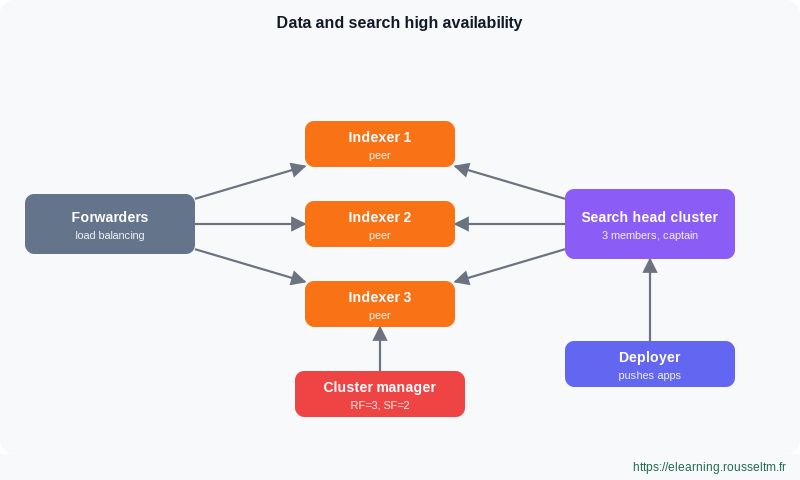
| Role | Function |
|---|---|
| Cluster manager | coordinates peer indexers, replication and common configuration (splunk apply cluster-bundle) |
| Deployer | distributes apps and configuration to search head cluster members (splunk apply shcluster-bundle) |
| Deployment server | distributes collection apps to forwarders |
| License manager | centralizes licenses and volume accounting per pool |
| Monitoring Console | health dashboards for the whole platform |
Reference architectures (Splunk Validated Architectures) range from a single server to multisite clusters; choose according to volume, expected availability and concurrent users.
2. Clusters #
Data and search availability.
Indexer cluster #
- Replication factor (RF, 3 by default): number of copies of each bucket; the cluster tolerates the loss of RF − 1 indexers.
- Search factor (SF, 2 by default): number of immediately searchable copies (with index files); the others are raw copies, smaller.
- Multisite: replication across data centers (
site_replication_factor = origin:2,total:3) and per-site search affinity. - Forwarders load-balance to all peers, with acknowledgment (
useACK).
splunk show cluster-status --verbose            # on the cluster manager
splunk enable maintenance-mode                   # before a rolling restart
splunk rolling-restart cluster-peers
splunk disable maintenance-mode
Search head cluster #
- At least three members; an elected captain schedules searches and replicates knowledge objects.
- Apps are deployed only through the deployer, never by copying files to a member.
- A load balancer in front of members, with session affinity, serves the web UI.
Watch out : Editing a peer or cluster member configuration directly creates drift that will be overwritten at the next deployment: always go through the manager or deployer.
3. Operating #
License, health, access, cloud.
License and health #
index=_internal source=*license_usage.log type=Usage | eval GB = b/1024/1024/1024 | timechart span=1d sum(GB) BY idx
index=_internal sourcetype=scheduler status=skipped | stats count BY savedsearch_name, reason
| rest /services/server/health/splunkd/details
The Monitoring Console gathers key indicators: blocked indexing queues, skipped searches, license usage, replication lag, forwarder status.
Users and roles #
| Item | Practice |
|---|---|
| Authentication | SAML or LDAP rather than local accounts; MFA through the identity provider |
| Roles | inherit from user or power, restrict srchIndexesAllowed per team |
| Capabilities | reserve admin_all_objects, delete_by_keyword (can_delete role) and real-time searches |
| Quotas | limit concurrent searches and job disk space per role |
Splunk Cloud Platform #
In SaaS, Splunk manages indexers, search heads and upgrades. The admin installs apps (Victoria experience, self-service for vetted apps), manages indexes, HEC tokens and IP allow lists through the Admin Config Service (ACS API and acs CLI), and keeps control of forwarders.
Commands to know #
Commands to know
splunk show cluster-status --verbose: indexer cluster statussplunk show shcluster-status: search head cluster statussplunk apply cluster-bundle: push configuration to peerssplunk apply shcluster-bundle -target https://sh1:8089: deploy apps to the search head clustersplunk btool check: check configuration syntax
Sources #
Checked in November 2026 (Splunk Enterprise 10.6): check the release notes before relying on a detail, Splunk Cloud Platform evolves faster than the on-premises version.
My progress
Sign in to track your progress and take notes. Sign in
💬 Questions about this lesson
No questions yet: be the first to ask for help or share your configuration.
Recommended Articles
Splunk: the machine data platform at a glance
Discover Splunk: the platform's role, components (forwarders, indexers, search heads), ports, eve...
Splunk best practices
Best practices for running Splunk in production: data quality and sourcetypes, index design, lice...
Security and observability with Splunk
Splunk solutions beyond search: Enterprise Security (detections, findings, risk-based alerting, a...
SPL: Splunk search fundamentals
Learning the SPL language: search structure, time range and time modifiers, search modes, filteri...
Administering Kibana: spaces, roles, users and monitoring
Organize Kibana for several teams: spaces, roles and privileges on indices and features, users an...
Installing Splunk and ingesting data
Installing Splunk Enterprise (package or Docker), understanding $SPLUNK_HOME and configuration fi...
Dashboards, reports and alerts in Splunk
Making the most of Splunk searches: reports and scheduling, Dashboard Studio dashboards (data sou...
Advanced SPL and knowledge objects
Going further with Splunk: CSV and KV store lookups, eventstats and streamstats, transaction vers...
Installing and administering Cribl Stream
Installing Cribl Stream with Docker or on Linux, running it as a service, understanding $CRIBL_HO...