1. Knowledge objects #
Giving meaning to data.
Overview #
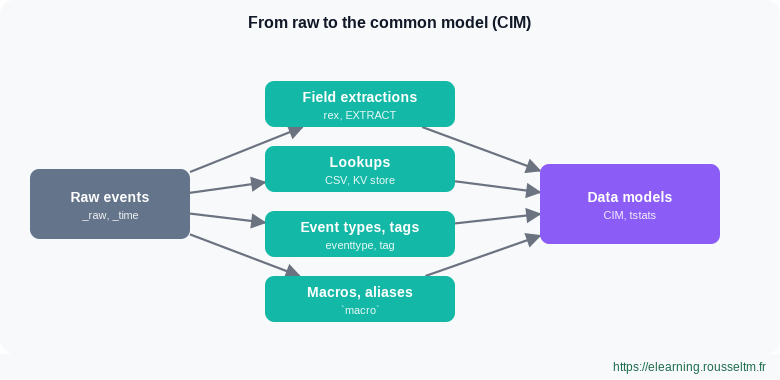
| Object | Role |
|---|---|
| Lookup | enriches with a table (CSV, KV store, external): host owner, code label |
| Event type | named search classifying events (eventtype=failed_login) |
| Tag | label on a value or event type (tag=authentication) |
| Alias, calculated field | harmonize names (src_ip → src) and compute on the fly |
| Macro | reusable SPL fragment: `web_errors(5)` |
| Data model | hierarchical schema (CIM) used by dashboards and tstats |
Each object has an owner and a scope (private, app, global): share at app level what the team uses.
Lookups #
| inputlookup http_status.csv
index=web | lookup http_status.csv status OUTPUT category
index=web | stats count BY client_ip | lookup geo_clients client_ip OUTPUT country
index=security action=blocked | stats latest(_time) AS seen BY src_ip | outputlookup blocked_ips.csv
Best practice : For tables that change often or exceed a few tens of thousands of rows, use a KV store collection rather than a CSV.
2. Advanced statistics #
Comparing each event with its group.
eventstats and streamstats #
-- Requests 3 times slower than their URL's average
index=web | eventstats avg(duration_ms) AS avg BY uri | where duration_ms > 3*avg

-- Gap between two successive logins of the same user
index=security action=success | sort 0 user _time
| streamstats current=f last(_time) AS previous BY user | eval gap_min = round((_time-previous)/60)
transaction or stats? #
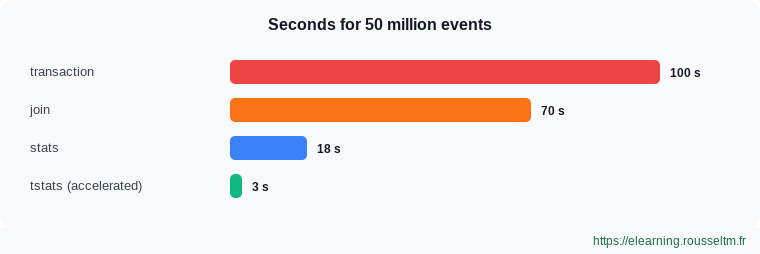
-- Session duration: transaction (simple but costly)
index=web | transaction session_id maxspan=30m | stats avg(duration)
-- Same result with stats (much faster)
index=web | stats min(_time) AS start, max(_time) AS end BY session_id | eval duration = end - start | stats avg(duration)
transaction keeps events in memory and does not distribute across indexers; keep it for cases where order or start and end markers (startswith, endswith) are essential.
3. tstats, data models and CIM #
Searching indexes, not events.
tstats #
| tstats count WHERE index=web BY sourcetype, host
| tstats count WHERE index=* BY _time span=1h, index
| tstats summariesonly=true count FROM datamodel=Web WHERE Web.status>=500 BY Web.uri_path
| tstats summariesonly=true dc(Authentication.user) FROM datamodel=Authentication WHERE Authentication.action=failure BY Authentication.srctstatsreads index files (tsidx) instead of raw events: on indexed fields (index,sourcetype,host,source,_time) or on an accelerated data model, it answers in seconds over billions of events.- The CIM (Common Information Model) defines common models: Authentication, Network Traffic, Web, Endpoint, Malware… Add-ons map their data to it, making Enterprise Security and dashboards source-independent.
- Data model acceleration builds summaries continuously, at the cost of disk space and indexer compute.
Optimizing a search #
- Restrict
index,sourcetypeand time range as early as possible. - Put filters in the initial search rather than in a later
where. - Use
fieldsearly to keep only useful fields. - Prefer
statstotransaction,joinand subsearches. - Switch to
tstatsas soon as the question involves indexed fields or a data model. - Check the cost with the Job Inspector (time per command, events scanned).
Good to know : SPL2, used by Edge Processor, Ingest Processor and some apps, revisits SPL with a more SQL-like syntax (from,where,select); SPL remains the search language in Splunk Enterprise.
Commands to know #
Commands to know
| tstats count where index=web by sourcetype: count without reading events| lookup http_status.csv status OUTPUT categorie: enrich with a table| eventstats avg(x) as moy by groupe: add a group statistic to each event| datamodel Web search: explore a data model`ma_macro(arg)`: call a macro
Sources #
Checked in November 2026 (Splunk Enterprise 10.6): check the release notes before relying on a detail, Splunk Cloud Platform evolves faster than the on-premises version.
My progress
Sign in to track your progress and take notes. Sign in
💬 Questions about this lesson
No questions yet: be the first to ask for help or share your configuration.
Recommended Articles
SPL: Splunk search fundamentals
Learning the SPL language: search structure, time range and time modifiers, search modes, filteri...
Splunk: the machine data platform at a glance
Discover Splunk: the platform's role, components (forwarders, indexers, search heads), ports, eve...
Installing Splunk and ingesting data
Installing Splunk Enterprise (package or Docker), understanding $SPLUNK_HOME and configuration fi...
Dashboards, reports and alerts in Splunk
Making the most of Splunk searches: reports and scheduling, Dashboard Studio dashboards (data sou...
Splunk best practices
Best practices for running Splunk in production: data quality and sourcetypes, index design, lice...
Administering distributed Splunk
Designing and administering a production Splunk platform: reference architectures, indexer cluste...
Security and observability with Splunk
Splunk solutions beyond search: Enterprise Security (detections, findings, risk-based alerting, a...
Visualizing in Kibana: Lens, dashboards and saved objects
Build visualizations with Lens, assemble interactive dashboards (filters, controls, links), and m...
Advanced Grail and DQL: performance, parse, joins, time series, entities and correlation
Writing fast, low-cost DQL queries, parsing text with DPL and JSON, combining sources with lookup...