1. Standalone or multi-instance? #
What makes a single instance fragile.
The single instance #
Available in: ✓ OSS ✓ Enterprise ✕ Cloud Grafana Cloud is already highly available
By default Grafana stores everything (users, dashboards, alerts, sessions) in a local SQLite database. Simple, but the machine becomes a single point of failure, and SQLite cannot be shared between servers.
The target architecture #
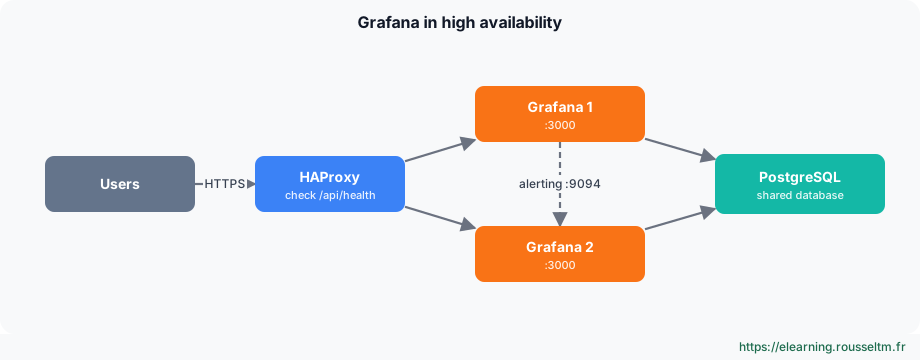
- Several stateless Grafana instances, identical and interchangeable.
- A shared PostgreSQL (or MySQL) database, itself backed up and ideally replicated.
- A load balancer (HAProxy, Nginx, cloud load balancer) checking
/api/health. - Clustered alerting, so notifications are only sent once.
2. Configuring the instances #
A shared configuration.
grafana.ini #
# grafana.ini: identical on every instance (except the advertised alerting address)
[database]
type = postgres
host = db.exemple.fr:5432
name = grafana
user = grafana
password = $__file{/run/secrets/db_password}
ssl_mode = require

[security]
secret_key = $__file{/run/secrets/grafana_secret_key}   # the same key everywhere

[unified_alerting]
enabled = true
ha_listen_address = 0.0.0.0:9094
ha_advertise_address = 10.0.0.21:9094                   # this instance's address
ha_peers = 10.0.0.21:9094,10.0.0.22:9094
Sessions and connections #
User sessions are tokens stored in the database: any instance recognizes a signed-in user, so session affinity (sticky sessions) is not needed. A remote cache ([remote_cache] with Redis) can offload the database on large installations.
Clustered alerting #
Every instance evaluates rules, but their alert managers talk over the cluster protocol (port 9094) to deduplicate notifications. Without ha_peers, each instance would send its own notification.
Plugins #
Every instance must have exactly the same plugins, in the same versions: install them through the image (Docker), GF_PLUGINS_PREINSTALL or provisioning, never by hand on one server. The image rendering service (grafana-image-renderer) is deployed separately and serves every instance.
3. Load balancer and reverse proxy #
HAProxy in front of the instances.
HAProxy #
frontend fe_grafana
    bind :443 ssl crt /etc/haproxy/certs/grafana.pem
    mode http
    default_backend be_grafana

backend be_grafana
    mode http
    balance roundrobin
    option httpchk GET /api/health
    http-check expect status 200
    server grafana1 10.0.0.21:3000 check
server grafana2 10.0.0.22:3000 check/api/healthreturns 503 if the instance can no longer reach the database: HAProxy removes it automatically.- Set the public URL in
[server] root_urlon each instance, otherwise links and OAuth redirects point to the internal address. - Keep WebSocket connections (Grafana Live): HAProxy handles them in HTTP mode with no special setting.
4. Docker, Kubernetes and backups #
Deploying and protecting.
Kubernetes #
# grafana Helm chart values.yaml (excerpt)
replicas: 2
persistence:
  enabled: false                     # no local volume: everything is in PostgreSQL
envFromSecret: grafana-secrets       # GF_DATABASE_PASSWORD, GF_SECURITY_SECRET_KEY…
grafana.ini:
  database: { type: postgres, host: postgres:5432, name: grafana, user: grafana }
  unified_alerting: { ha_peers: "grafana-headless:9094" }
podDisruptionBudget: { minAvailable: 1 }
On Kubernetes, the Grafana Operator also lets you declare dashboards, folders and data sources as custom resources.
Backup and recovery #
- Back up PostgreSQL (daily dump and transaction logs), the
secret_key,grafana.iniand provisioning. - Dashboards versioned in Git (Git Sync, Terraform) can be redeployed without the database: the best insurance against data loss.
- Upgrade instances one at a time (HAProxy removes the one restarting); schema migrations run when the first upgraded instance starts.
Commands to know #
Commands to know
curl -s http://grafana1:3000/api/health: status of an instance and its databaseecho "show servers state be_grafana" | socat stdio /var/run/haproxy.sock: instance status as seen by HAProxypsql -h db -U grafana -c "select count(*) from dashboard": check the shared databasekubectl rollout status deploy/grafana: follow a rolling update[unified_alerting] ha_peers: alerting cluster peers
